AI Quote Assitant for WooCommerce (Product Inquiry Pro Integration)

Turn quote requests into instant quotations

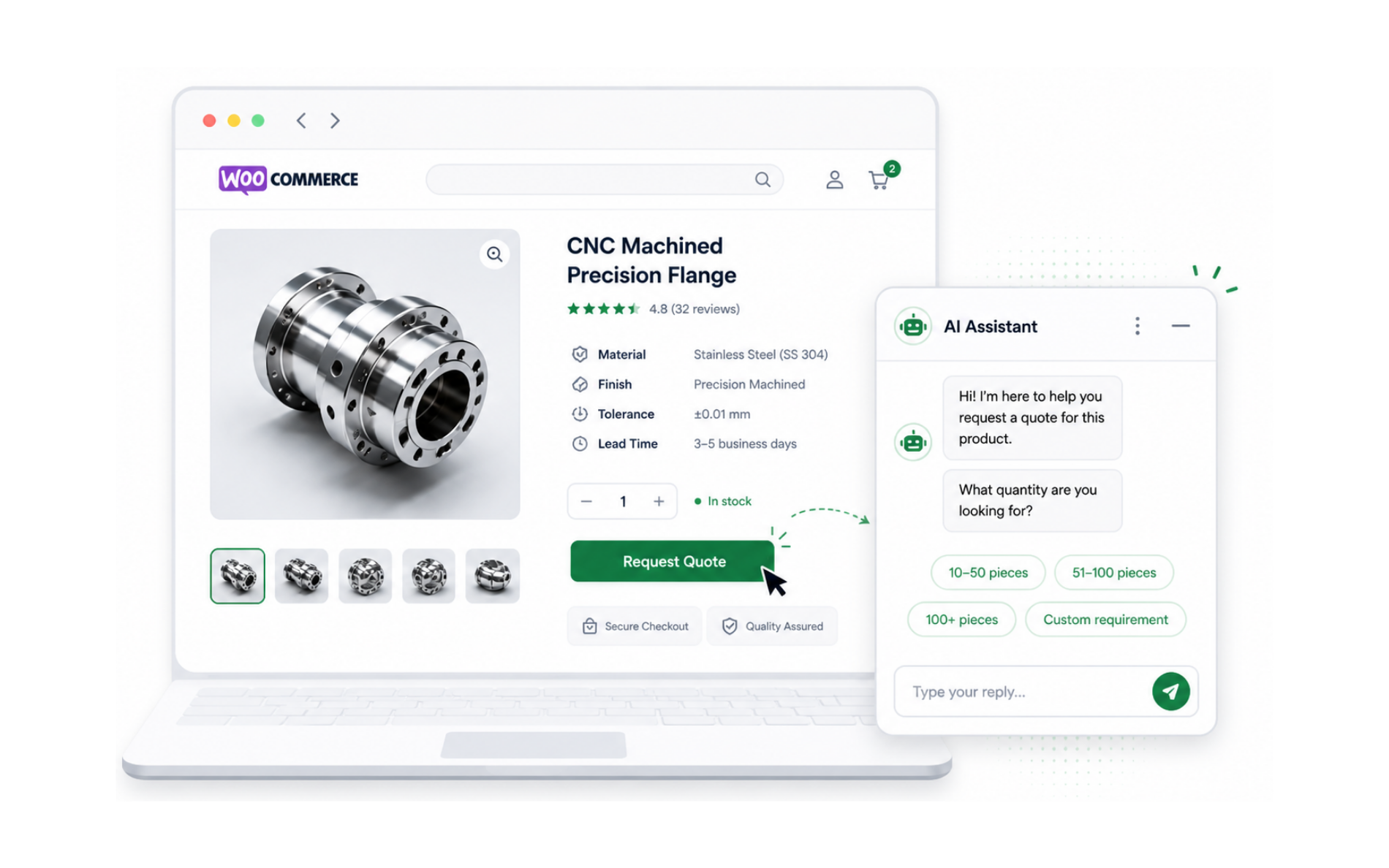
Add an AI quote agent to your WooCommerce product pages. Buyers ask questions, get answers, and receive an instant quotation — all in one conversation. Every enquiry arrives as a complete, qualified lead, ready for your team to close.

By · Makers of Product Inquiry Pro — trusted by 5000+ WooCommerce stores worldwide
woocommerce-store.com/product
📦
WooCommerce Product

Custom Bulk Product

Quantity 100+ units
Customization Available
AI
Quote Assistant

By AI BotKit

I need a quote for 250 units.
Sure! Do you need customization or branding?
Yes, logo printing.
Instant Quote ₹18,500 Based on quantity + branding
Demo

See it in action — set it up in under 15 minutes

Watch the AI handle a real quote conversation on a WooCommerce product page, then follow the step-by-step tutorial to go live on your store. No developers needed.

See How Customers Get Instant Quotes
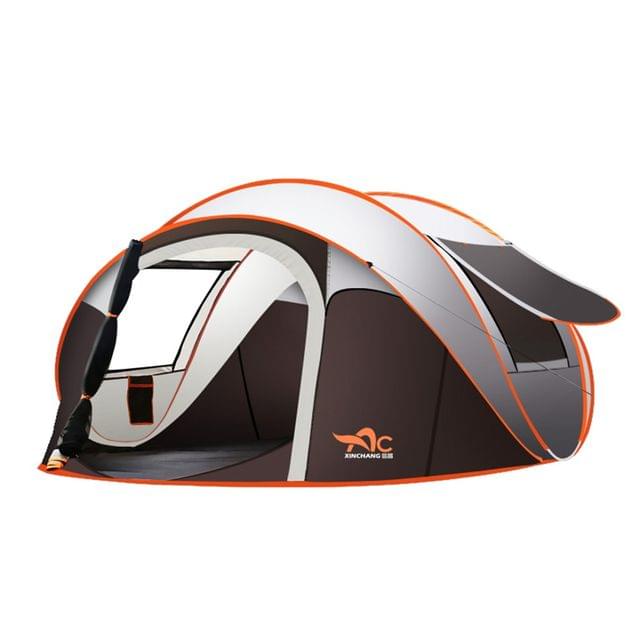
Camping Tent
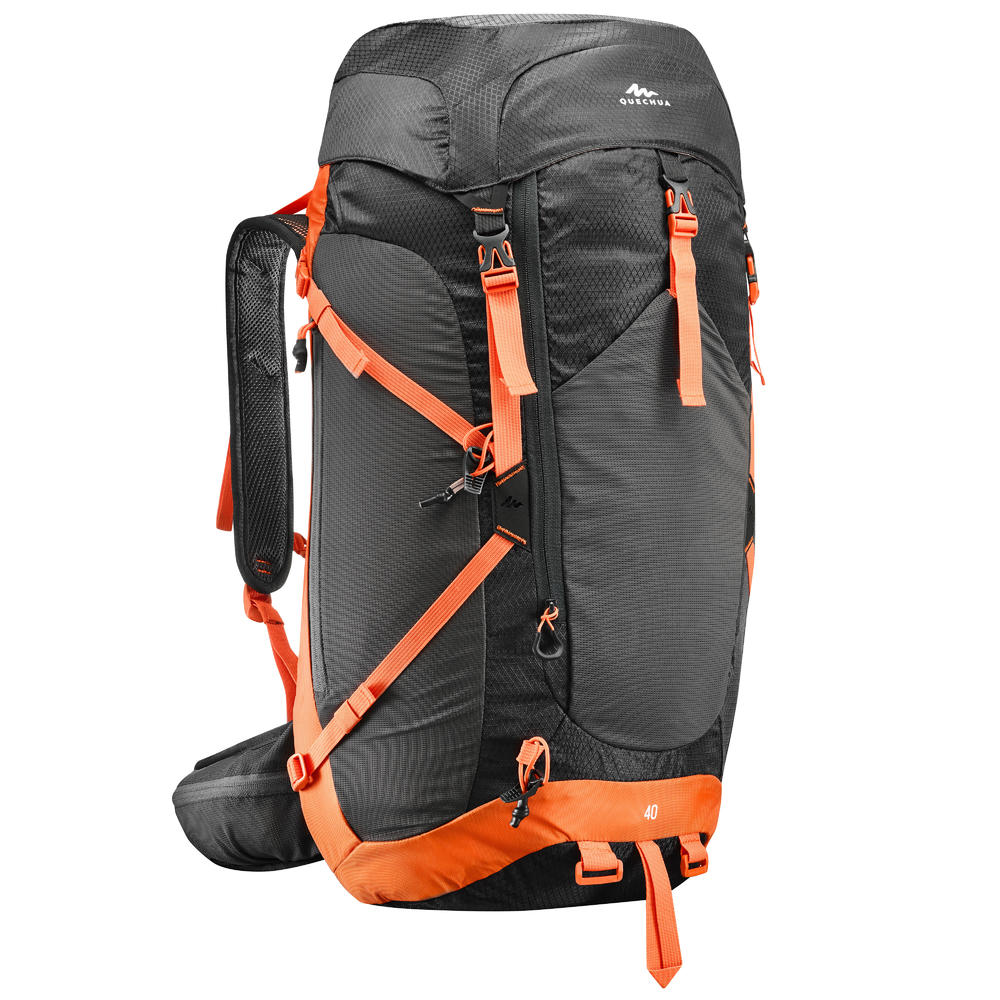
Camping Tent

$12,000.00
Camping Tent

Backpack 2

$3,500.00
Hcb218b417aa9497b803869d1b8144d45P

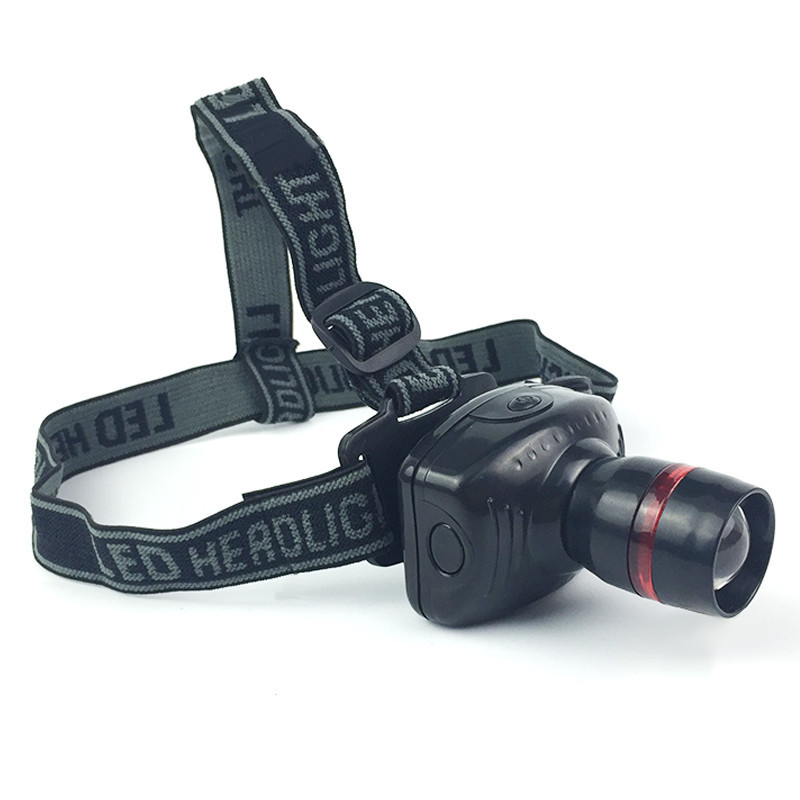
Head Torch Light

Request pricing

Click any product below. The AI quote assistant opens with that product request so visitors can ask questions, confirm details, and get quotation help instantly.

Live Demo • Outdoor Gear Store
THE PROBLEM

Your enquiry form is costing you deals

Product Inquiry Pro gets buyers to the form. But static forms have a drop-off problem your team never sees.

🧱

Buyers abandon long forms

A multi-field quote form feels like homework. Visitors drop off before hitting submit — and you never find out why.

📋

Incomplete submissions waste time

You get enquiries missing quantity, specs, or budget. Your team spends hours chasing details before they can even respond.

🕐

Slow responses lose deals

Even when the form is filled, there's a lag before a quote goes back. By then, the buyer has already moved on.

Before vs After

What actually changes for your buyers

Same product page. Completely different enquiry experience.

Before Static Enquiry Form
  • The form asks too much. Buyers quit before you see their name.
  • Submissions arrive missing key details
  • No pricing until your team manually responds
  • Buyer submits and waits — responses only come during business hours
  • You never know why they didn't submit
After AI Instant Quotes
  • Guided chat keeps buyers engaged step by step
  • AI asks follow-ups to fill every gap automatically
  • Instant quote estimate generated in the conversation
  • Works 24/7 including weekends and after hours
  • Conversations capture what forms miss — your team receives specs, context, and real buyer intent, ready to act on
HOW IT WORKS

Buyer gets an instant quote.
You get a qualified lead. Automatically

Instead of asking visitors to fill a static form, the AI quote assistant starts a conversation, understands their requirement, and sends you a more qualified lead.

Buyer clicks "Get Quote" on your product page

No redirects, no new pages. The AI chat launches instantly on the product page — where the buyer already is, already interested.

On Product Page
Zero Friction
No Static Form
Instant Launch

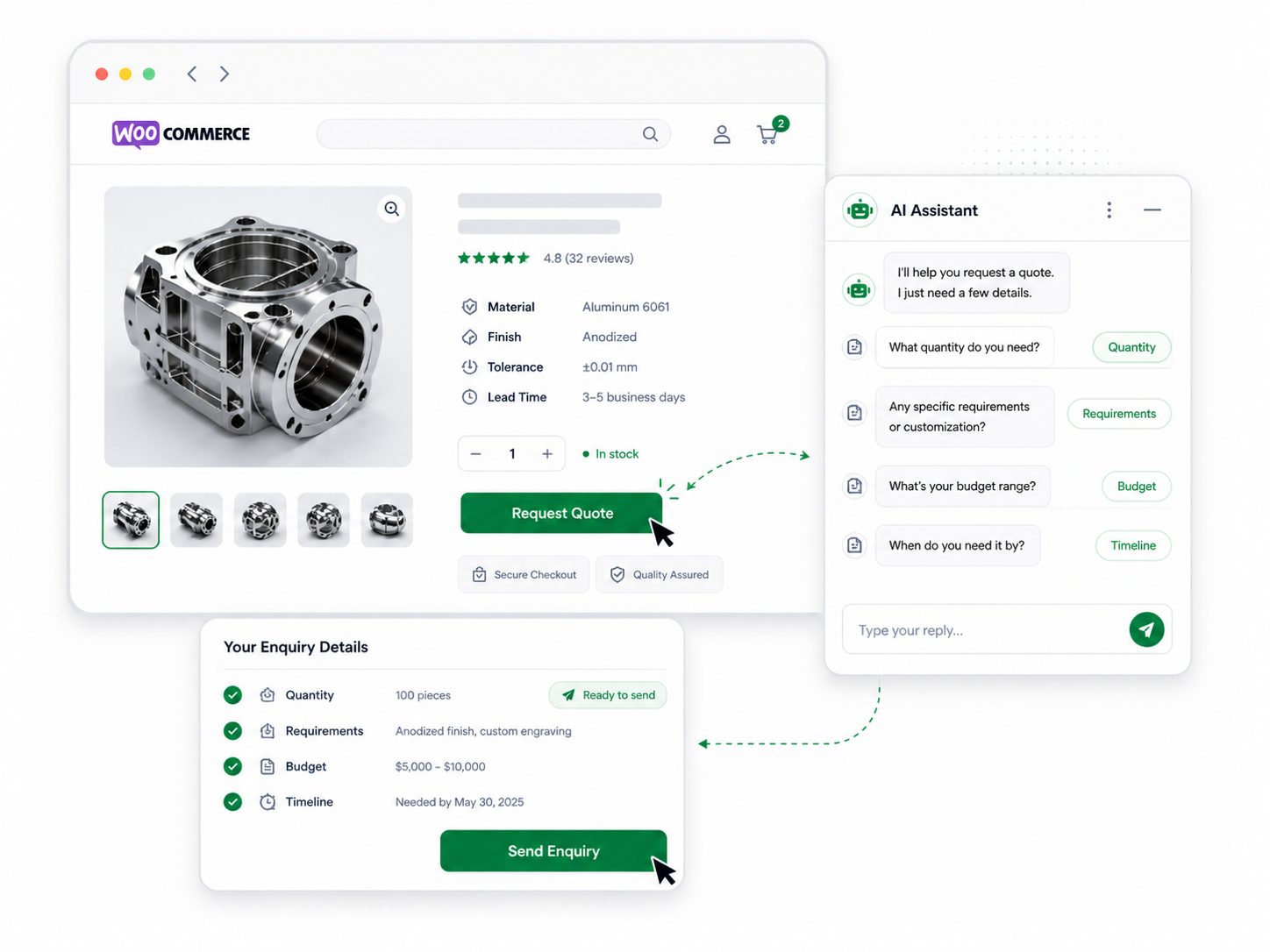
AI asks the right questions — so you get complete enquiries

The AI holds a natural back-and-forth conversation, asking your form questions naturally about about quantity, specs, customization, budget, and timeline. No blank fields. No guessing. Just the details your team actually needs.

Quantity
Requirements
Budget
Timeline

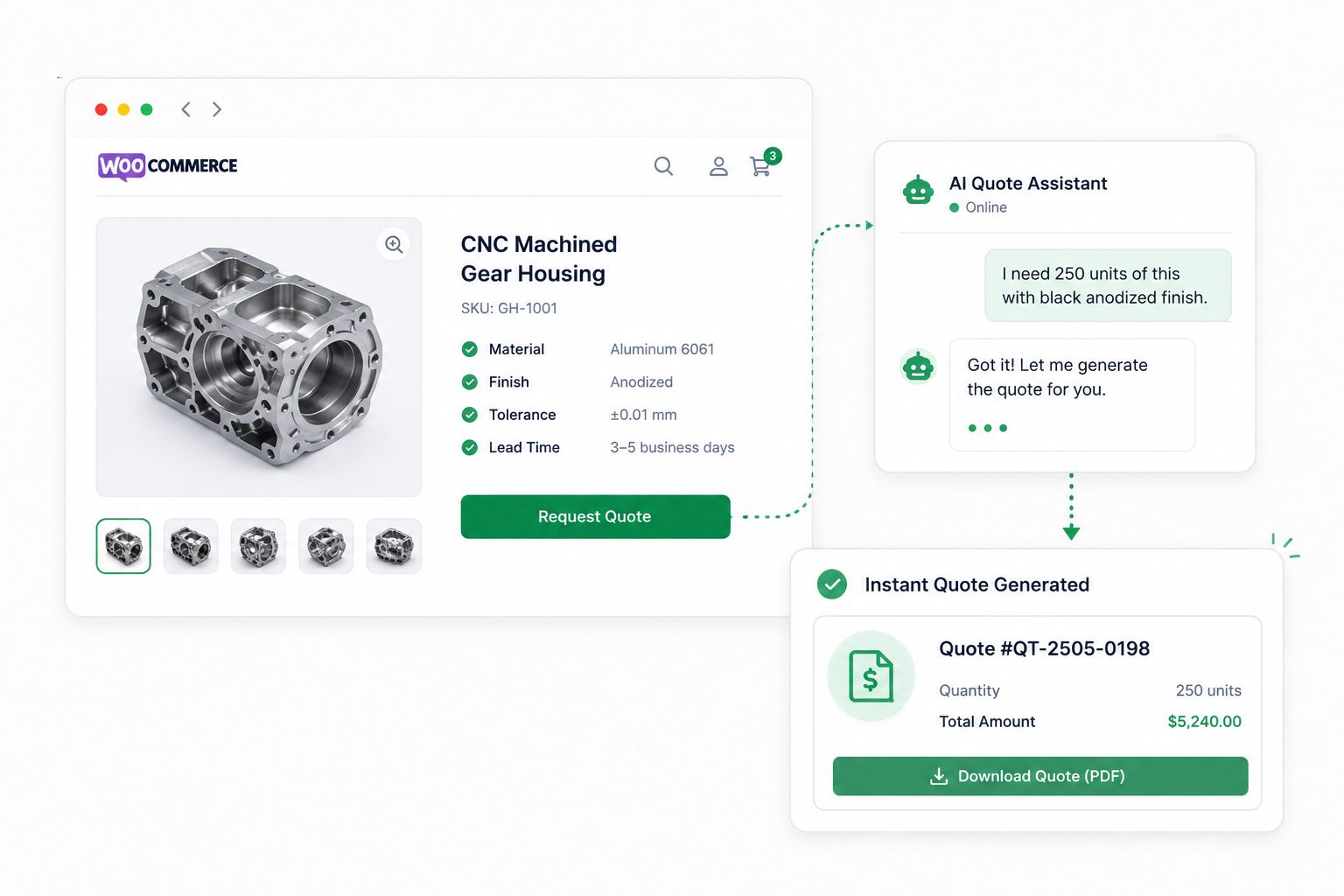
Buyer gets an instant quote — you get a qualified lead

Based on the conversation, the AI generates an instant quote estimate for the buyer. You receive a complete lead summary with all requirements captured, ready for your team to follow up and close.

Instant Quote
Lead Summary
Ready to Close
Untitled design 31
Aibotkit
ChatGPT Image May 18 2026 09 45 23 AM
GET STARTED

Up and running before your next enquiry comes in

Works with your existing Product Inquiry Pro setup. No developers needed.

1

Install the AIBotKit plugin

Install the free AI Botkit WordPress plugin and connect your AIBotKit account in minutes.

⬇ Download Free Plugin
2

Train it on your product data

Sync your websit and Woocommerce product pages. Upload your catalog, pricing sheets, or product URLs. The AI learns your products and quoting logic.

3

Connect to Product Inquiry Pro — go live in one click

Link AIBotKit to your existing Product enquiry Pro and add the AI chat to your product pages instantly.

OR TALK TO US FIRST

Not sure where to start? We'll set it up with you.

Book a free 20-minute call. We'll connect AIBotKit to your Product Inquiry Pro form live, answer your questions, and make sure you go live before the call ends.

Book a Free Setup Call →

Free · No commitment · 20 minutes

What the AI Captures

Everything your form misses, the AI gets

The quote assistant asks the right follow-up questions so your team always has what they need to respond with confidence.

📦

Quantity & Product Details

How many units, which variant, which product — all confirmed before the enquiry reaches your inbox.

🎨

Customisation & Specifications

Branding, materials, dimensions, finish, and packaging requirements — the AI asks what your team would ask.

💰

Budget & Timeline

Surfaces urgency and expected spend before your team invests time in a buyer who isn't ready.

Instant Quote Estimate

Based on what the buyer shares, the AI generates a real-time estimate — no wait, no back-and-forth.

📇

Contact & Lead Summary

Name, email, and a complete conversation summary packaged as an actionable lead for your sales team.

🌐

Multilingual Support

The AI responds in your buyer's language automatically. Supports 95+ languages with no setup needed.

The Full Platform

One AI agent
Every conversation on your store, covered

The quotation agent is just the start. AIBotKit gives your WooCommerce store a complete AI sales and support layer — answering questions, capturing leads, and handling every conversation your buyers have.

Trained on your business
Product Catalog
Specs & Pricing
Website Pages
FAQs & Policies
Quote Logic
Knowledge

A knowledgeable AI assistant trained on your business

Train your bot on your website and product pages. Upload your product catalogs, specs, and pricing — and the AI learns your business, how you work, and how to answer buyer questions accurately.

📚
Learns your products and services Understands your products, specifications, and the specific questions your buyers ask.
🗣️
Speaks your industry language Adapts to your business and the way your buyers ask for quotes — not generic chatbot responses.
Pre-Sale
💬

Pre-Sale Q&A

Buyers ask about specs, materials, shipping, and compatibility. The AI answers instantly and accurately, 24/7 — no staff needed.

Leads
📋

Lead Capture

Capture leads on any of your website pages. Every conversation ends with a qualified lead summary — requirements, contact details, and context — delivered straight to your team.

Live Support
🖥️

Live Chat

Your team can jump into any conversation in real-time. Switch from AI to live agent in one click, with full context already loaded.

Live Handoff
🤝

Human Handoff

When a conversation needs escalation, the AI hands it over to you instantly on your preferred channel — WhatsApp, Instagram, Messenger, Telegram, or email. Full context, no repetition.

🌐
Language

Multilingual

Set any language as your default. The AI detects and responds in your buyer's language automatically — supports 95+ languages with zero configuration needed.

95+ languages supported
Security

Your data security comes first

You can focus on automation without worrying about data leaks or misuse.

Full Control Over Bot

Easily update, replace, or delete your bot's content anytime from your dashboard.

You Control the Data

Easily update, replace, or delete your bot's content anytime from your dashboard.

Secure Integrations

All third-party connections (Google Calendar, WhatsApp API, CRMs) use secure, token- based authentication.

No Unauthorized Access

Your bot's training data and customer chats are never shared or used for other purposes.

Choose a Plan that Suits Your Need

The price is perfect and so is our product!

Annual
Lifetime

Save up to 60% by purchasing lifetime license.

WISDM Product Enquiry Pro AI

$99
$80
19% Off
$596 $24060% Off
47% Off
65% Off
per business license per year
per business license for lifetime
1 Chatbot Assistant
5000 Webpages / Chatbot Assistant
Lead Collection
Chat History
Multi-lingual (95+ languages)
WordPress Native Training
WhatsApp Integration
Chat Transcript (Email)
Lead Notifications (Email)
Quick Enquiry Option
 
Capture genuine leads
Make it easy for customers to ask a question or request a quote by
adding an inquiry button on the Shop or Product Archive Pages.
Add Custom Fields to your Inquiry Forms
 
Create Inquiry forms specific to your requirement
The WISDM Product Enquiry Pro has a built-in Custom Form Builder that
helps you add custom fields to your Inquiry Form.
Personalize emails as well as quotations by adding logo
 
Power-up your branding game by adding your logo
Make your emails and quotations look more professional by adding a
custom/personalized logo for your business.
Compatible with Translation Plugins
 
Accept Quotations in All Languages
Compatibility with multi-language plugins helps you to implement your
quotation system without language as a barrier.
Compatibility with Page Builders
 
Seamlessly add the Inquiry Button on the page builder
The option to add the Inquiry Button on Pages built with your favorite
page builders.
Create Quote in WordPress Backend
 
Easy Quote Creation
Reply or create a price quotation right from the WordPress backend and
send the quote PDF to the customer. You can also send quotes back and
forth until you reach a price agreement.
Support for Variable Products
 
Never miss out on inquiries on Product Variations
Allow interested customers to inquire or request quotations for simple
products or variations of a particular product as well.
Mini-Cart Widget for Product Pages
 
Enhance the look and feel to smoothen user’s shopping experience
A Mini-Cart Widget on the Product Pages that allows users to view their
Inquiry Cart at all times.
Default Variations for Variable Products to show the Inquiry Button
 
Collect Inquiries for Variable Products with Ease
Ability to set a Default Variation for Variable Products. This Default
Variation will show by default on the Product Pages with the Inquiry
Button Visible for the same product.
Control Price Visibility with Toggle
 
Define your Visitors Shopping Experience
Have complete control on a visitor’s shopping experience by choosing to
hide or show the Enquiry button, Add to Cart button, and product price
Dashboard View of Enquiries/Quote Requests
 
Get a bird’s eye view of product demand
Easily analyze buyer demands with a single view of all inquiries and
quote requests in your dashboard. Filter inquiries for better
assessment.
Quote Request for “Out of Stock” Products
 
Add restrictions on quote requests
Limit the customer’s ability to request quotes by enabling the inquiry
or quote request button on ‘Out of Stock’ products only.
Quick Reply Option in Dashboard
 
Save time by quickly reply to a customer
No need to leave your store to manage product inquiries. There’s a
reply-option in the dashboard itself.
“Send a Copy” Option for Customers
 
Help Customers keep a tab on their Quotations
While filling an enquiry or quotation request, customers have the option
to “Send a Copy” of the email to themselves.
Multiple Recipients for Inquiry Emails
 
Delegate inquiry or quote requests to your team
You can add Multiple recipient email ids for incoming product enquiries
or quotation requests.
Multiple Personalization Options
 
Maintain your store’s branding, always!
Easily style and personalize the product inquiry form and button, decide
the button location with options in the settings panel.
Analyze Inquiry & Quote Requests
 
Stay ahead of consumer demand
Filter and export enquiry and quotation records from the dashboard to
analyze buyers demands and price requests.

WooCommerce Advisor AI

$218
$12144% Off
$825 $36356% Off
44% Off
68% Off
per business license per year
per business license for lifetime
2 Chatbot Assistants
2000 Webpages / Chatbot Assistant
Lead Collection
Chat History
Multi-lingual (95+ languages)
WordPress Native Training
WhatsApp Integration
Chat Transcript (Email)
Lead Notifications (Email)
Quick Enquiry Option
 
Capture genuine leads
Make it easy for customers to ask a question or request a quote by
adding an inquiry button on the Shop or Product Archive Pages.
Add Custom Fields to your Inquiry Forms
 
Create Inquiry forms specific to your requirement
The WISDM Product Enquiry Pro has a built-in Custom Form Builder that
helps you add custom fields to your Inquiry Form.
Personalize emails as well as quotations by adding logo
 
Power-up your branding game by adding your logo
Make your emails and quotations look more professional by adding a
custom/personalized logo for your business.
Compatible with Translation Plugins
 
Accept Quotations in All Languages
Compatibility with multi-language plugins helps you to implement your
quotation system without language as a barrier.
Compatibility with Page Builders
 
Seamlessly add the Inquiry Button on the page builder
The option to add the Inquiry Button on Pages built with your favorite
page builders.
Create Quote in WordPress Backend
 
Easy Quote Creation
Reply or create a price quotation right from the WordPress backend and
send the quote PDF to the customer. You can also send quotes back and
forth until you reach a price agreement.
Support for Variable Products
 
Never miss out on inquiries on Product Variations
Allow interested customers to inquire or request quotations for simple
products or variations of a particular product as well.
Mini-Cart Widget for Product Pages
 
Enhance the look and feel to smoothen user’s shopping experience
A Mini-Cart Widget on the Product Pages that allows users to view their
Inquiry Cart at all times.
Default Variations for Variable Products to show the Inquiry Button
 
Collect Inquiries for Variable Products with Ease
Ability to set a Default Variation for Variable Products. This Default
Variation will show by default on the Product Pages with the Inquiry
Button Visible for the same product.
Control Price Visibility with Toggle
 
Define your Visitors Shopping Experience
Have complete control on a visitor’s shopping experience by choosing to
hide or show the Enquiry button, Add to Cart button, and product price
Dashboard View of Enquiries/Quote Requests
 
Get a bird’s eye view of product demand
Easily analyze buyer demands with a single view of all inquiries and
quote requests in your dashboard. Filter inquiries for better
assessment.
Quote Request for “Out of Stock” Products
 
Add restrictions on quote requests
Limit the customer’s ability to request quotes by enabling the inquiry
or quote request button on ‘Out of Stock’ products only.
Quick Reply Option in Dashboard
 
Save time by quickly reply to a customer
No need to leave your store to manage product inquiries. There’s a
reply-option in the dashboard itself.
“Send a Copy” Option for Customers
 
Help Customers keep a tab on their Quotations
While filling an enquiry or quotation request, customers have the option
to “Send a Copy” of the email to themselves.
Multiple Recipients for Inquiry Emails
 
Delegate inquiry or quote requests to your team
You can add Multiple recipient email ids for incoming product enquiries
or quotation requests.
Multiple Personalization Options
 
Maintain your store’s branding, always!
Easily style and personalize the product inquiry form and button, decide
the button location with options in the settings panel.
Analyze Inquiry & Quote Requests
 
Stay ahead of consumer demand
Filter and export enquiry and quotation records from the dashboard to
analyze buyers demands and price requests.
Best Seller

Sales Booster Pack AI

$320 $131 59% Off
$894 $393 56% Off
55% Off
70% Off
per business license per year
per business license for lifetime
2 Chatbot Assistants
2000 Webpages / Chatbot Assistant
Lead Collection
Chat History
Multi-lingual (95+ languages)
WordPress Native Training
WhatsApp Integration
Chat Transcript (Email)
Lead Notifications (Email)
Quick Enquiry Option
 
Capture genuine leads
Make it easy for customers to ask a question or request a quote by
adding an inquiry button on the Shop or Product Archive Pages.
Add Custom Fields to your Inquiry Forms
 
Create Inquiry forms specific to your requirement
The WISDM Product Enquiry Pro has a built-in Custom Form Builder that
helps you add custom fields to your Inquiry Form.
Personalize emails as well as quotations by adding logo
 
Power-up your branding game by adding your logo
Make your emails and quotations look more professional by adding a
custom/personalized logo for your business.
Compatible with Translation Plugins
 
Accept Quotations in All Languages
Compatibility with multi-language plugins helps you to implement your
quotation system without language as a barrier.
Compatibility with Page Builders
 
Seamlessly add the Inquiry Button on the page builder
The option to add the Inquiry Button on Pages built with your favorite
page builders.
Create Quote in WordPress Backend
 
Easy Quote Creation
Reply or create a price quotation right from the WordPress backend and
send the quote PDF to the customer. You can also send quotes back and
forth until you reach a price agreement.
Support for Variable Products
 
Never miss out on inquiries on Product Variations
Allow interested customers to inquire or request quotations for simple
products or variations of a particular product as well.
Mini-Cart Widget for Product Pages
 
Enhance the look and feel to smoothen user’s shopping experience
A Mini-Cart Widget on the Product Pages that allows users to view their
Inquiry Cart at all times.
Default Variations for Variable Products to show the Inquiry Button
 
Collect Inquiries for Variable Products with Ease
Ability to set a Default Variation for Variable Products. This Default
Variation will show by default on the Product Pages with the Inquiry
Button Visible for the same product.
Control Price Visibility with Toggle
 
Define your Visitors Shopping Experience
Have complete control on a visitor’s shopping experience by choosing to
hide or show the Enquiry button, Add to Cart button, and product price
Dashboard View of Enquiries/Quote Requests
 
Get a bird’s eye view of product demand
Easily analyze buyer demands with a single view of all inquiries and
quote requests in your dashboard. Filter inquiries for better
assessment.
Quote Request for “Out of Stock” Products
 
Add restrictions on quote requests
Limit the customer’s ability to request quotes by enabling the inquiry
or quote request button on ‘Out of Stock’ products only.
Quick Reply Option in Dashboard
 
Save time by quickly reply to a customer
No need to leave your store to manage product inquiries. There’s a
reply-option in the dashboard itself.
“Send a Copy” Option for Customers
 
Help Customers keep a tab on their Quotations
While filling an enquiry or quotation request, customers have the option
to “Send a Copy” of the email to themselves.
Multiple Recipients for Inquiry Emails
 
Delegate inquiry or quote requests to your team
You can add Multiple recipient email ids for incoming product enquiries
or quotation requests.
Multiple Personalization Options
 
Maintain your store’s branding, always!
Easily style and personalize the product inquiry form and button, decide
the button location with options in the settings panel.
Analyze Inquiry & Quote Requests
 
Stay ahead of consumer demand
Filter and export enquiry and quotation records from the dashboard to
analyze buyers demands and price requests.
Customer Based Pricing
 
Set individual prices for every customer
Make customers feel special by setting different prices for
customers/users. Dynamic pricing helps you offer a personalized buying
experience for all customers.
Role Based Pricing
 
Increase memberships by offering role-based discounts
Set product discounts based on all kinds of user roles like wholesaler,
manager, customer and more.
Group Based Pricing
 
Boost customer happiness by setting different prices for segments/groups
Set different prices for different groups or segments to encourage
customer loyalty at every level.
Quantity Based Pricing
 
Offer cost benefits to wholesale buyers and bulk purchasers
Create plenty of offers by setting discounts based on quantities of
products. For example, you can create “Buy 1 Get 1 free” by offering 2
products for the price of 1. Quantity based pricing also help wholesale
sellers to manage their WooStore.
Different prices for categories
 
Set specific rules for product categories and subcategories
Simply manage product discounts by assigning prices per product category
for customers, user roles, and groups. For example, if there is a
category ‘electronics’, then you can apply dynamic pricing on all
products which are in the ‘electronics’ category. Or want to set a 10%
discount on ‘furniture’ (category) or a 20% sale on ‘chairs’ (child
category). Now, offer different pricing rules for product categories.
Cart Discounts Rules
 
Push for higher purchase orders with exclusive cart discounts
Entice buyers to complete a sale, by setting personalized discounts on
items added to the cart. Set different discount rules and percentages to
automatically trigger offers to New users, Existing users, and Guest
users. Exclude certain products, categories, users, or roles from your
discount rules. Award higher discounts on larger orders and set an upper
limit on the discount amount awarded.
Tiered Pricing for Bulk Purchases
 
Create pricing tiers for bulk purchases
Encourage customers to buy more by having different pricing slabs for
bulk purchases. For example – 2 books at 10% off; 3 books at 15%; 5
books at 40% off and so on. Use tiered pricing to auto-apply discounts
based on purchase quantity.
Personalized Shop Page for Special Users
 
Catalog for Special Customers
Make it easy for your preferred customers to buy products by showing
them a unique catalog page with personalized discounts. All deals on one
page – let logged-in users view all special prices set for them on a
single page. Entice logged in users and keep them coming back for more
with all special pricing offers listed on one page.
Store-wide Discounts and Deals
 
Global discounts for users, roles and groups
Save time and focus on other aspects of your business by offering
site-wide discounts with a single click. Run store-wide sales, holiday
offers and deals on all products or categories, for your customers, user
roles, or certain group.
Compatibility with WISDM Product Enquiry Pro
 
Capture inquiries and leads seamlessly for special buyer
Don’t miss out on potential customers and directly create quotes with
special pricing to users with the leading “Inquiry Form” and “Quote
Request” plugin on WooCommerce.
Control the Pricing Display Options
 
Take control of prices on your WooCommerce store!
Hide or show product price as per your needs. When the regular price is
not set, you can add custom text to the “Read More” button option. You
can also enable the ‘Hide Price Total’ option to remove the total price
when a user adds a higher product quantity.
Give products for free to special customers
 
Set 100% off on products for specific users
Attract buyers and generate leads by setting a 100% discount on certain
products to give some products for free on your store.
Control and manage pricing using APIs
 
Integrate 3rd party apps using the plugins API
Simplify product pricing management from an external system or integrate
3rd party apps with CSP using the plugins APIs. Plugin APIs help you to
easily integrate external services with the plugin to control and manage
prices!
Sale Price Badge
 
Save time setting prices with the Smart Pricing Manager
Give shoppers a personal touch by showing them a strike-through on the
sale price displayed. Set percentage discounts on sale prices as well.
Price Management
 
Manage prices easily
Simplify price management using the search, edit, and delete options in
the plugin. In the Search and Delete tab, you can simply search
associated prices, select and delete or edit these prices by a user,
role, group or product category.
Products and Pricing tab
 
Use the Product Pricing tab with ease
Forget spending hours setting discounts using complex plugins! With
WISDM Customer Specific Pricing, you can apply discounts to one or more
products and for more than one customer at the same time, using a single
screen!
Personalized Cart Offer Messages
 
Marketing messages to pitch for an up-sell
Add custom messages on the cart page prompting a user to increase the
purchase value for availing the discount. And show a custom message once
a discount has been applied to display the percentage amount saved.
Custom Description for Prices
 
Shed spotlight on the savings you’re offering
Set personalized messages for exclusive prices offered to customers to
coax them into making a purchase.
Cart Discounts Exclusions
 
Exclude high-selling items from being discounted
Exclude certain users, roles, groups, products or categories from being
discounted.
Progress status while Importing Data
 
Sit back and relax till the data is being imported
Progress status is shown while importing the files. There also is an
option to export these reports.
Product Import Flexibility
 
Effortlessly bulk import or export prices by product ID or SKU
Stop struggling with editing prices by product name. Offline price
editing is made a whole lot easier with the flexibility to edit prices
for multiple products using a product ID or SKU. Save time by setting
prices for customers, user roles or groups in a CSV file to
import/export pricing data in bulk.
Multi-site Compatible
 
Work flawlessly on WordPress multisites
Set personalized prices effortlessly across multiple stores on your
WooCommerce multisite setup. Manage pricing rules for each store
separately. Also, set up schedules and timers on your multi-sites
easily.
Developed by Woo Experts
 
Bank on expertise you can trust
These WooCommerce plugins are the best ones out there since they’re
built by the best Gold WooExperts!
*By purchasing lifetime license you get 3 years of support and lifetime updates.
Not sure whether WISDM Product Enquiry Pro Plugin is perfect for you?

Try it out for Free!

Here’s a Free 15-day trial for you to experience how the plugin works, how well it integrates with your site, and the many different settings you can play around with!
  • 15 days of complete access to all premium plugin features
  • Premium support for the duration of the Trial
  • Freedom to cancel anytime during the Trial period
Testimonials

The difference an AI conversation makes — in their own words

★★★★★

"We manufacture custom metal components and buyers always struggled with our enquiry form — too many fields, not enough guidance. Now they have a conversation, get an instant quote estimate, and actually stay engaged. Our enquiry completion rate went up and the leads we receive are detailed enough to quote from directly."

MD
Mark Davidson Owner, Precision Parts Co.
★★★★★

"I build WooCommerce stores for clients and already use Product Inquiry Pro on most of them. Adding AIBotKit took about 15 minutes per site. Buyers now get instant answers and a quote estimate right in the conversation — my clients love it and the enquiries they receive have everything already captured."

JC
James Carter WooCommerce Developer
★★★★★

"We sell custom printed packaging and our old form submissions were always incomplete. Now buyers have a back-and-forth with the AI, get an instant estimate based on their requirements, and stay engaged through the whole process. Quoting went from a two-day process to same day."

TE
Tom Eriksen Founder, PrintBox
FAQ

Frequently Asked Questions

An AI chatbot is a virtual assistant powered by artificial intelligence that can understand and respond to user questions in real-time. Unlike old rule-based bots that rely on rigid scripts, modern AI chatbots like AIBotKit use natural language processing (NLP) to hold human-like conversations, learn directly from your website's content, and provide instant, accurate support 24/7.

You can make a custom AI chatbot in under two minutes without writing a single line of code. With AIBotKit, you simply enter your website URL, upload your documents (like PDFs or FAQs), and the AI automatically trains itself on your data. From there, you can customize its appearance and embed it directly into your website.

The best free AI chatbot for websites and businesses is AIBotKit. Our forever-free plan allows you to build a custom-trained AI assistant, train it on up to 20 webpages, capture leads, and automate customer support without needing a credit card to start.

Training an AI chatbot is as easy as providing it with reference material. Using AIBotKit, you can paste your website links, upload PDF/DOCX files, add raw text, or even input YouTube video links. The bot automatically reads, learns, and syncs this information so it can answer customer questions accurately based purely on your business data.

Yes! Modern AI chatbots do more than just answer questions; they actively capture leads. AIBotKit features built-in lead collection flows. Instead of forcing users to fill out static contact forms, the chatbot naturally asks for their name, email, or phone number during the conversation and exports that data directly to your CRM or email.

Custom AI chatbots are highly affordable. AIBotKit offers a generous Free forever plan. For growing businesses, premium plans start at just $10/month (billed yearly), which includes thousands of AI messages, massive character storage, email lead notifications, and free installation support.

No technical or coding skills are required. AIBotKit provides a simple embed code that works on any platform (Shopify, Squarespace, Wix, custom HTML) and a dedicated one-click plugin for WordPress users.

You can have an AI chatbot live on your website in just 2 to 3 minutes. The AI auto-trains on your URLs instantly, meaning you can test and deploy it the same day you sign up.

Absolutely. AIBotKit is perfect for e-commerce. You can train the bot on your product pages, shipping policies, and return FAQs so it can assist shoppers, recommend products, and reduce cart abandonment 24/7.

Yes. You have full control over your chatbot's appearance. You can change the widget colors, select custom avatars or icons, adjust the welcome message, and match the chat interface perfectly to your brand’s theme.

Yes. You can set specific "Bot Instructions" to dictate how the AI speaks. Whether you want your bot to sound professional, casual, friendly, or authoritative, it will follow your exact prompt guidelines.

You maintain complete control. If a user asks a question the bot hasn't been trained on, it won't guess. Instead, it triggers a customizable "fallback message" (e.g., "I'm not sure about that, but let me connect you with a human agent") and can prompt the user to leave their contact details.

Yes! AIBotKit supports over 75 languages. You can set a default language or let the bot auto-detect and respond in the native language of the website visitor.

No. AIBotKit is designed to be incredibly lightweight. The chat script loads asynchronously, meaning it will not affect your website's performance, core web vitals, or page load times.

If your traffic spikes and you hit your message limit, you can easily upgrade your plan directly from the dashboard. We offer transparent tracking so you always know how many messages and storage characters you have left.

Yes, with our Advanced AI Automation services, AIBotKit can be integrated directly with tools like Google Calendar and Google Meet to allow instant booking flows right inside the chat window.

AIBotKit includes a comprehensive analytics dashboard. You can view full chat histories, track the volume of generated leads, monitor response times, and identify common questions to continuously improve your bot's knowledge base.

Human Handover allows the AI to step aside when a customer needs complex, personalized help. Available on our higher-tier plans, this feature notifies your team via email so a real human can take over the conversation seamlessly.

Yes! One of AIBotKit's unique features is the ability to extract and learn from YouTube videos. Just paste the video link, and the bot will transcribe and train on the video's content to answer user questions.

Live chat requires a human agent to be sitting at a computer, waiting to reply. An AI chatbot works autonomously 24/7, providing instant answers to multiple users simultaneously without making them wait in a queue.

Definitely. You can upload internal company manuals, HR policies, and onboarding documents to create a private AI assistant that answers employee FAQs instantly, reducing the repetitive workload on your HR team.

Yes! If you don't want to build it yourself, we offer free setup and strategy calls for our users. We also provide "Managed Chatbot Services" as a paid add-on where we build, customize, and optimize the bot end-to-end for your business.

Limited Time — Start Free Today

Scale your business on Autopilot

Stop wasting time on routine chats. Let AIBotKit handle the work while you focus on growth.

No Credit Card Required