
A WordPress AI chatbot plugin puts a chat widget on your site and answers visitor questions from your own content instead of a script you wrote by hand. Every option on the market does that part. They differ in three ways that matter far more: where the AI runs, how you get charged, and what the bot does when it cannot answer. Get those three right and the plugin lasts. Get them wrong and you will quietly deactivate it in eight weeks.
This guide compares seven plugins on those terms, shows what each pricing model costs as your traffic grows, and gives you a four-question test for picking a type before you shortlist a product.
What a WordPress AI chatbot plugin actually does
An older WordPress chatbot worked from rules. You wrote the questions, you wrote the answers, and anything outside that list got a shrug.
An AI chatbot plugin works from your content. It reads your pages, posts, products, documentation and PDFs, breaks that text into passages, and stores them as embeddings so it can find the relevant passage for any question. When a visitor asks something, the plugin retrieves the closest passages and asks a language model to write an answer using only those. That pattern is called retrieval augmented generation, and it is the reason a good bot can explain your refund window without anyone scripting a refund answer.
The practical difference: a rule bot needs you to predict the question. An AI bot needs you to publish the information once.
Three kinds of plugin, and why the difference matters
Almost every product in this category falls into one of three buckets. The bucket predicts your setup time, your monthly bill and your data exposure better than any feature list.
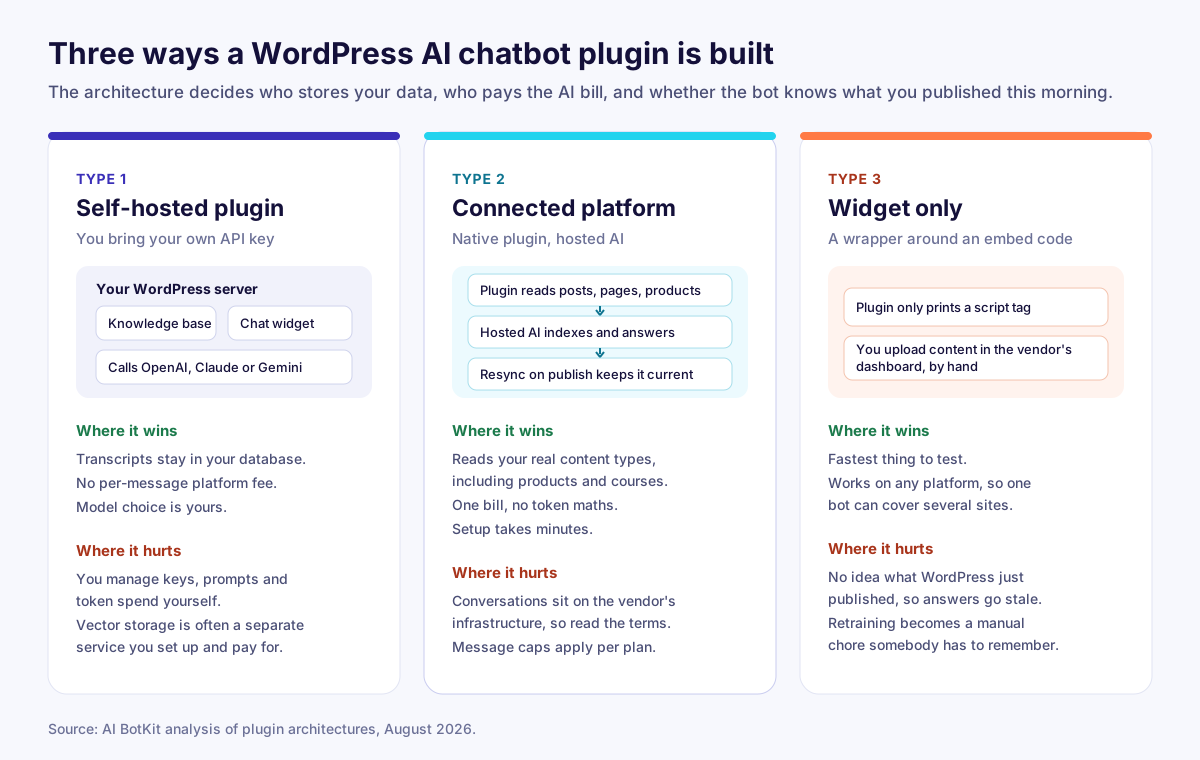
Self-hosted plugins keep everything inside WordPress. The knowledge base sits in your database, the widget is served by your theme, and the plugin calls OpenAI, Anthropic or Google with an API key you supply. You own the transcripts and you pay the model provider directly. You also own the work: keys, prompts, retries, and often a separate vector database.
Connected platforms ship a native WordPress plugin backed by a hosted service. The plugin handles content sync and the widget, the platform handles indexing, retrieval and the model bill. You get one invoice and a setup measured in minutes, and your conversations sit on the vendor’s infrastructure.
Widget-only tools give you an embed code with a thin plugin wrapper around it. They know nothing about WordPress. You paste URLs or upload files in the vendor’s dashboard, and when you publish a new page, somebody has to remember to add it. That last part is where most of these projects die.
Five checks before you install anything
Run every shortlisted plugin through these five. Four out of five is a pass. Failing the first one is not.
1. Training source and resync
Ask two questions. Which content types can it read, and what happens after you publish?
Reading posts and pages is table stakes. Reading WooCommerce products, custom post types, course content and PDFs is where the useful answers live. Resync matters even more. A bot trained in March and never retrained will confidently quote your old pricing in September, and the visitor has no way to know it is wrong.
Look for automatic retraining tied to WordPress publish events, or at minimum a one-click resync you can run without rebuilding anything.
2. How the meter runs
There are four billing patterns in this market, and they behave very differently at volume:
- Flat monthly messages. You get an allowance of AI replies. Predictable, easy to forecast, and you notice when you outgrow it.
- Credits per reply. Every answer burns credits, and premium models burn several per answer. Costs rise exactly as the bot gets used more.
- Conversation-metered live chat with an AI add-on. Two or three separate meters running at once: human conversations, AI conversations, and automation triggers.
- Your own API key. A small licence fee plus token costs. Cheapest at volume, and the only model where you have to watch a provider dashboard.
Price your realistic volume, not the headline plan. A site with 8,000 monthly visitors typically sees a few hundred chats.
3. What it adds to your page
A chat widget should cost you milliseconds. One async script, no extra render-blocking CSS, no jQuery dependency dragged in from 2014.
Run Lighthouse before you install and again after. If Largest Contentful Paint moves by more than a rounding error, the widget is doing something it should not.
4. The handoff
Bots hit their limit. The question is what happens next.
Good behaviour: the bot admits it does not know, offers to pass the conversation on, and sends your team the full transcript by email, WhatsApp or live chat. Bad behaviour: a dead end, or worse, an invented answer delivered with total confidence. Check the fallback settings before you buy, not after a customer complains.
5. Data control
Find out where transcripts are stored, how long they are kept, who can delete them, and whether they feed anyone’s model training. If you handle health, finance or education data, get that in writing. Every plugin here can be configured reasonably. Only some default to it.
The 7 plugins, compared
Install counts come from wordpress.org. Prices were checked in August 2026 and vendors change plans often, so confirm on the pricing page before you buy.
| Plugin | Type | Trains on your WordPress content | Billing model | Free plan | Human handoff |
|---|---|---|---|---|---|
| AI BotKit | Connected platform | Yes, posts, pages, products, custom types, with resync | Flat monthly AI messages, from $10/mo billed yearly | Yes, 1 bot and 100 messages | Email, WhatsApp, Instagram, Telegram, Messenger, plus live chat on Business |
| AI Engine | Self-hosted | Yes, via embeddings you configure | Free core, Pro from about $8.40/mo yearly, plus your own token spend | Yes, full plugin | Not built in |
| WPBot Pro | Self-hosted | Yes, RAG knowledge base from pages, PDFs, CSV | $39/year, or $149 once, WooCommerce on the $99/year tier | Yes, Lite version | Live chat and email in Pro |
| Tidio with Lyro | Connected platform, live chat first | Partial, needs its own knowledge base | Conversations, AI conversations and flow triggers metered separately | Yes, 50 conversations and 50 lifetime AI chats | Strong, this is its core strength |
| Chatbase | Widget only | No, you add URLs and files by hand | Credits per reply, from about $32/mo yearly | Trial only, agents deleted after 14 idle days | Via integrations |
| HubSpot | Connected platform, CRM first | No | Free tier, then CRM pricing | Yes, generous | Yes, tied to the CRM inbox |
| Jotform or Elfsight | Widget only | No | Free tier, then widget plans | Yes | Limited |
1. AI BotKit
AI BotKit is a hosted chatbot platform with a native WordPress plugin, and the WordPress side is the reason it belongs at the top of this list. Point it at your site and it reads your posts, pages, products, courses and custom post types, then resyncs when you publish, so the answers track your content instead of drifting away from it. You can also feed it PDFs, DOCX files, plain text, Q&A pairs and YouTube videos.
Billing is a flat monthly message allowance rather than credits, which makes forecasting simple. The free plan gives you one bot, 100 messages and 1M characters of storage, enough to test whether visitors actually use it. Paid plans start at $12/month, or $10/month billed yearly, with 1,000 monthly AI messages. Handover runs to email, WhatsApp, Instagram, Telegram and Messenger, with a live chat inbox on the Business plan. It answers in 95 or more languages, detected from the visitor’s browser.
Where it wins: native WordPress training and resync, flat and predictable message pricing, handoff into channels your team already watches, and setup in minutes.
Where it hurts: conversations sit on AI BotKit’s infrastructure rather than your server, message allowances at the entry tiers are modest for a high-traffic store, and removing the “powered by” line needs the Business plan. See the plan and message limits or read the AI chatbot for WordPress page for the plugin detail.
Best for: business sites, WooCommerce stores, LMS sites and agencies who want the bot to stay current without anyone babysitting it.
2. AI Engine by Meow Apps
AI Engine is the adoption leader in this category, with more than 100,000 active installs and a 4.9 average rating on wordpress.org. It is less a chatbot product than an AI framework for WordPress: chatbots, content generation, image tools, embeddings and an MCP server that lets Claude or ChatGPT manage your site.
You bring your own API keys, and the connector list is long: OpenAI, Anthropic, Google, xAI, Mistral, Perplexity, OpenRouter, plus local models through an OpenAI-compatible endpoint. Grounding the bot in your content means setting up embeddings against Pinecone, Qdrant, Chroma or OpenAI’s vector store. Pro starts around $8.40/month billed annually, and your real cost is token spend on top.
Where it wins: control, model choice, no per-message platform fee, and a very active developer.
Where it hurts: the setup assumes comfort with API keys and vector stores, token costs are yours to monitor, and there is no built-in human handoff. If nobody on your team wants to own that, it becomes shelfware.
Best for: developers and technical marketers who want to build a custom AI chatbot and keep everything under their own account.
3. WPBot Pro by QuantumCloud
WPBot has been in this category longer than most and it stayed native. Everything runs from your dashboard: a RAG vector knowledge base built from pages, posts, PDFs, CSV and sitemaps, answers through OpenAI, Gemini, Grok or anything reachable via OpenRouter, conversational forms for lead capture, and WooCommerce features including cart recovery.
Pricing is refreshingly boring. Starter is $39/year or $149 as a one-time lifetime licence, and WooCommerce support sits on the $99/year Professional tier. A free Lite version runs a working bot with keyword matching.
Where it wins: no per-conversation billing, a lifetime option agencies like, deep WooCommerce coverage, and full data ownership.
Where it hurts: the settings screen is dense, with a long tail of paid add-ons for individual features. Budget an afternoon, not ten minutes.
Best for: agencies and store owners who prefer to own software rather than rent it.
4. Tidio with Lyro
Tidio is a live chat platform first and an AI product second, with over 80,000 WordPress installs. If you have people answering chats during business hours, the inbox, routing, canned replies and visitor tracking are genuinely good, and Lyro adds an AI layer that answers from a knowledge base you build.
The catch is the meter. Billable conversations, Lyro AI conversations and flow triggers bill separately. The free plan covers 50 billable conversations and 50 lifetime Lyro chats. Starter sits around $29/month, Growth from around $59/month, and Lyro is an add-on from about $39/month. The next step above Growth is Plus at $749/month, so the ladder has a cliff in it.
Where it wins: the best human side of any tool here, plus multichannel reach.
Where it hurts: three meters make forecasting hard, the AI does not read your WordPress content natively, and the jump from Growth to Plus is steep.
Best for: teams with staffed support hours who want AI to absorb the repetitive half.
5. Chatbase
Chatbase is a hosted agent builder, not a WordPress product. You add URLs and files in its dashboard, tune the agent, and drop the widget onto your site.
Pricing is credit based. Hobby runs about $32/month billed annually with a small credit allowance, Standard about $120/month, Pro about $400/month, and extra credits cost roughly $12 to $15 per thousand. Premium models can consume three credits for a single reply, so your capacity depends on your model choice as much as your plan. The free tier is a sandbox: agents get deleted after 14 days of inactivity.
Where it wins: clean interface, quick to prototype, works across platforms.
Where it hurts: no WordPress content awareness, so retraining is a manual habit somebody has to keep. Credit billing charges you more as the bot succeeds more, and branding removal and custom domains are priced as extras.
Best for: teams running one agent across several non-WordPress properties.
6. HubSpot
The HubSpot plugin has the largest install base of anything in this space, past 200,000 sites, because it is a free CRM that happens to include chat. Forms, contacts, email and live chat all land in one place, and the chatbot builder handles qualification and meeting booking well.
What it is not is a content-trained AI bot for your WordPress site. Treat the chat widget as a lead capture and routing tool, and expect to pay CRM prices for the automation tiers.
Best for: sites already running HubSpot that need chat attached to the CRM, not answers drawn from documentation.
7. Jotform AI Chatbot and Elfsight AI Chatbot
Both are widget-first tools with free tiers and a plugin that mostly injects the embed. You train them by pasting URLs or uploading files, customise the look, and publish. Jotform leans on forms and lead capture, Elfsight on a large free knowledge base allowance and quick styling.
They are the fastest way to get something live today. They are also the ones most likely to be answering last quarter’s questions next quarter, because nothing syncs automatically. If free is the constraint, our breakdown of what you get from each free chatbot for WordPress plan is worth ten minutes.
Best for: small brochure sites with a fixed FAQ and an owner who will retrain by hand.
What each pricing model costs as you grow
Sticker prices hide the shape of the curve. Here is what the same bot costs under each model as monthly AI replies climb.
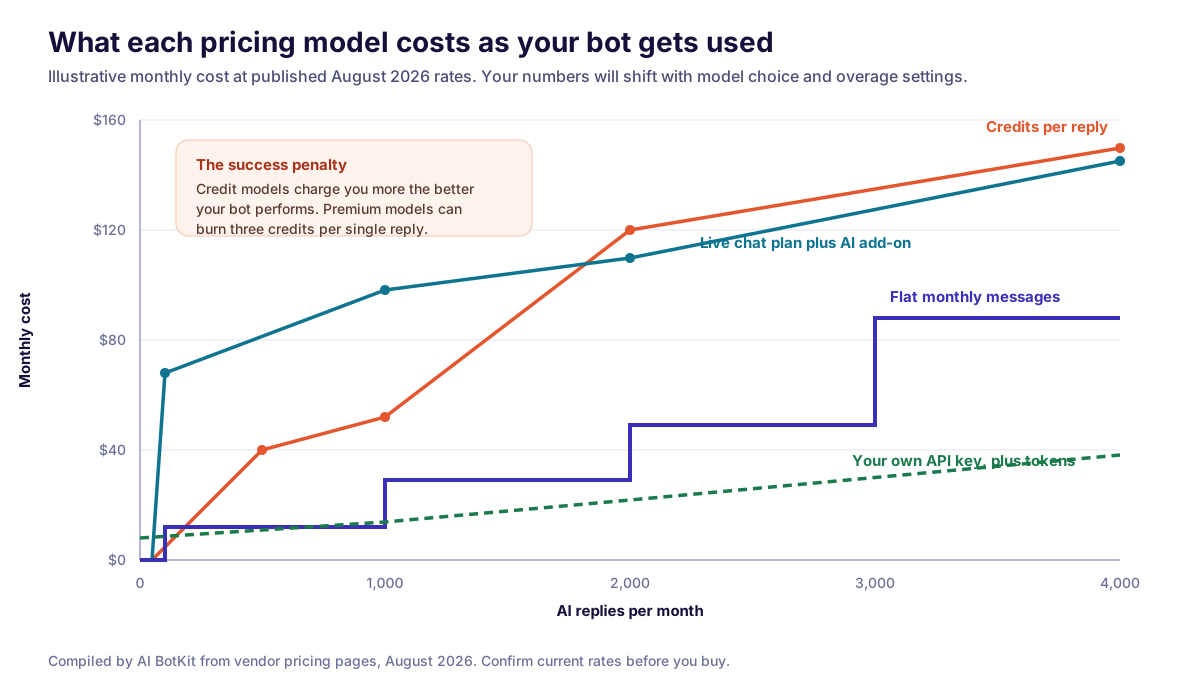
Take 1,000 AI replies a month, which is a realistic figure for a site with moderate traffic and a widget on every page:
- Flat monthly messages: around $10 to $12 on an entry plan sized for 1,000 messages. About one cent per answer, and the number does not move.
- Credits per reply: an entry credit plan does not cover 1,000 replies, so you add a top-up, landing near $45 to $50. Switch the bot to a premium model at three credits per reply and 1,000 answers needs 3,000 credits, which pushes you onto a plan four times the price.
- Live chat with an AI add-on: the base plan plus the AI add-on typically totals $100 to $150 before overage.
- Your own API key: a licence around $8 a month plus token spend, often single digits at this volume, plus whatever your vector database costs.
The pattern is consistent. Credit models are cheapest to start and most expensive to succeed with. Flat models cost slightly more on day one and stay flat. Bring-your-own-key is the cheapest at scale and the most expensive in your time. For a fuller breakdown of setup, subscription and hidden costs, see what a chatbot actually costs on WordPress.
Which one fits your site
Four questions, answered in order. The first Yes decides it.
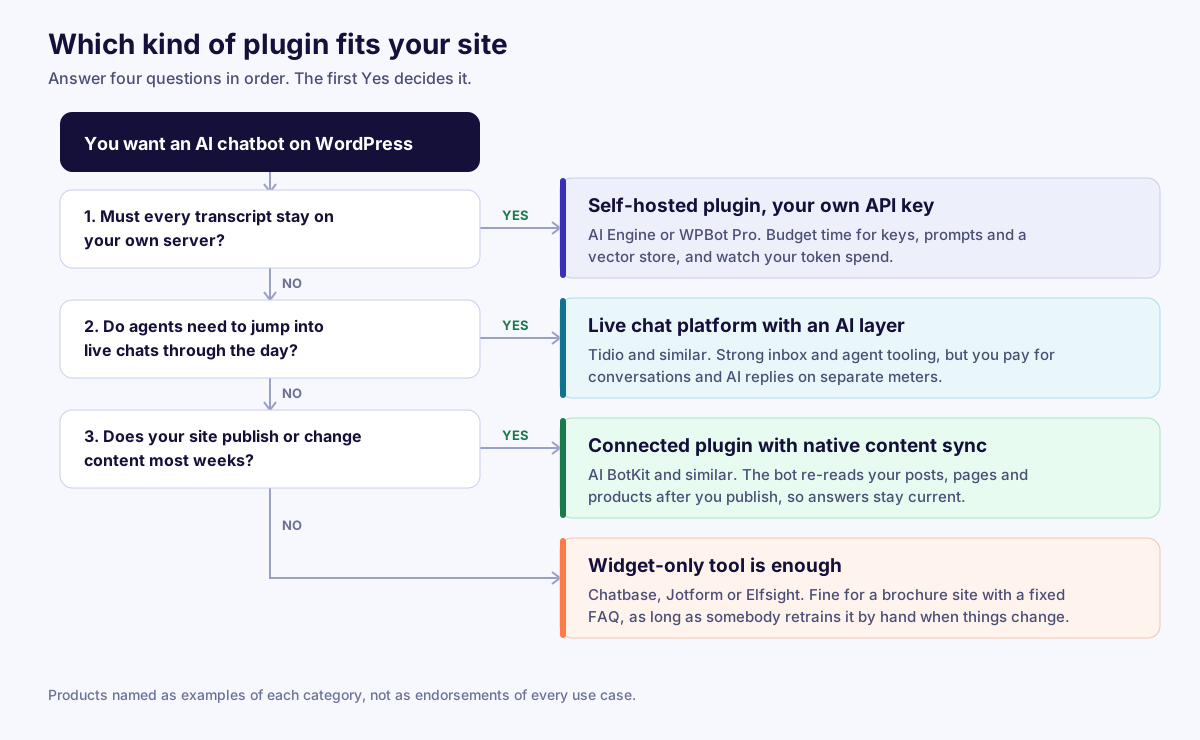
- Must every transcript stay on your own server? Go self-hosted. AI Engine if you want flexibility, WPBot Pro if you want a lifetime licence and WooCommerce features.
- Do agents need to jump into live chats through the day? Go live chat first. Tidio, with AI as the add-on rather than the point.
- Does your site publish or change content most weeks? Go connected with native sync. This is where AI BotKit fits, because resync is automatic and nobody has to remember it.
- None of the above? A widget-only tool is fine. Just diary a monthly retrain, or the bot will start lying to your customers by accident.
How to add an AI chatbot to WordPress in about ten minutes
The steps below describe AI BotKit. The shape is similar for any connected platform.
- Install the plugin. Search for it in Plugins, Add New, then activate. No FTP, no code.
- Connect your account. Paste the API key from your dashboard. Free plans work here, so you can test before you pay.
- Pick your content. Select which post types the bot should learn: pages, posts, products, courses, documentation. Add PDFs or external URLs for anything that lives outside WordPress.
- Train and read the answers. Ask it your ten most common support questions. Where the answer is thin, the content is thin. Fix the page, not the prompt.
- Set the fallback and the handoff. Write the “I do not know, let me get someone” message and choose where the transcript goes.
- Style and publish. Match brand colours, write the welcome line, add three starter questions, then set the pages where the widget appears.
Two habits keep it working: check the conversation log weekly for questions the bot fumbled, and confirm resync ran after any big content change. If a plugin is not an option for you at all, there is a add a chatbot without a plugin route using the embed script.
Five mistakes that kill WordPress chatbot projects
- Training once and never again. Answers age with your site. Automate the resync or diary it.
- No fallback message. A bot that dead-ends is worse than no bot, because the visitor already tried.
- Loading the widget everywhere. Keep it off checkout and off high-intent landing pages where it competes with the button you want clicked.
- Ignoring the logs. The list of failed questions is the best content brief you will get all quarter.
- Buying on features instead of the meter. Nobody switches off a chatbot because it lacked a feature. They switch it off when the invoice stops making sense.
FAQs
What is a WordPress AI chatbot plugin? It is a plugin that adds a chat widget to your WordPress site and answers visitor questions using your own content. It reads your pages, posts and documents, stores them as searchable embeddings, and uses a language model to write answers grounded in that material rather than following a script.
Which is the best AI chatbot plugin for WordPress? It depends on which constraint binds you. AI BotKit suits sites that want native WordPress training with flat message pricing. AI Engine suits developers who want their own API keys and model choice. WPBot Pro suits agencies who prefer a one-time licence. Tidio suits teams with staffed live chat.
Do AI chatbot plugins slow down WordPress? A well-built one does not. The widget should load as a single async script after your page renders. Self-hosted plugins add a little PHP and database work on each answer, which is worth watching on shared hosting. Test with Lighthouse before and after install.
Can I get a WordPress AI chatbot plugin for free? Yes, several have real free tiers. AI Engine and WPBot Lite are free plugins where you supply your own API key. AI BotKit, Jotform and Elfsight all offer free hosted plans with message or storage caps. Free plans are for validating that visitors use chat at all.
Do I need an OpenAI API key? Only for self-hosted plugins. Connected platforms include model access in the plan price, so there is no key to manage and no token bill to reconcile.
Can the chatbot answer questions about WooCommerce products and orders? Product questions, yes, as long as the plugin can read your product post type. Order status needs a live connection to your store data, which is a specific feature. Confirm it is included rather than assuming, because it usually sits on a higher tier.
How do I stop the chatbot from making things up? Use a plugin that answers only from retrieved content, set a strict fallback message, and keep the knowledge base tight. Vague source content produces vague answers. Reviewing the weekly conversation log catches the rest.
How long does setup take? A connected platform takes ten to twenty minutes end to end. A self-hosted plugin with your own vector store takes an afternoon, plus tuning.
Where to start
Pick the type first, then the product. If your content changes and nobody has spare time to retrain a bot by hand, a connected plugin with automatic WordPress sync is the one that survives contact with a real editorial calendar.
You can test that in a few minutes. The AI chatbot for WordPress plugin installs from your dashboard, trains on the content you select, and runs free while you check whether visitors actually use it.