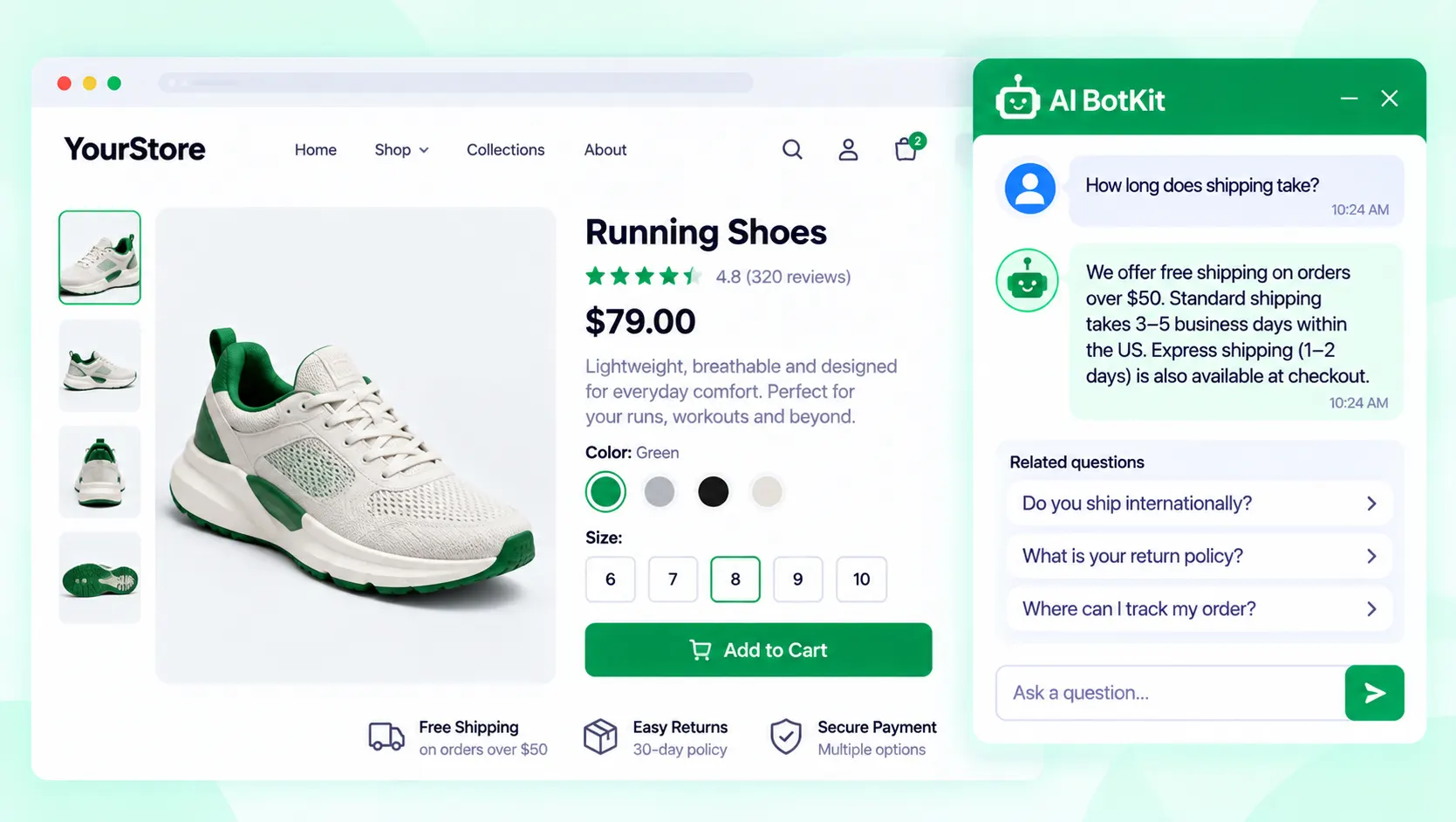
An ai sales chatbot is a chat widget that answers shoppers’ pre-purchase questions from your own content, captures leads, and hands over to you when it can’t help. As an ai chatbot for ecommerce, it pays off when you answer the same questions repeatedly. Here is how it works and how to set one up.
A shopper lands on your jacket page at 11 p.m. and wants to know whether it runs small and whether you ship to their city. Nobody is online, so they close the tab. We built AI BotKit for moments like this: it answers from the pages you’ve already written. That only works if those pages say the right things.
What is an AI sales chatbot, and how is it different from the bots you’ve tried?
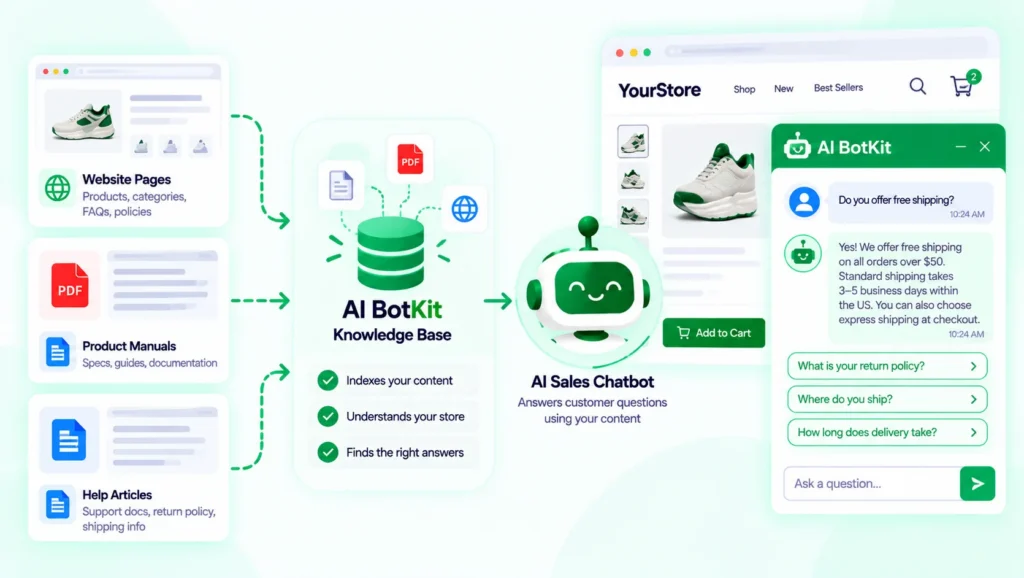
A rule-based bot follows a script: tap a button, get a canned reply. An ai sales chatbot reads the question as the shopper typed it and answers from content you supplied. Ask “does this ship to Austin?” and it looks in your shipping page instead of walking a decision tree.
A script can only answer what someone predicted; an AI sales chatbot can answer in plain language from what you’ve already published.
What “trained on your own content” means in plain terms
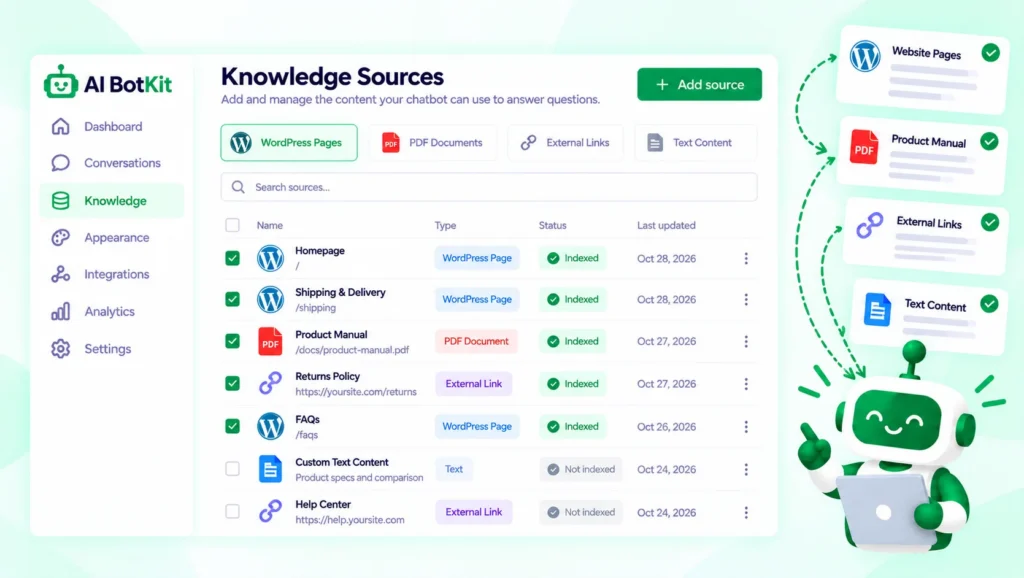
It means you pick the sources: WordPress pages and posts, uploaded PDFs, or external links. The chatbot builds a knowledge base from them and answers from that base, not from general internet knowledge. When you update WordPress content, we sync the change to the knowledge base.
If your pages are vague, the answers will be vague. That dependency is the main thing to understand before you buy anything, and it’s why the content checklist comes before setup in this guide.
How does an AI sales chatbot help someone buy?
Baymard Institute puts average cart abandonment at 70.22% across 50 studies. Not every abandoned cart is a lost sale, since some shoppers are only comparing. But a shopper with an unanswered question has little reason to stay. That’s the gap a sales chatbot targets.
It answers pre-purchase questions from your pages
Shipping times, returns, sizing, materials, and compatibility are the questions that tip a decision. If your pages cover them, the chatbot can answer at any hour, in any of 50+ supported languages. You don’t need to be online for the shopper to get an answer.
It captures leads and quote requests
Not every visitor is ready to buy today. The chatbot can collect a name and email inside the chat, and a Leads tab in the plugin shows what was collected. On WooCommerce, the Product Enquiry for WooCommerce plugin includes one-click access to the free chatbot we built, and it works alongside the enquiry form.
It hands off when it shouldn’t answer
A custom order, a complaint, or a disputed refund needs a person. A good sales chatbot passes those to you instead of improvising. We cover how below.
A sales chatbot earns its keep by catching the questions you’d answer anyway and routing the rest to you.
Do you need one, or is a good FAQ page enough?
A fair objection comes from a store builder on the Shopify Community, who says most AI chatbots frustrate customers when they can’t solve a problem or take an action, and prefers a well-organized FAQ page. That’s worth taking seriously. The right answer depends on your situation.
| Your situation | A good FAQ page may be enough | An AI chatbot may earn its place |
|---|---|---|
| Question volume | A few a week, always the same | The same ones answered by hand most days |
| Catalog | 15 to 20 products with clear pages | Many products, details spread across pages and PDFs |
| Question type | Shipping and returns only | Mixed: sizing, compatibility, materials, delivery |
| Visitors | One language, daytime traffic | Several languages or other time zones |
| Sales model | Straight add-to-cart | Quotes or custom orders where leads matter |
When a static FAQ page is enough
If you get a handful of questions a week and your pages already answer them, fix the FAQ page and stop there. A chatbot adds a tool to maintain without removing much work.
When an AI chatbot earns its place
If you answer 40 pre-sales emails a week and most repeat, a chatbot trained on your pages takes the repetitive part off your plate. You keep the conversations that need judgment.
If you answer the same questions by hand every week, a chatbot probably earns its place; if you rarely get questions, fix your FAQ page first.
Is your content ready? A 10-minute checklist before you train anything
A chatbot is only as good as the content it learns from. Thin or outdated pages produce thin or outdated answers, and shoppers can’t tell the bot from you. If you’re starting with almost no written content, writing your shipping and returns pages is the real first project.
Pre-training content checklist
- Shipping times and costs sit on one clear page.
- The return policy states the actual window and conditions.
- Each product page lists size, material, and compatibility.
- Expired promotions and old prices are removed.
- Size charts and manuals are readable text, not only scanned images.
- A contact route is stated for questions the bot can’t answer.
- Someone unfamiliar with your store has read the pages as a stranger would.
Fixing your pages before training beats fixing wrong answers after launch.
How do you set up an AI sales chatbot on your store?
Setup takes one of two routes depending on your platform. Both start with the same decision: which content the chatbot learns from.
If your store runs on WordPress or WooCommerce
We’ve spent over a decade building WordPress products at WisdmLabs, so we built our AI chatbot for WordPress to install like any other plugin. You need WordPress 5.8 or higher and PHP 7.4 or higher.
- In your WordPress dashboard, go to Plugins → Add New.
- Search for AI BotKit, then install and activate it.
- You’ll land on the Welcome page.
- If you already have an AI BotKit chatbot, copy the WordPress code from it.
- If not, follow the onboarding wizard to create your first chatbot.
- Activate the chatbot on your whole site or on chosen pages.
Then pick your training sources: pages, posts, PDFs, or external links. One site owner on the free plan wrote in a WordPress.org review that the team helped train the bot with their materials and handle the initial setup.
If you’re on Shopify, Wix, Squarespace or custom HTML
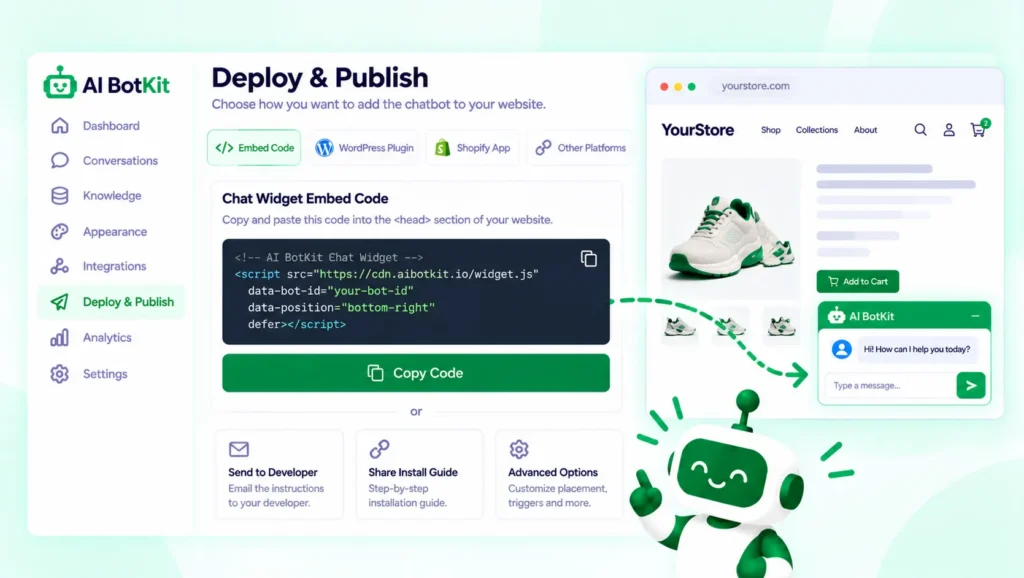
We provide an embed snippet instead of a plugin. After saving your chatbot, go to Deploy → Publish, copy the Chat Widget code, and paste it into your site’s header or footer, as our docs explain.
- Shopify: Online Store → Themes → Edit Code →
theme.liquid, before the closing body tag - Wix: Settings → Advanced → Custom Code, set to All Pages
- Squarespace: Settings → Advanced → Code Injection → Footer
- Webflow: Project Settings → Custom Code → Footer Code
- Custom HTML: just before the closing body tag
Paste both lines of the snippet, and use code injection rather than an embed block. Embed blocks often strip scripts, as our troubleshooting page notes. On Shopify, duplicate your theme before editing it.
If you’re building this for a client
The free plan covers one chatbot, per our docs, so check the chatbot limit on a paid plan before you quote a client. The embed snippet also works on client sites built on other platforms.
Test it before your customers do
Ask it twenty real questions pulled from your inbox, including some it shouldn’t answer. Note every wrong or vague reply, fix the source page, and ask again. Then write your fallback and handoff messages before you publish.
What does it cost to run an AI sales chatbot?
Pricing is message-based, so the question is how many replies your traffic will need. These figures come from our pricing docs as of October 2026. Confirm them on the pricing page before you decide.
| Plan | Price | AI messages | Notes |
|---|---|---|---|
| Free Full Access | $0 | 100, one-time | All features, 1 chatbot; top-ups $9 per 50 or $18 per 100 |
| Basic | $10/mo billed yearly, $12 monthly | 1,000 per month | |
| Essential | $24/mo billed yearly, $29 monthly | 2,000 per month |
Higher plans exist; the pricing page lists them. The free allowance is a trial, not a monthly quota: the 100 messages never reset. At 40 questions a week, they go quickly, so treat free as a test, not a plan.
When you research options, check who is talking. In one Shopify Community thread asking what AI tools merchants use, several replies came from vendors pitching their own chatbots.
Start on the free allowance as a test, then size a paid plan to the replies you actually used.
What will it get wrong, and how do you stop shoppers hitting a wall?
Keep answers inside your content
The chatbot should answer from your content and say so when it doesn’t know. A clear fallback message beats a confident guess. We built AI BotKit around answers grounded in your sources for that reason, but it can’t be better than those sources.
A chatbot that answers from your content is also a different tool from one that reads live stock or manages carts. Check which one you’re buying.
Conversations pass through our servers for chatbot training and response generation, per the plugin listing. Read our privacy policy, tell visitors a bot is answering, and decide what you collect. That’s your call, not ours.
Make the human handoff obvious
In a Gartner survey published in 2024, 64% of 5,728 customers said they’d prefer companies not use AI in customer service. The top worry, at 60%, was that it would get harder to reach a person.
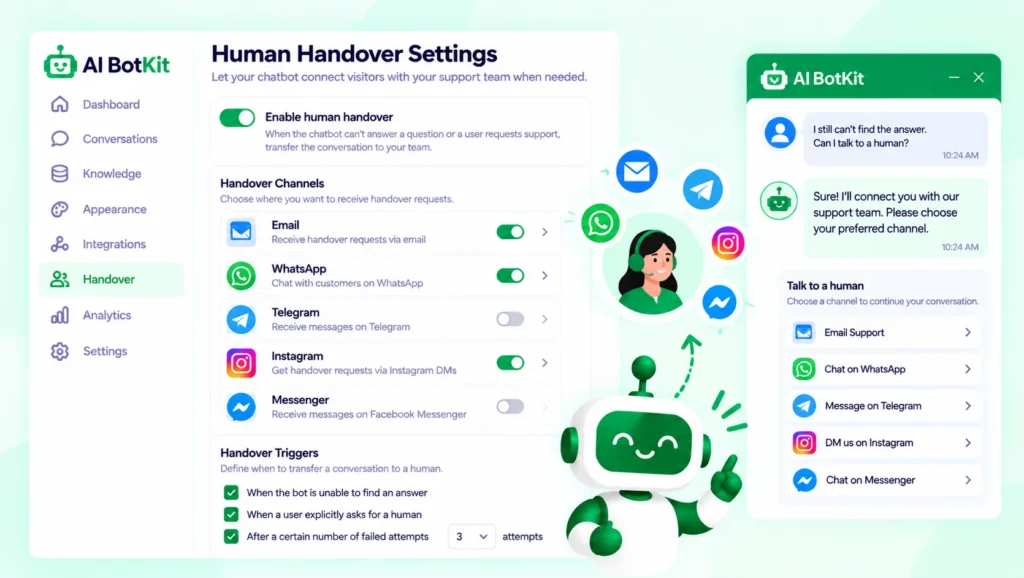
So build the exit first. The chatbot can offer handover by email, WhatsApp, Telegram, Instagram, or Messenger, and shares the chat context with your team so the shopper doesn’t repeat themselves. You can also trigger handover after consecutive unanswered questions.
Design the handoff before you design the greeting.
FAQ
Can an AI sales chatbot actually increase sales?
It can help when unanswered questions stand between a visitor and a purchase, since it answers instantly at any hour. We can’t promise a lift, and it won’t fix weak product pages or high prices. Track chats and leads in the analytics and judge it after a month of real traffic.
Does it work with Shopify and WooCommerce?
On WooCommerce, use the WordPress plugin, or the Product Enquiry for WooCommerce plugin, which includes one-click access to our chatbot. On Shopify, add the embed snippet to theme.liquid. It answers from your content, so it isn’t the same as a bot that reads live stock or manages carts.
Can I train it on PDFs and product pages?
Yes. You can train it on WordPress pages and posts, uploaded PDFs, and external links. Readable text works better than scans. Whatever you feed it is what it knows, so keep those sources current.
What happens when it can’t answer?
It uses your fallback message and can offer handover to you by email, WhatsApp, Telegram, Instagram, or Messenger. You can also trigger handover after consecutive unanswered questions. Write the fallback yourself so it points to a real person.
Is the free plan enough to try it?
Yes, for a test. The free plan unlocks all features but gives 100 one-time messages, so it won’t last long on a busy store. When you upgrade, messages become a monthly allowance.
If you’re answering the same pre-sales questions by hand every week, start by fixing your shipping and returns pages, then train a chatbot on them. At AI BotKit, we built the free plan so you can test with real shoppers before paying anything. Start on the free plan and see which questions it handles.