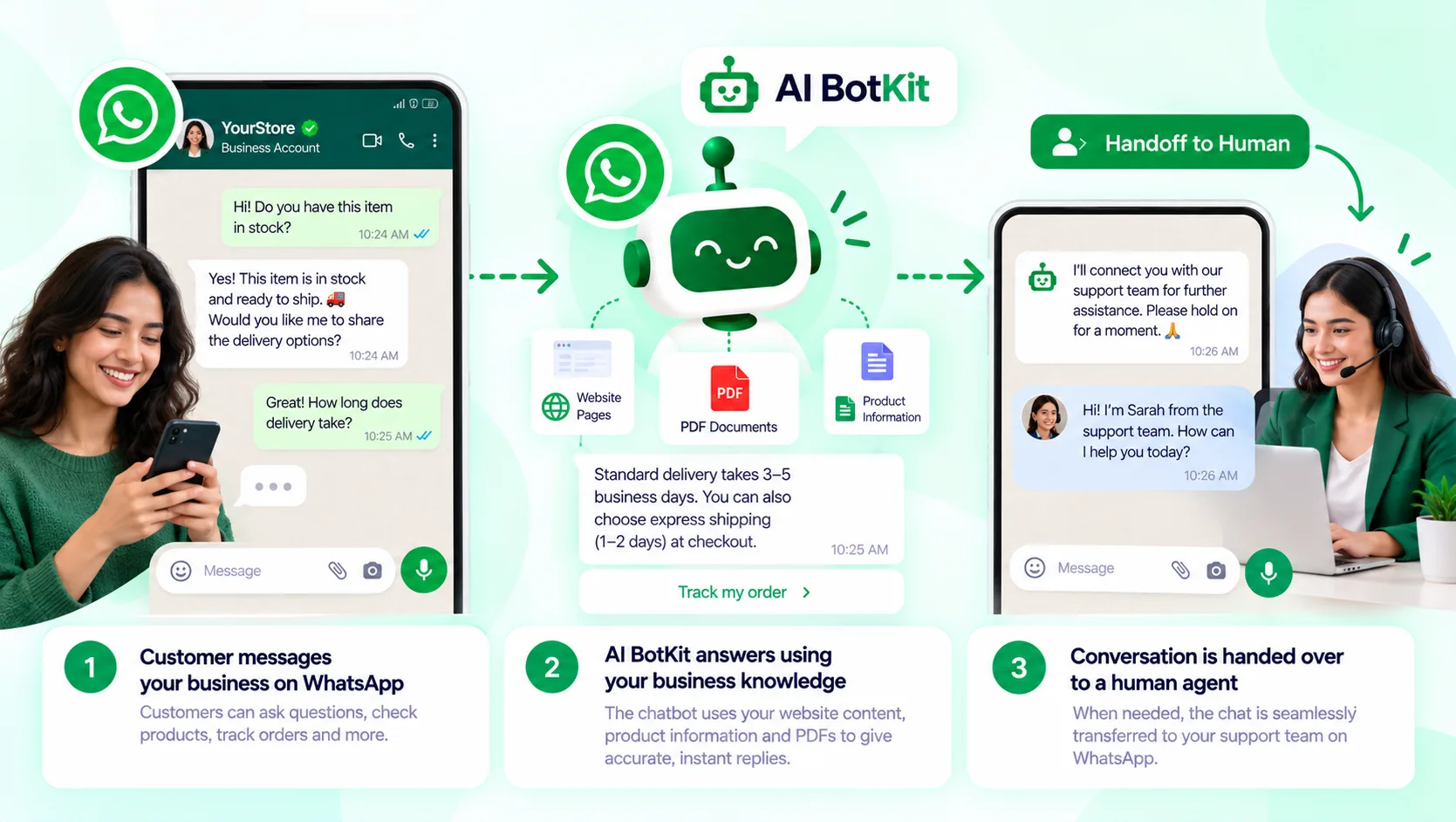
A WhatsApp chatbot for business is software that replies to customer messages on WhatsApp automatically, either with fixed replies or, in a WhatsApp AI chatbot, with answers drawn from your own content. For AI answers, you generally connect through Meta’s WhatsApp Business Platform (the API), which needs Meta verification and a number that isn’t also running in the WhatsApp Business app. It earns its place when you answer the same questions by hand every week.
It’s 9pm and three people have asked whether you ship to their city. By morning they’ve bought elsewhere. A chatbot is meant to catch exactly those messages, but only if the setup fits how many enquiries you really get. We built AI BotKit to answer from your own content, and this guide covers what that takes on WhatsApp, including the parts that are Meta’s rules and not ours.
What is a WhatsApp chatbot for business, in plain terms?
A WhatsApp chatbot sits on your business number and replies when customers message you. It can greet people, answer questions, collect contact details and pass a conversation to you when it should. The useful question is not whether it can reply, but what it replies from.
Fixed-reply bots vs bots that answer from your own content
A fixed-reply bot follows a script. A customer taps a menu option and the bot sends the matching message. It’s predictable and cheap, and it breaks the moment someone types a question you didn’t plan for.
An AI chatbot works differently. You give it your website pages, FAQs or documents, and it answers from that material instead of from general knowledge. In plain terms, “trained on your own content” means the bot looks up your information before it replies.
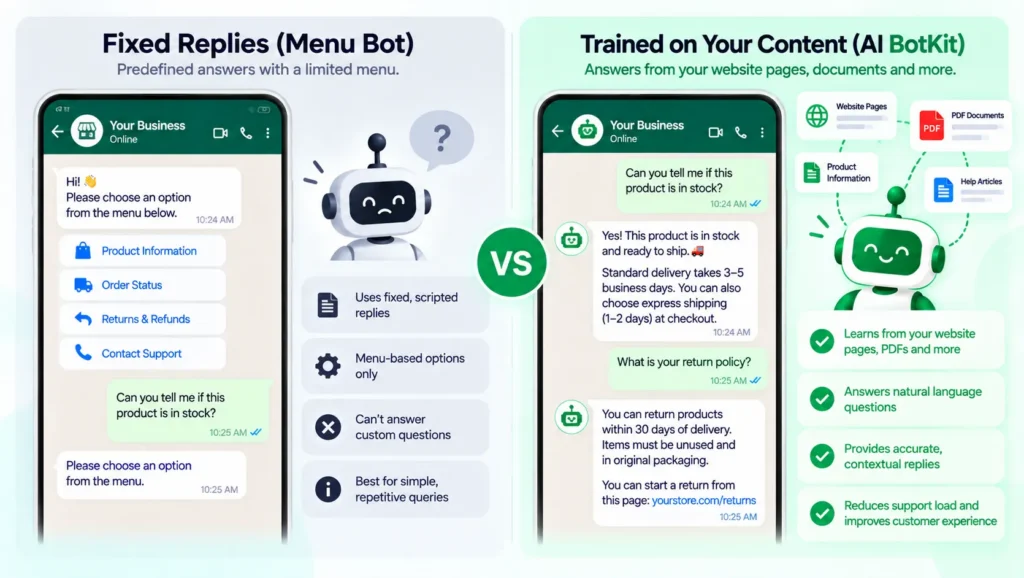
That second kind is what most people now mean by a WhatsApp AI chatbot, and it’s the focus of this guide. It carries one dependency worth knowing early: if your pages are thin or out of date, the answers will be too.
Do you need a WhatsApp chatbot, or is the free WhatsApp Business app enough?
It depends on how many enquiries you get and how repetitive they are, and it’s worth being honest about that before you pay for anything. A chatbot only earns its place when the same questions keep arriving.
If your inbox is small and varied
If you get a handful of messages a day and each one is different, the free WhatsApp Business app is probably enough. A greeting, an away message and quick replies cover the basics, and every conversation stays personal.
You’d be in good company. Statista’s summary of Meta’s figures puts the Business app at around 200 million monthly users in 2023, up from 50 million in 2020.
If you answer the same questions every week
If you keep typing the same shipping, pricing or opening-hours answers, automation starts to pay back. Say 20 of your 30 daily enquiries are repeats. That’s a lot of typing that adds nothing, and it’s the kind of load we cover in our guide on handling pre-sales questions.
A bot can also catch leads you’d otherwise miss. Our post on the lead generation chatbot walks through how, and for a deeper look at the support side, see how to deflect support tickets with AI.
One caution applies to every route. A small business owner wrote on LinkedIn about a WhatsApp ban hitting an operation that relied on one number for leads and client orders. A bot doesn’t remove that risk, so keep your key customer details somewhere you control.
How the three routes compare
| Route | What you get | Cost type | Best for |
|---|---|---|---|
| Free WhatsApp Business app | Greeting, away message, quick replies; everything else by hand | No software fee, your time | Small, varied inboxes |
| API through a chatbot platform | An AI bot answering from your content, with handoff to your team | Platform fee plus Meta message charges | Repeat questions at steady volume |
| Custom build on Meta’s API | Whatever your developer builds | Developer time plus Meta charges | Unusual workflows, in-house developers |
If you only need to collect enquiries, a form may do the job. Our comparison of a chatbot vs a contact form helps you decide.
What does it take to get a WhatsApp chatbot live?
Expect three jobs: get a number ready, get through Meta’s setup, and train the bot on your content. The second is Meta’s process, not any chatbot provider’s, and it’s where most delays come from. Start with the number, because that’s the step people most often get stuck on.
The short version:
- Decide what the bot should handle (for example, shipping, pricing and opening hours).
- Choose a number that isn’t active in the WhatsApp Business app, or plan how to move it.
- Register for the WhatsApp Business API through Meta and get your business verified.
- Add your website links, FAQs or documents so the bot can answer from them.
- Test it with real customer questions, then switch it on.
The number rule that trips people up
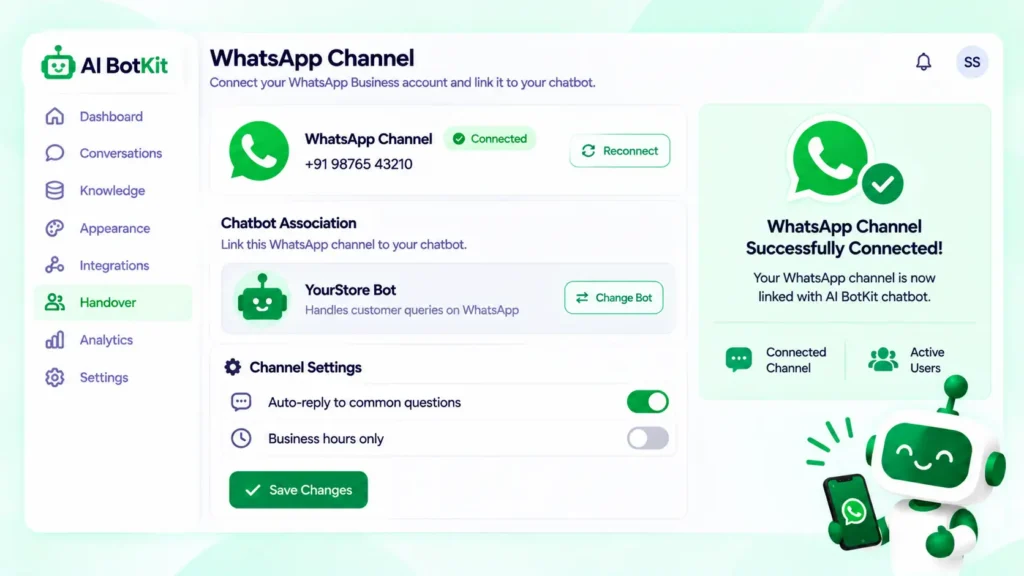
A phone number can’t be active in the WhatsApp Business app and on the API at the same time. In Meta’s developer community, one user asked whether that’s expected after registering a number with the Cloud API, and a reply said it’s by design.
Your options are a separate number for the bot, moving your existing number to the API, or a “coexistence” setup that some providers describe for keeping both. Moving can cost you the app’s chat history unless you back it up, according to Zoko’s documentation. Coexistence has eligibility rules, so check ChatDaddy’s guide and Meta’s current documentation first.
The Meta approval path
To use the official API, you register through Meta, connect your number and get your business verified. On our WhatsApp page, we list this as step one, ahead of adding content, because it comes before anything we do. Use the same business name everywhere you can, so your details match.
Train the bot on your content
Once the channel is connected, you add what the bot should answer from. In AI BotKit, that means website links, FAQs, documents or product details. Start with your ten most common questions and check each answer before going live.
If you’re setting this up for clients
Agencies face the same steps once per client. Plan for each client’s number and business details to be verified in their own name, and treat Meta’s approval time as outside your control when you quote. Our post on a chatbot for agencies covers the client-work side.
What will a WhatsApp chatbot cost you?
You pay in three places: Meta’s message charges, the chatbot platform and your own time. Meta’s charges depend on the type of message, not on how clever the bot is.
What Meta charges
Since July 1, 2025, Meta has billed per message instead of per conversation, according to its WhatsApp pricing page. Utility templates delivered inside an open customer service window are free. That window opens when a customer messages you.
Providers that summarise Meta’s rate card, such as SleekFlow, also report that replying within 24 hours of a customer’s message is free. Charges apply to template messages sent outside that window, such as a marketing broadcast. Rates vary by country, so check Meta’s current rate card for yours.
What the platform charges
Chatbot platforms add their own fee on top. Plans change, so see current options on our pricing page and ask any provider exactly what’s included for WhatsApp before you commit.
The template recategorisation surprise
Template categories affect cost. Vendor explainers such as Macha’s guide describe Meta moving utility templates to marketing when they carry promotional content, which raises the price per message. Keep order updates and promotions in separate templates, and watch your first month’s bill. This is vendor-reported, so confirm it against Meta’s rules.
| Cost | Who charges | What triggers it |
|---|---|---|
| Template messages (marketing, utility outside the window, authentication) | Meta | Each delivered template message |
| Replies inside the customer service window | Meta (free, per providers) | Replying within 24 hours of the customer’s last message |
| Chatbot platform plan | The provider | Your plan; check what it includes |
| Setup and upkeep | You | Training, testing, weekly review |
Does Meta allow AI chatbots on WhatsApp?
Yes, with a limit. From January 15, 2026, Meta’s business terms bar general-purpose AI assistants from the platform, as TechCrunch reported. Bots for support, bookings and sales are still allowed. A bot that sticks to your business topics is on the right side of that line.
Per respond.io’s explainer, new API users came under the terms on October 15, 2025, and existing users on January 15, 2026.
In practice, scope your bot to your products, pricing, orders and opening hours. An assistant that will chat about anything is what Meta targeted. Read Meta’s policy yourself before launch; this isn’t legal advice.
How do you keep answers accurate, and when should a person step in?
Accuracy is a content problem more than a technology problem. A bot can only answer well from what you’ve given it.
The bot is only as good as your content
Thin pages produce thin answers, and outdated pages produce outdated ones. Test with real customer questions before going live, and keep testing after.
In AI BotKit, analytics show what people ask and where the bot lacked an answer, so you know which page to fix.
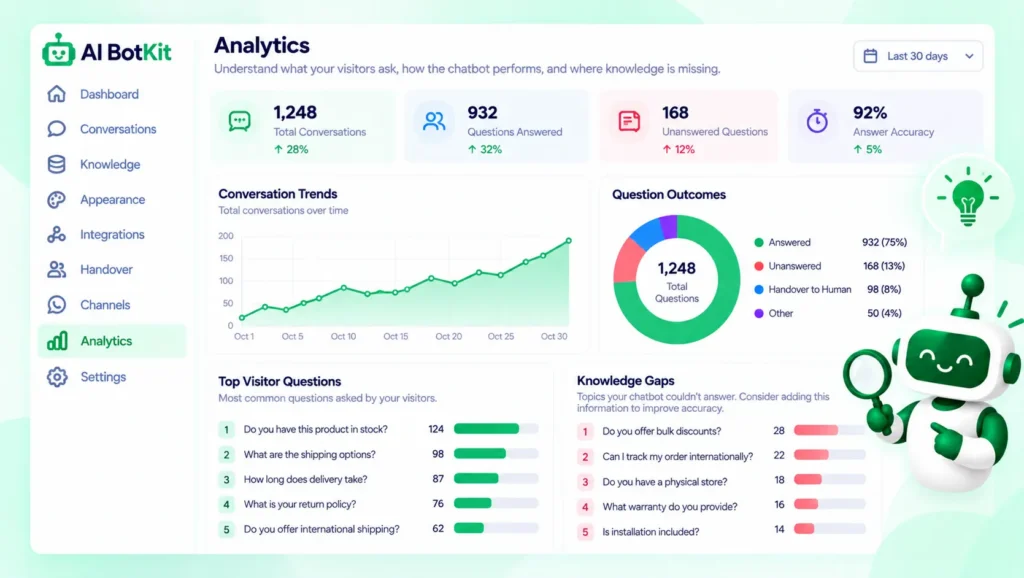
When a person should take over
Hand over complaints, pricing disputes, complicated orders and anything emotional or high-stakes. In AI BotKit, a conversation can move to your team with its context, so the customer doesn’t repeat themselves.
What happens to customer conversations
WhatsApp chats can include names, phone numbers and order details. Check where a provider stores them, who can read them, how you delete them, and what notice your region expects. In AI BotKit, you can update, replace or delete your bot’s content from the dashboard.
Is your business ready for a WhatsApp chatbot? A 6-question check
Count your yeses:
- Do the same questions arrive most days?
- Do customers already message you on WhatsApp, or ask to?
- Are the answers already written on your site, in FAQs or in documents?
- Can someone review the bot’s conversations once a week?
- Can you dedicate a number to the bot, or move yours?
- Would a missed message cost you a sale?
0 to 2 yeses: stay on the free app for now. 3 to 4: try one use case, such as shipping questions, and see how it goes. 5 to 6: a chatbot is worth setting up properly.
FAQ
Do I need the WhatsApp Business API to use a chatbot?
For a bot that answers automatically from your content, generally yes. The free app offers fixed replies like greetings and away messages. You can connect to the API directly through Meta or through a provider.
Can I keep my existing number?
Not in both places at once. A number can’t be active in the app and on the API together, and people in Meta’s developer community report “already registered” errors during setup. Use a separate number, move yours (which ends app use), or check whether coexistence is available to you.
Is WhatsApp chatbot automation allowed by Meta?
Yes for business use such as support, bookings and sales. Meta’s January 2026 terms target general-purpose AI assistants. Keep your bot on your own business topics.
What happens when the chatbot doesn’t know the answer?
That depends on your content and setup. A well-configured bot says it can’t help and hands the conversation to a person. If the same gap keeps appearing, add the missing answer to your content.
Will a chatbot replace talking to customers?
No. It handles repeat questions so you can spend time on the conversations that need a person. Complaints, negotiations and unusual requests should still reach you.
If you answer the same WhatsApp questions every week, the lowest-risk next step is to test a bot on your own content before committing to anything. We built AI BotKit so you can start free, no credit card needed, and see how it answers from your pages. Try the WhatsApp AI chatbot builder.