
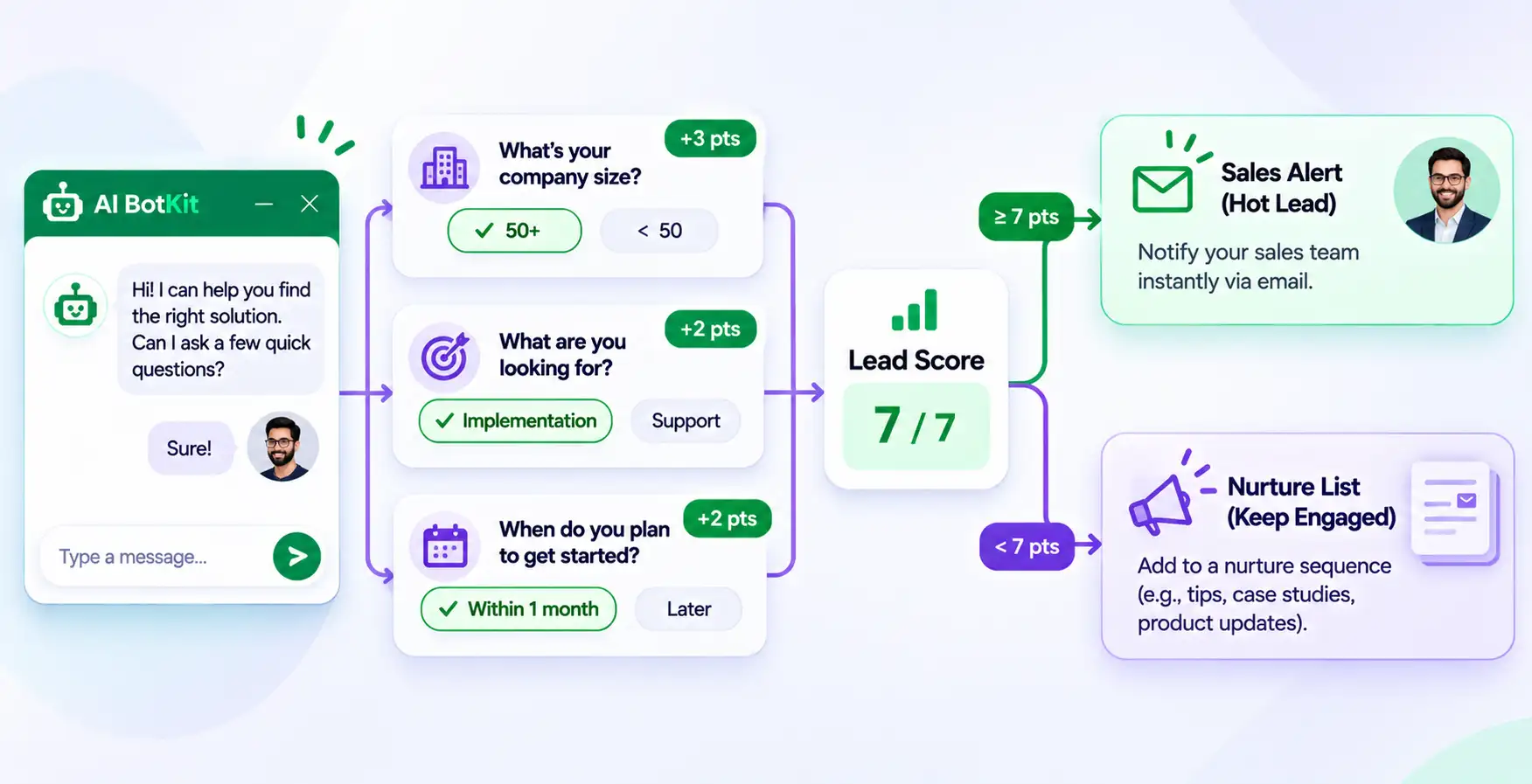
A lead qualification bot is a website chatbot that asks visitors a few questions, checks the answers against rules you set, and sends promising leads to the right person through chatbot lead routing. You choose the questions and the cutoff, and the bot applies them to every visitor, including at 2 a.m.
Picture a small agency that gets about 30 enquiries a week through its website. Four are ready to hire. The rest are students, vendors and people comparing prices. All 30 land in one inbox, and the four real buyers wait two days for a reply.
At AI BotKit, we build chatbots for sites like this, and the fix usually starts with a clear rule, not more software. This guide shows how to write that rule, and when you can skip it.
What does a lead qualification bot actually do?
Capturing a lead vs. qualifying one
Capturing a lead means collecting a name and an email. Qualifying one means deciding whether that person deserves your time today. Most chatbots do the first well and leave the second to you.
In a G2 community thread on lead-generation chatbots, one reply says capture is manageable for a small team, while real qualification takes more work on CRM mapping, routing and conversation design. Another reply says a bot that gathers only a name, an email and a vague question saves reps very little time.
The useful output is a lead with context: what the visitor asked, what they need, and how soon.
Where the AI part fits
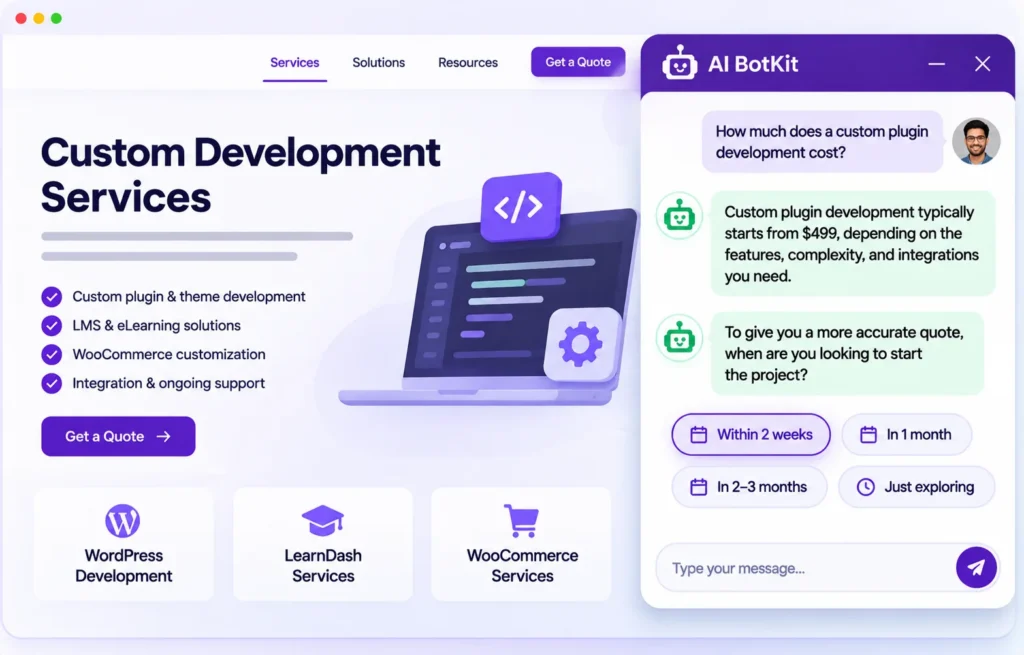
An AI chatbot trained on your own content can answer questions while it asks yours. Visitors often want a price range or a turnaround time before they share an email. When the bot answers from your pages, they stay in the chat long enough to reach your questions.
That only works if your pages hold the answers. We come back to that limit below.
Do you need a lead qualification bot, or is a good form enough?
Not every site needs one. If you answer every enquiry yourself within the hour, a good contact form may be all you need. The right setup depends on who is reading the inbox.
If you’re a solo operator answering every lead yourself
With a handful of enquiries a week, you can read each one. A bot earns its place here only if visitors arrive while you’re away, or the same pre-sales questions keep coming. Scoring is probably overkill. A bot that answers questions and captures an email is enough.
If a small team sorts enquiries by hand
A team of three to ten often has the opposite problem. Enquiries arrive for several people, and someone sorts them manually. A score and a routing rule remove that sorting step and make follow-up predictable.
If you’re an agency building this for clients
The scoring rule is the part you customise. Good-lead signals for a web designer differ from those for an accountant. Keep the structure identical across clients and change only the questions and the points.
| Option | Best when | Watch out for |
|---|---|---|
| Contact form | A handful of enquiries a week, and you reply the same day | Nothing sorts leads for you, so reply speed is on you |
| Rule-based chatbot | Visitors ask the same few questions in predictable ways | It can’t handle anything off script |
| AI chatbot trained on your content | Visitors ask varied questions before they enquire | Answers are only as good as your pages, and it needs testing |
Speed is the other reason to care. In a Harvard Business Review audit of 2,241 US companies, only 37% replied to a web lead within an hour, and the average first reply took 42 hours. The study dates from 2011, but the pattern is familiar to anyone with a busy inbox.
A companion HBR study found that firms replying within an hour were about seven times more likely to reach a decision maker. A routing rule that alerts a person within minutes is the cheapest way to avoid that delay.
How do you score leads when you don’t have a sales team?
Scoring is arithmetic you decide in advance. Pick a few questions, give each answer points, and set the number that means “worth a call”. A small-business owner asked for exactly this on a Jeff Bullas community thread, and the replies converged on one simple pattern.
Pick 3 to 5 qualifying questions
Choose questions that separate likely customers from browsers:
- What problem are they trying to solve?
- What budget band are they in?
- When do they want to start?
- Are they the person who decides?
Use multiple choice where you can. Open text is harder to score and easier to abandon.
Give answers points and set a cutoff
One reply on that thread sums up the method: “Score answers. Give high-intent answers points.” Use three points for a strong fit, one for a partial fit and zero for a poor fit. With three questions the maximum is nine, and a cutoff of six is a sensible start.
| Question | Strong fit (3) | Partial fit (1) | Poor fit (0) |
|---|---|---|---|
| What are you trying to solve? | A problem you handle | Still exploring | Unrelated to your work |
| What’s your budget range? | Fits your usual project size | Close to it | Far below it |
| When do you want to start? | This month | Within three months | Later, or just browsing |
This table is an example. Replace every row with what a good lead looks like for your business. One reply on the thread warns to expect some false positives, so plan a quick human check before you commit to anything big.
For scale, Gleanster Research, cited in HubSpot’s lead nurturing roundup, puts the share of leads ready for sales at about 25%. It’s an older figure. It still explains why most enquiries need a different next step than a sales call.
What happens to leads below the cutoff
A low score is not a rejection. Send those visitors a useful page, a guide or an email signup, so the lead stays warm without costing you a call.
How do you route leads to the right person?
Routing means the right person hears about a lead quickly. For most small teams, routing is an email alert plus a sheet, not a rules engine.
Instant email alert
When a visitor completes the contact form, an email notification tells you straight away. Here’s how we handle it in AI BotKit: lead email notifications are a paid feature, included free during the Free Full Access trial. Point the alert at a shared inbox if your settings allow it, so one person’s holiday doesn’t stall follow-up.
The Leads table and Excel export
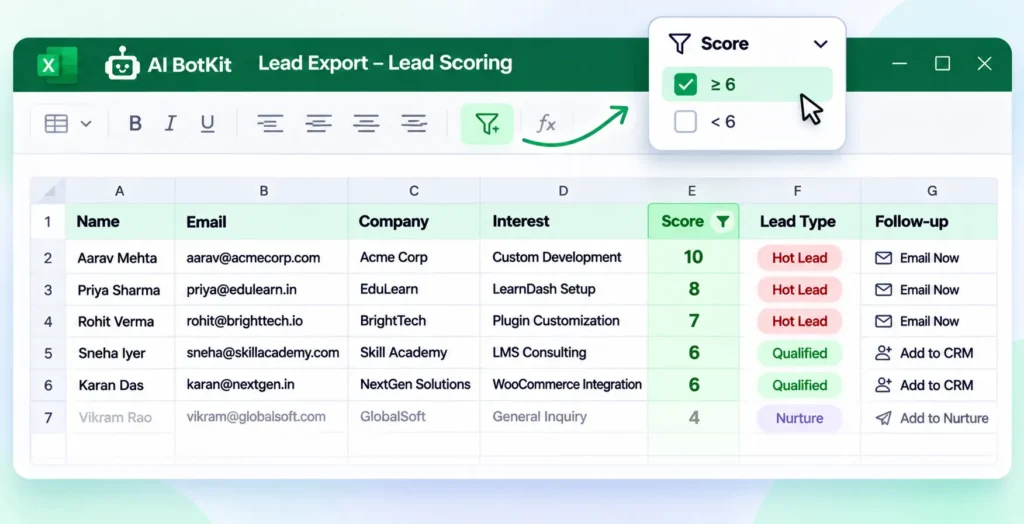
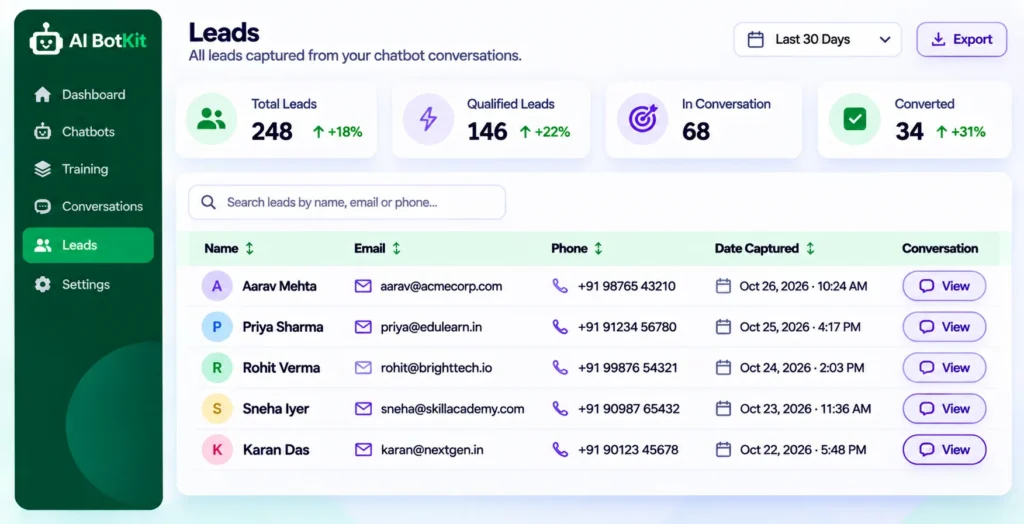
Every lead appears in a Leads tab with name, email, phone, date and a button that opens the full conversation. You can export leads to an Excel file and import them into a CRM or email tool. That export is where your score lives: add a points column, filter to your cutoff, and assign from there.
If your team already works in a CRM, HubSpot’s guide to its own lead qualification bot shows the CRM-native version. Without a CRM, a sheet does the same job.
Webhooks
We list webhooks among our integrations. Check the documentation for exactly which fields they send before you build a workflow on them.
Handing a conversation to a person
Some visitors should talk to a human before any score matters. We support handover by email, WhatsApp, Instagram, Telegram and Messenger. A pricing question the bot can’t answer from your pages is a good moment to hand over. Set up the contact form first, because email handover relies on it to collect the visitor’s details.
How do you set this up in AI BotKit?
Here’s the setup we’d follow on a fresh site. It runs on WordPress through the plugin, and on other platforms through an embed snippet, so a no-code chatbot for WordPress is only one of the places it can live.
Step 1: Train the bot on your own content
Add your service pages, pricing page, FAQs and any PDFs, plus external URLs if they hold answers. The bot answers from this content, so gaps here become gaps in conversations.
Step 2: Turn on the contact form
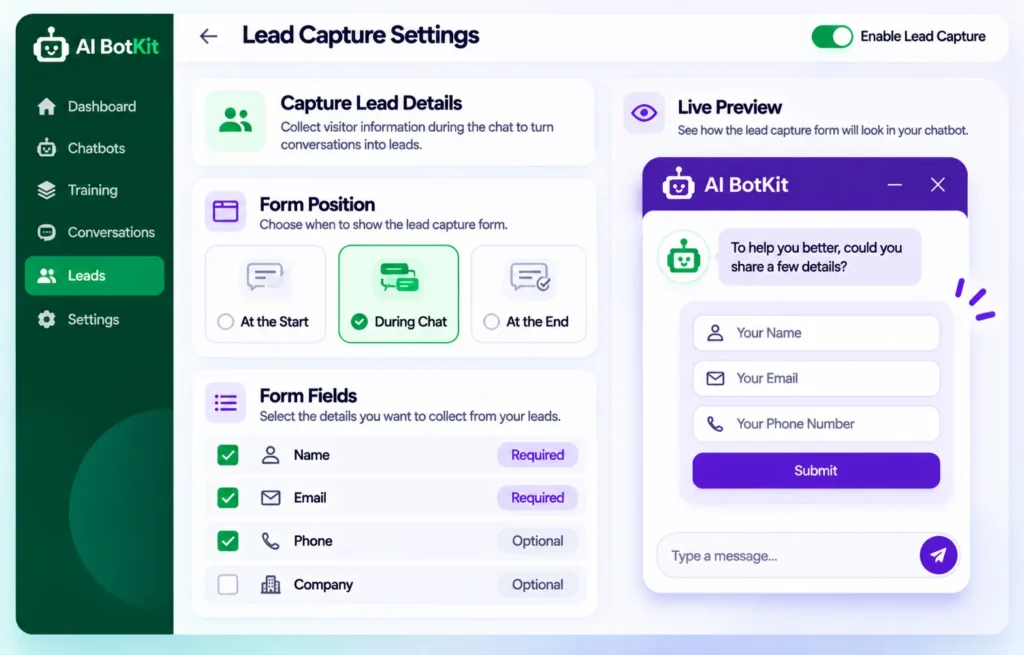
Open Actions, then Lead Capture. Choose whether the form appears at the start or the end of the chat, and which fields to collect: name, email and phone. Showing it at the end lets visitors get answers before they hand over details.
Step 3: Give the bot your questions
Use the custom bot instructions to tell the bot which three questions to bring up. Then test it, because a bot can skip a question or loop, and you want to catch that before visitors do.
Step 4: Turn on email notifications
Enable the lead notification so a new lead reaches your inbox as it happens. This is the routing step for most small teams.
Step 5: Review leads and apply your score
Open Conversations, then the Leads tab. Click View on a lead to read the chat, add the points and decide who follows up. The table itself shows name, email, phone, date and the chat link, so you apply the score by hand or in an exported sheet.
Why does a lead qualification bot sometimes get it wrong?
Because a bot only does what its content and instructions allow. Treat the first week as a test, not a launch.
Thin or outdated pages produce thin answers
A bot trained on a three-line services page gives three-line answers. If visitors keep asking something your site never answers, that is a content gap, and the conversation history shows you where. Fixing the page fixes the bot.
Flows can stall or loop
On a WordPress.org support thread, a site owner described a bot that kept repeating its opening line instead of moving on to qualifying questions. That was a plugin from another vendor, and its author found a workaround. The lesson transfers: read real conversations before you trust any flow.
False positives and the one-week test
Expect some good leads to score low and some poor ones to pass. Read a week of chats, then move the cutoff or reword a question. Some conversations deserve a human whatever the score, such as complaints or detailed pricing.
We’ve spent over a decade building WordPress products at WisdmLabs, and the lesson that carries over is simple: test on real traffic before you trust any automation.
Data handling
A lead form collects personal details. Tell visitors what you collect and why, and keep the form to the fields you use. Rules vary by country and industry, so confirm what applies to you with a qualified adviser. Read the plugin listing and documentation for where conversation data goes.
Lead qualification bot launch checklist
Work through this list once and you’ll have a bot that sorts leads instead of just collecting them.
☐ Write one sentence describing what a good lead looks like for you
☐ Pick 3 to 5 multiple-choice questions
☐ Assign points and set a starting cutoff
☐ Train the bot on pages that answer what visitors actually ask
☐ Turn on the contact form and the email alert
☐ Decide who follows up, and how fast
☐ Read a week of real chats, then adjust the questions and cutoff
FAQ
Can a small business without a CRM use a lead qualification bot?
Yes. A spreadsheet works: export your leads, add a points column and filter at your cutoff. The Jeff Bullas thread reaches the same conclusion, with email alerts or a Google Sheet as the destination for qualified leads.
How many qualifying questions should the bot ask?
Three to five. Fewer questions mean fewer abandoned chats, and the answers stay easy to score. Start with three and add a fourth only if you find a gap.
How much technical setup does it take?
Less than the scoring design does. One G2 reply says getting the AI running was the easy part, and the qualification questions, flow tweaks and routing took the time. With a no-code plugin or embed snippet, plan your effort for those three.
Will a lead qualification bot replace my contact form?
It can sit alongside it. The bot suits visitors who want answers first, and the form suits those who just want to send a message. Keep both until your chat data shows which one your visitors prefer.
What should I do with leads that score low?
Send them a useful page, a guide or an email signup rather than ignoring them. They stay in touch without using your time, and you can revisit them if their situation changes.
If you answer the same pre-sales questions every week and sort enquiries by hand, a lead qualification bot is worth a one-week test. At AI BotKit, we offer a free plan, so you can train a bot on your own pages, turn on the contact form and read real conversations before you spend anything. Start with a free chatbot.