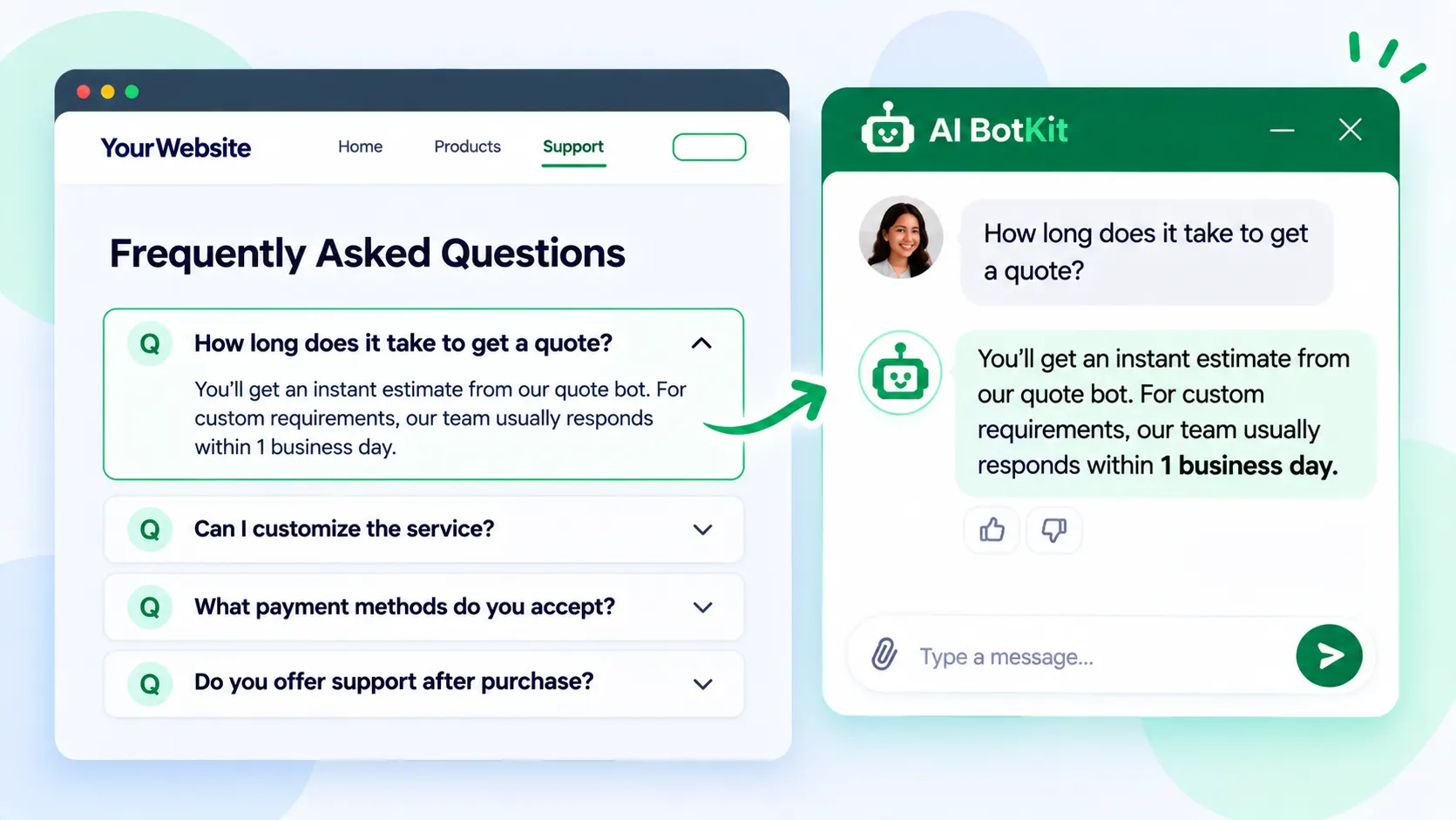
An FAQ chatbot is a chat widget that answers visitors’ repeat questions from content you have already written, then hands off to you when it cannot. FAQ automation works best when you start with your ten most repeated questions and keep your FAQ page. Expect fewer emails, not zero, because the bot is only as good as its answers.
Your FAQ page already answers the email in your inbox this morning. The visitor opened it, scanned a dozen headings, found none in their own words, and wrote to you instead.
That pattern shows up in the data. In Gartner’s 2024 customer survey, the most common reason self-service failed was not finding relevant content, in more than 43% of self-service cases. At AI BotKit, we built a chatbot for this gap, and this guide shows how to turn the FAQ page you have into a conversation.
What is an FAQ chatbot, and how is it different from an FAQ page?
An FAQ chatbot searches the content you give it each time someone asks a question, then answers from what it finds. Nothing is retrained. Your FAQ page, policies and PDFs become a library the bot checks before it replies.
That makes your answers the ceiling. A bot trained on a vague or outdated FAQ gives vague or outdated replies, only faster. The chatbot changes how people find your answers, not whether the answers are good.
FAQ page, rule-based bot, or AI FAQ chatbot: what each does well
Each option suits a different amount of effort and a different mix of questions. This table shows where they differ.
| FAQ page | Rule-based bot | AI FAQ chatbot | |
|---|---|---|---|
| Setup effort | Write once, publish | Build every question and button path by hand | Add your pages and answers, then test |
| Handles rewording | No, the visitor scans or searches | Only wording you planned for | Usually, because it matches meaning, not exact words |
| Stays current | When you edit the page | When you edit every path | When you update the source content |
| Best for | A few stable questions | A fixed menu of choices | Many questions asked in varied words |
When a plain FAQ page is still enough
If you have fewer than about ten stable questions and get a handful of messages a month, a clear FAQ page may be all you need. A chatbot earns its place when the same questions keep arriving in different words, or arrive while you are offline.
Why do visitors skip your FAQ page and email you instead?
Asking is faster than searching. A visitor with one question has to guess which heading holds the answer, open it, and check whether it fits their situation. A chat box lets them type the question in their own words.
An Ada and NewtonX study of 2,000 consumers found 59% prefer instant AI over waiting for a human, but only when it can resolve their issue. Only 24% said their last AI service interaction was fully resolved by AI alone. Ada sells AI customer service, so read it as a vendor study.
Speed only counts when the answer is right, so the content behind the chat matters more than the chat. That is the gap we built our customer support assistant for: it reads the help pages and FAQs you have already published, and passes what it cannot answer to you. How handoff works depends on your plan.
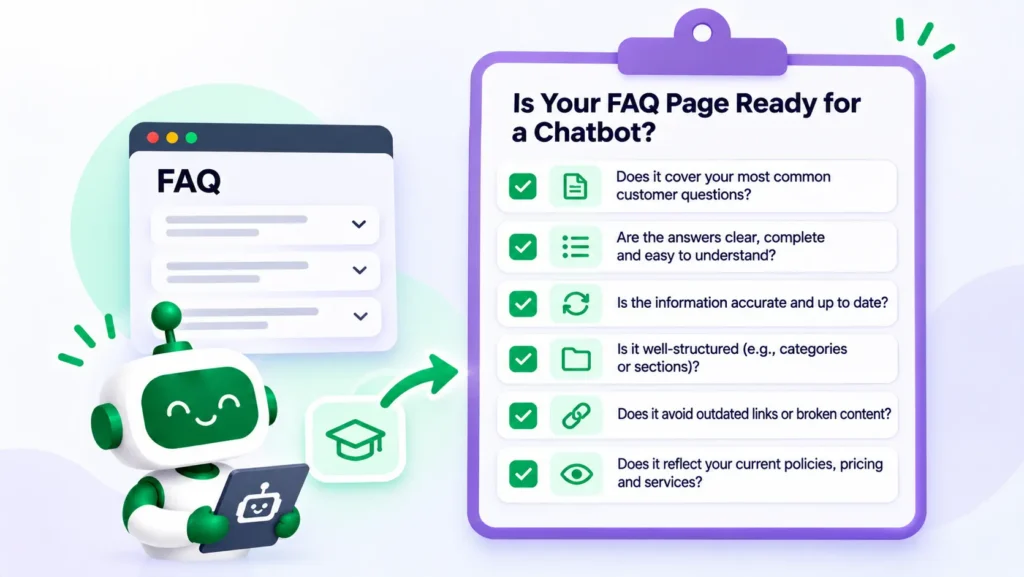
Is your FAQ ready to become a conversation?
Not every FAQ page is ready. Count how many of these six you can answer yes to:
- Are your ten most repeated questions answered in writing today?
- Does each question have one current answer, with no older copy still live?
- Are the answers written in the words customers use, not internal terms?
- Is each answer real text, not a screenshot or “see the section below”?
- Are prices, policies and opening times up to date?
- Can you spend 30 minutes a week reading what visitors asked the bot?
What your score means:
- 0 to 2 yes: fix the page first. A clear FAQ page beats a confused bot.
- 3 to 4 yes: start with your ten strongest answers and add more later.
- 5 to 6 yes: go straight to the steps below.
If an answer is not written down, the bot has nothing to answer from.
If you have no FAQ page yet
Start from your inbox. Write down the answers you paste most often, in the words customers use. Ten short answers beat a long page you never finish.
If you have a long FAQ page
Do not upload everything on day one. Start with the ten questions people ask most, check each has one current answer, then add more once you have read real conversations.
If you already run live chat or a rule-based bot
Keep it running while you test. Train the new bot on the same ten questions and compare the answers side by side before you switch anything off.
How do you turn your FAQ page into an FAQ chatbot in six steps?
Here is the order we would follow for a first version. You can stop after any step, and you can start on a free plan.
Step 1: Pull your top ten questions from real messages
Skim the last month of emails, DMs and contact-form messages and tally what repeats. Write each question in the customer’s own words. Thirty or forty messages a week is plenty to learn from.
If you want a method for counting, our guide to deflecting support tickets with AI shows one. Real questions beat guessed ones.
Step 2: Put the answer in the first sentence
Rewrite each answer so the first sentence answers the question and the detail follows. For example, “Yes, you can return it within 14 days” comes before the conditions.
Keep one current version per question and remove old copies, because a bot can retrieve the wrong one.
Step 3: Add your FAQ page, its linked pages and your top answers as Q&A pairs
Add the sources your answers already live in. We built AI BotKit to accept all of these in one bot:
- Website pages and URLs
- Uploaded files such as PDFs
- Pasted text
- Question-and-answer pairs
- WordPress posts and pages
Write your highest-stakes answers, such as returns and prices, as exact Q&A pairs so the wording sits in the knowledge base. Keep them consistent with your page, or you create a contradiction yourself. Our guide to training a chatbot on docs covers sources in more depth.
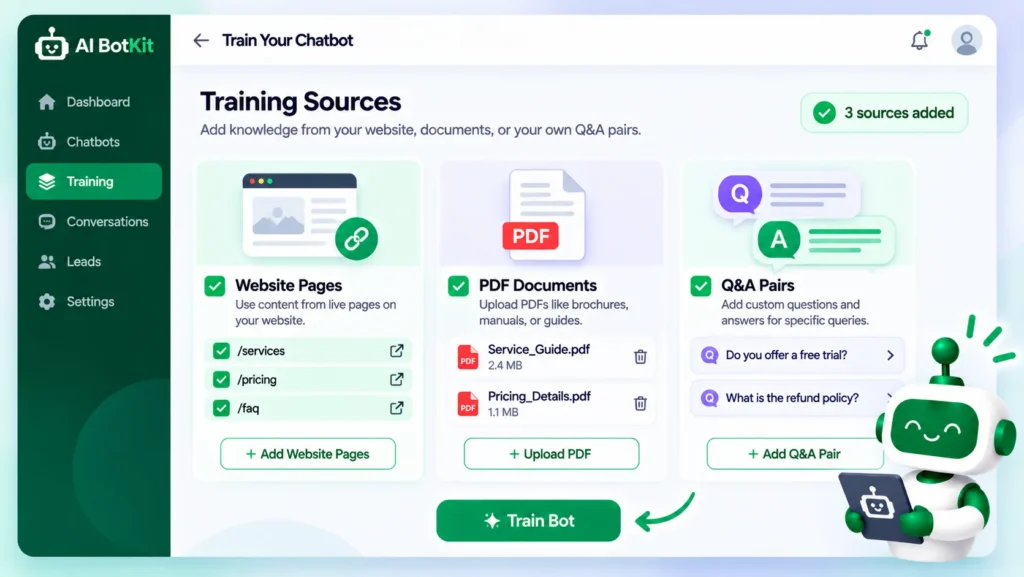
On WordPress, you install the plugin and connect your content, as our AI chatbot for WordPress page explains. On Shopify, Squarespace, Wix or custom HTML, you paste an embed snippet instead. Agencies should create one bot per client site, trained only on that client’s content. Setup details are in our documentation.
Check what a tool’s setup depends on before you commit. In one WordPress.org support thread, a site owner imported content into a bring-your-own-key chatbot plugin, every item failed, and the bot appeared on the site but answered nothing. Support traced it to an API key with no credit behind it.
If you are still choosing, our roundups of the best chatbot for WordPress and free chatbots for WordPress compare the options.
Step 4: Decide what the bot says when it does not know
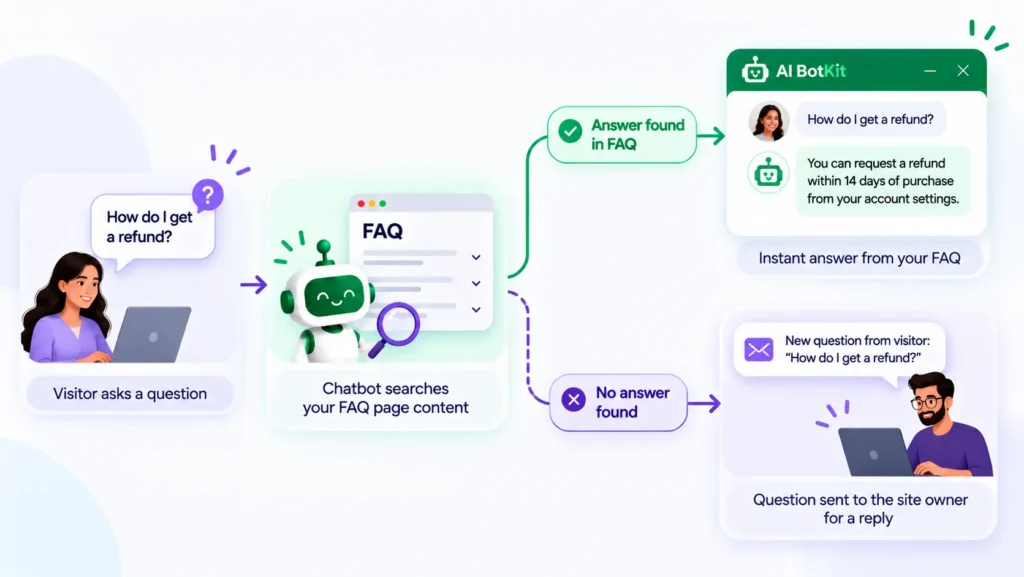
Every bot meets questions your FAQ does not answer, so decide that moment in advance. In AI BotKit, we let you set both the fallback message and the bot’s instructions, so you can tell it to point people to you instead of guessing.
A site owner asked exactly this on our WordPress.org support forum: how to show a support email when the bot cannot answer. Our answer was to put your contact details in the bot instructions and in the fallback message, so the fallback always shows them.
Write the fallback as if you were replying personally, with a way to reach you. Whether a conversation can also move to your team depends on your plan, so check the pricing page before you promise visitors a handoff. A fallback that points visitors somewhere useful beats a confident guess.
Step 5: Add starter questions and test with real wording
Starter questions are suggested questions visitors can pick when the chat opens. We let you set them, and the ten questions from Step 1 are the obvious list.
Then test before you publish:
- Your ten questions, worded the way customers word them
- Five rephrased versions of the hardest ones
- Three questions your FAQ does not answer, to confirm the bot says so
When an answer is wrong, check the source page first. Unclear or outdated content often causes it.
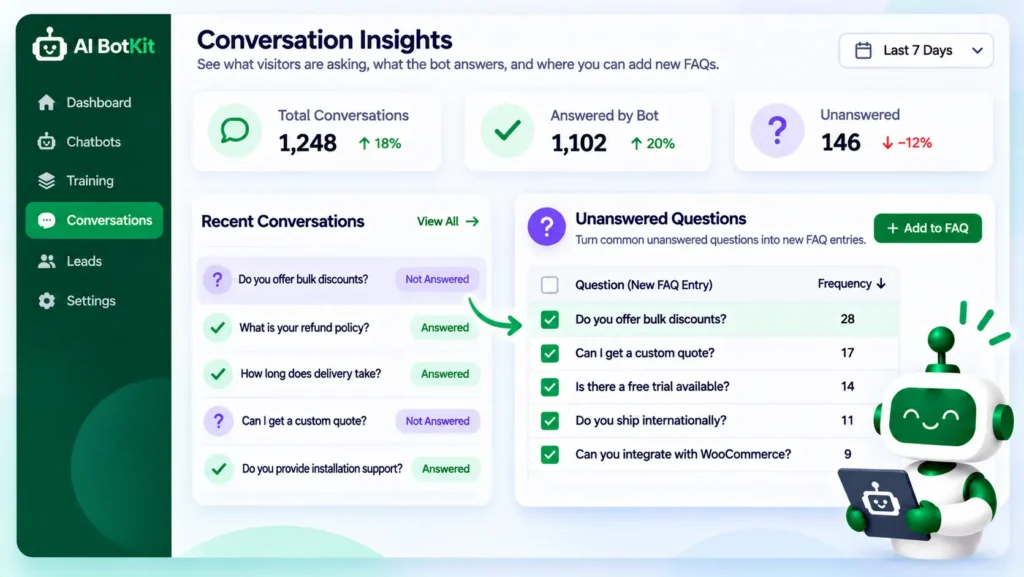
Step 6: Publish, then turn unanswered questions into new FAQ entries
Launch on one page or across the site, then spend 30 minutes a week reading the conversations. Each question the bot could not answer is an FAQ entry you have not written yet.
Add the answer to your FAQ page, then to the bot’s sources. This loop is the real payoff of FAQ automation: the chat shows you what your page is missing.
Should the chatbot replace your FAQ page?
No, keep the page as the source of truth. It is what the bot reads, what visitors can scan, and what you can link to in an email. The chat is a second way in, not a replacement.
Keep the page, add the conversation
Shopify App Store reviews show what can go wrong when an app takes over. One merchant wrote that after installing an FAQ and chat app, “it has overwritten our FAQ page”. Whatever you install, confirm your existing page is still live afterward.
Check that links arrive exactly as you wrote them
Another merchant said in a Shopify App Store review that the app changed the returns link they had pasted into the bot’s answers. Test every link in a chat answer before you publish, and prefer a plain page address over one that needs a login.
Add the conversation, keep the page, and test every link.
How do you keep the answers accurate and current?
A bot is accurate on launch day, then drifts as your prices and policies change. Match your review rhythm to how often yours move: monthly suits most small sites, and sooner for anything seasonal.
Update the source, then re-test that one question
When something changes, edit the source, then ask the bot about that one change. A Product Hunt reviewer of a competing bot said scheduled source updates were the feature they wanted most, so they would not need to re-upload content after every edit.
On WordPress, we offer automatic re-sync when your content changes, on some plans. The pricing page shows which. If your plan does not include it, set a calendar reminder.
A bot repeats whatever your page says, including its mistakes. Grounding reduces made-up answers but cannot remove them. We have spent over a decade building WordPress products at WisdmLabs, and the pattern holds: a bot stays useful when someone reads what visitors asked.
Which questions should go to a person
Some questions should reach you directly: refund disputes, billing problems, upset customers, and anything where a wrong answer costs real money. Tell visitors how to reach you. A bot with no way out is worse than no bot.
What to check about data
Treat chat conversations as customer data. Before you train any bot, check what the tool stores, where, and for how long, and read its privacy policy. Keep documents with customers’ personal details out of your sources.
Ours is on our privacy policy page. No tool can hand you compliance, so check against the rules that apply to your business.
FAQ
What happens when an FAQ chatbot does not know the answer?
It shows the fallback message you set, so write one that points visitors to you. You can also tell the bot in its instructions to share your support email or page. Whether the conversation can move to your team depends on your plan.
Will a chatbot replace my FAQ page?
It should not. Keep the page as the source of truth that the bot reads and visitors can scan. The chat is a second way to reach the same answers.
How is an FAQ chatbot different from a rule-based chatbot?
A rule-based bot follows paths you built by hand, so it only handles the wording you planned for. An FAQ chatbot trained on your content searches that content for each question, so it can answer rephrased questions. It still cannot answer what your content does not cover.
Can I add an FAQ chatbot without coding?
Yes. On WordPress you install a plugin, and on Shopify, Squarespace, Wix or custom HTML you paste an embed snippet. No code is needed to train it on your pages and answers. Test it with real questions before you publish.
How do I keep my FAQ chatbot up to date without re-uploading everything?
Edit the source content, then re-test the question that changed. On WordPress, automatic re-sync is available on some plans, and the pricing page shows which. If your plan does not include it, a monthly calendar reminder is enough for most small sites.
If you answered yes to five or six of the readiness questions, test your ten questions first. We built AI BotKit with a free plan, so you can build a free chatbot trained on your own FAQ page and read a week of real questions. The free plan has a message limit, so start with your top ten.