Search for a free chatbot for WordPress and you get about forty results that all say “free forever, no credit card.” Install three of them and you find out the word was doing a lot of work. One stops answering after fifty messages. One removes itself from your site entirely when you hit a view cap. One is free to install but bills you directly through OpenAI.
None of that is dishonest. It is just badly explained.
So this piece does the boring part. We read the pricing page, the help docs and the plugin readme for eight free WordPress chatbots, then wrote down what each free tier actually includes, what stops working when you hit the limit, and what it costs to keep going. Numbers were checked in August 2026.
Short version if you are in a hurry: Tawk.to if you will answer chats yourself and want to spend nothing, BotPenguin Baby for the highest free AI message allowance, AI Engine if you want everything inside wp-admin and already have API keys, and AI BotKit if you need a bot trained on your own content and want to judge answer quality before paying anything.
“Free” means three different things
Before comparing anything, it helps to know which kind of free you are being offered. There are three, and they fail in three different ways.
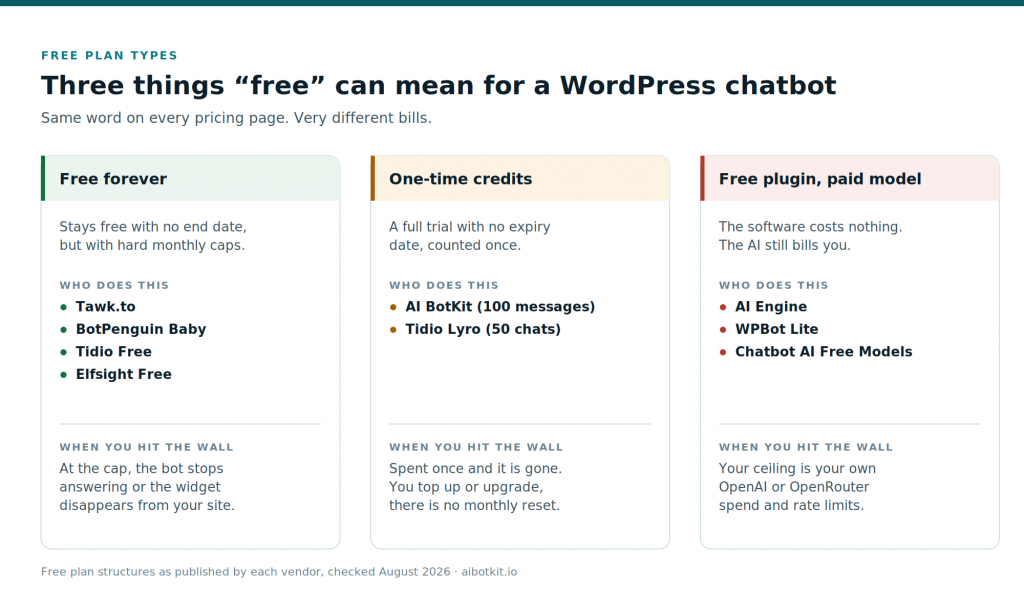
Free forever plans stay free with no end date, but cap you monthly. Tawk.to, BotPenguin’s Baby plan, Tidio Free and Elfsight all work this way. The failure mode is a wall: at the cap, the bot stops replying or the widget disappears.
One-time credits look like a free plan and behave like a trial that never expires. AI BotKit’s free tier and Tidio’s Lyro allowance both work this way. You get real capability, you spend it once, and there is no monthly reset.
Free plugins with a paid model are free software. AI Engine, WPBot Lite and AI Chatbot Free Models all install at no cost, then send your traffic to an AI provider you pay directly. Your ceiling is your own spend and whatever rate limit your provider applies.
Most disappointment with free chatbots comes from expecting the first kind and getting one of the other two.
The eight free plans, side by side
| Tool | Kind of free | What you get free | AI on free | The catch |
|---|---|---|---|---|
| Tawk.to | Free forever | Unlimited chats, agents, sites, tickets, help centre | No | Live chat, not an AI agent. A human still answers |
| BotPenguin Baby | Free forever | 1 chatbot, unlimited leads, 1,000 to 2,000 messages a month | Yes, basic | Their own pages quote both figures. Bot goes silent at the cap |
| Tidio Free | Free plus credits | 50 chats a month, up to 10 seats, 50 Lyro AI chats for life | 50 total | Two meters at once. AI stops when the 50 Lyro chats are gone |
| Elfsight | Free forever | 1 chatbot, about 50 AI messages a month, plus a view cap | Yes | Hit either cap and the widget is deactivated |
| AI Engine | Free plugin | Chatbot, content tools, any model provider, inside wp-admin | Your key | Grounding answers in your own content needs Pro |
| AI Chatbot Free Models | Free plugin | Chatbot on OpenRouter’s free model pool | Your key | Free models are rate limited and get retired without notice |
| WPBot Lite | Free plugin | Menu and FAQ bot, email capture, self-hosted | Not really | Closer to a smart FAQ than a conversation |
| AI BotKit | One-time credits | 1 chatbot, 100 AI messages, 1M characters of training | Yes, full | The 100 messages are one time, not monthly |
Now the detail that matters for each.
Tawk.to
The most honest free product in this category, as long as you understand what it is. Tawk.to’s own explanation is straightforward: the core is free for life, with unlimited chats, unlimited agents and unlimited sites, plus ticketing and a knowledge base. They make money on add-ons.
The add-ons are where a chatbot appears. Automated answers come from AI Assist, which starts around $29 a month with a small free tier of about 100 messages. Removing “Powered by tawk.to” from your widget is a separate $19 to $29 a month per property.
Pick it if you or someone on your team will personally answer chats and you want the best free live chat available. Skip it if you wanted automation, because on the free plan a human is the automation.
BotPenguin (Baby plan)
BotPenguin’s free Baby plan has the highest AI message allowance of any free forever plan here, and it includes AI rather than gating it behind an add-on. It also covers several channels beyond your website.
One oddity worth knowing before you build on it: BotPenguin’s own pages quote the Baby plan cap as 1,000 messages in one place and 2,000 in another. Check the pricing page the day you sign up. Either figure is generous by free-tier standards. When you hit it, the bot stops talking to visitors until you upgrade.
Pick it if volume matters more than answer quality and you are fine with BotPenguin branding on the widget. Skip it if you need the bot to reason carefully over your own documentation.
Tidio (Free plan)
Tidio is the most common recommendation for WooCommerce stores, and its store integrations deserve that. Its free plan is also the most commonly misread on this list.
You get 50 billable conversations a month and up to 10 seats. Separately, you get 50 conversations with Lyro, their AI agent, and Tidio’s pricing page is explicit that those 50 are free for the lifetime of the account, not per month. Once they are used, the AI stops until you buy the Lyro add-on, which starts around $39 a month.
Testing counts against the allowance too. Fifty conversations is roughly a fortnight of real traffic on a small store, and less if you demo the bot to colleagues.
Pick it if you mainly want live chat with good store integrations and treat the AI as a taster. Skip it if you are budgeting for AI, because the base plan and the AI meter are priced separately and the total climbs quickly.
Elfsight AI Chatbot
Elfsight sells widgets, and the chatbot is a well-designed one. It embeds on WordPress in a couple of minutes and looks good with no work.
The free plan gives you one chatbot and roughly 50 AI messages a month, alongside a monthly widget view limit. The behaviour at the limit is the thing to know: per Elfsight’s own help docs, the widget is deactivated and stops appearing to visitors, as though it was never installed. It does not degrade politely. It vanishes.
Pick it if you run a low-traffic brochure site and want something attractive with minimal setup. Skip it if traffic is uneven, because a good month is exactly when the widget switches itself off.
AI Engine by Meow Apps
The best genuinely free option for people comfortable with API keys. AI Engine is a free plugin on WordPress.org that connects your site to OpenAI, Anthropic, Google, Mistral, OpenRouter and others. You bring the key, you pay the provider directly, and nobody meters you in between. No vendor branding either.
The limit is a real one for support use cases. Making the bot answer from your own pages and PDFs rather than from general knowledge needs embeddings and a vector store, and that sits in the Pro licence. On the free version you get a capable chatbot that does not reliably know your refund policy.
Pick it if you are technical, want everything managed inside wp-admin and value not being locked to one model. Skip it if you need accurate answers about your own content on day one without wiring anything up.
AI Chatbot Free Models
A neat idea: a free WordPress plugin that runs your chatbot on the free model pool available through OpenRouter, with everything configured in the WordPress backend. You still create an OpenRouter account for a key, but the models themselves cost nothing.
The tradeoff is stability. Free models carry tight rate limits and get retired or swapped without notice, so a bot that answered well last month can start answering differently. Fine for a personal site, awkward for anything customer-facing.
WPBot Lite
WPBot has been around a long time and the free Lite version runs entirely on your own site, which some people specifically want for data reasons. It handles menu-driven flows, a small FAQ set, and collecting an email or phone number.
Set expectations correctly and it is useful. The free version is a good conversational contact form. Real natural language answers need the Pro licence or an external AI connection.
AI BotKit
Full disclosure, this is our plugin, so here is the plain version rather than the sales version.
AI BotKit’s free tier gives you one chatbot, 1M characters of training storage and 100 AI messages, with every paid feature switched on. It trains on your WordPress posts and pages, uploaded PDFs and DOCX files, or any URL you point it at.
The 100 messages are one time, not monthly. When they are gone you either top up, starting at 50 messages for $9, or move to a paid plan. Paid plans start at $10 a month billed yearly on our pricing page, and our branding stays on the widget until the Business tier.
So it is not the plan to pick if your goal is running a chatbot at zero cost indefinitely. Tawk.to and BotPenguin are better at that, and we would rather say so than have you find out after installing.
What 100 full-feature messages are genuinely good for is answering the question every other free tier makes hard: will an AI bot trained on my content actually answer my customers’ questions correctly? You get lead capture, human handover, multi-language and the real models, not a stripped demo. Test it on your twenty hardest support questions. If the answers are wrong, you have lost nothing.
Pick it if you want to evaluate a real AI chatbot properly before paying. Skip it if you need a permanent zero-cost widget.
Six costs the word “free” hides
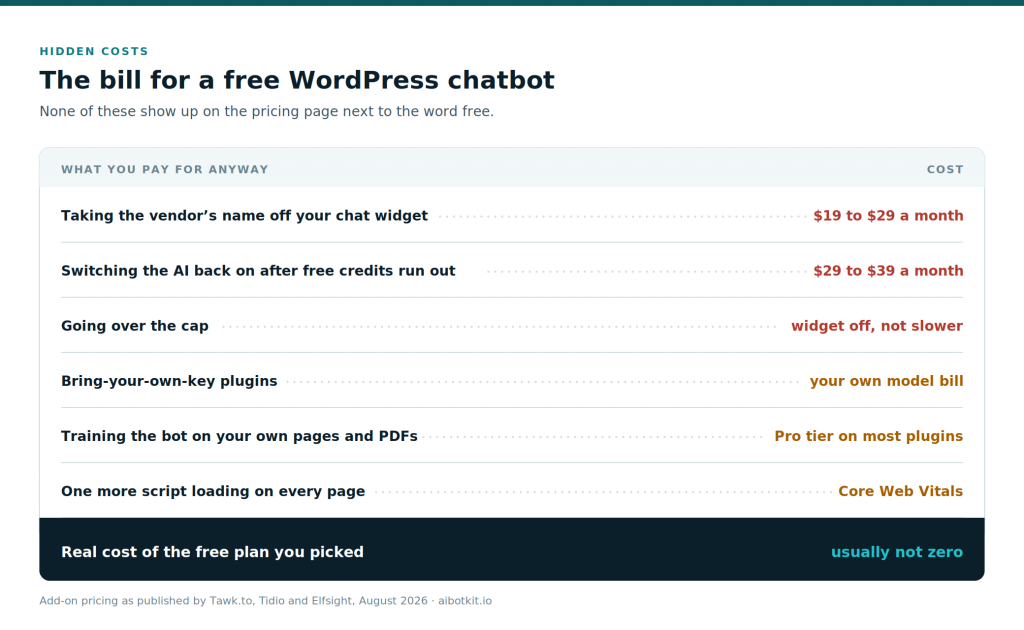
The badge on your widget. Nearly every free plan puts the vendor’s name in your chat window. Removing it runs $19 to $29 a month on Tawk.to and costs extra on Tidio. On AI BotKit it clears at the Business tier. Only the self-hosted plugins are clean by default.
AI billed separately from chat. Live chat platforms treat AI as a different product with a different meter. Tidio and Tawk.to both do this. A free chat plan plus a working AI agent is two line items.
Caps that switch things off rather than slow them down. Worth repeating because it surprises people: Elfsight deactivates the widget, and BotPenguin stops the bot answering. Your visitors do not get a slower bot, they get no bot, usually during your busiest week.
Your own model bill. Bring-your-own-key plugins move the cost, they do not remove it. Budget a few dollars a month for a small site on a current mid-tier model, more if answers are long or traffic is heavy.
Training on your own content is the paywalled part. This is the pattern across the category. The chat interface is cheap to give away. Retrieval over your documentation is the expensive bit, so it lands in the paid tier. Check specifically for this before choosing, because a bot that cannot read your own pages will confidently invent your shipping policy.
One more script on every page. Every hosted widget adds third-party JavaScript that loads on each page view, which shows up in Core Web Vitals and Interaction to Next Paint. Test with your chosen widget installed, not before. If you would rather avoid the extra request entirely, we wrote about adding a chatbot without a plugin.
Which free chatbot fits your situation
Match the cap to your traffic first and the feature list second. Features you cannot reach because the meter ran out are not features.
How to add a free chatbot to WordPress
The process is close to identical across every hosted tool on this list.
- Create the free account first. Almost every one of these needs an account, because the AI runs on the vendor’s servers. Only the self-hosted plugins skip this step.
- Install the plugin. In your dashboard, go to Plugins, then Add New, search the tool’s name, then Install and Activate. The AI BotKit plugin is on WordPress.org, as are AI Engine and WPBot.
- Connect the account. Paste the API key or account key from the vendor dashboard into the plugin settings.
- Train it on something real. Point it at your site URL, then add your FAQ page, refund policy, shipping page and any PDF spec sheets. A bot trained only on your homepage will answer badly, and it is usually the reason people conclude that free chatbots do not work.
- Write the first message and three starter questions. Give visitors a nudge. “Ask about pricing, delivery or returns” gets far more use than “Hi, how can I help?”
- Test on your twenty hardest questions before you launch. Not the easy ones. The edge cases your support inbox actually receives. Fix the gaps by adding the missing content, then retrain.
- Watch the transcripts for two weeks. The questions people ask a chatbot are the best free keyword research you will get, and they usually reveal one or two pages you should write.
When free stops making sense
Run the numbers rather than the feeling. If a free bot handles ten support replies a week that you would otherwise write yourself, at five minutes each, that is about 3.3 hours a month. Value your time at even $20 an hour and the bot is saving around $66 a month while costing nothing.
That is the case for using a free plan. It is also the case for leaving one, because the moment your traffic pushes past the cap, the saving stops and the widget starts turning itself off during your best weeks. At that point a $10 to $12 a month plan is cheap against the hours it protects.
Three signals it is time to move:
- You hit the cap before the month ends, more than once.
- You are declining to test or improve the bot because testing burns allowance.
- The bot is answering from general knowledge instead of your content, and you cannot fix it on the free tier.
If you want the wider comparison including paid options, we cover that in our guide to the best chatbot for WordPress.
Frequently asked questions
Is there a truly free chatbot for WordPress? Yes, with a caveat. Tawk.to is genuinely free forever for unlimited live chat, and AI Engine is a genuinely free plugin, though you pay your AI provider directly. Free forever plus real AI plus no message cap does not exist, because every AI reply costs the vendor money.
Do free WordPress chatbot plugins use real AI? Some do. BotPenguin, Elfsight and AI BotKit include AI on their free tiers. Tawk.to’s free plan is live chat with AI as a paid add-on, and WPBot Lite is menu-driven rather than conversational. Check which of the two you are getting before installing.
Can I use a free chatbot without an API key? Yes. Hosted tools like AI BotKit, BotPenguin, Tidio and Elfsight handle the AI on their side, so you never touch a key. Plugins like AI Engine and AI Chatbot Free Models need your own key from OpenAI, Anthropic or OpenRouter.
Will a free chatbot plugin slow down my WordPress site? Every hosted widget adds a third-party script to each page, which affects Largest Contentful Paint and Interaction to Next Paint. Well-built widgets load after your content and the effect is small. Run PageSpeed Insights before and after installing so you are measuring rather than guessing.
Do free WordPress chatbots work with WooCommerce? Most do, in that the widget appears on store pages and can answer questions about shipping and returns if you train it on those pages. Reading live order data or tracking a specific order is a different capability, and on most tools that sits in a paid tier.
How many messages does a free chatbot plan give you? It ranges from about 50 a month on Elfsight to 1,000 or 2,000 a month on BotPenguin. AI BotKit gives 100 one time rather than monthly, and Tidio gives 50 AI conversations for the lifetime of the account. As a rule of thumb, 1,000 monthly visitors produces roughly 100 chatbot messages.
When should I upgrade from a free chatbot plan? When you hit the cap before month end more than once, when testing the bot feels expensive, or when the bot cannot answer from your own content on the free tier. Entry paid plans in this category sit around $10 to $15 a month, which is less than the value of a few saved support hours.
Free is a good place to start and a bad place to plan from. Pick the plan whose cap matches your traffic, train it on your real content rather than your homepage, and read the transcripts. If you want to see how a fully featured bot answers your hardest questions before spending anything, AI BotKit’s free tier gives you 100 messages with every feature on, which is enough to find out.