A coaching website can explain what you do, who you help, and how someone can work with you. But prospects often leave with questions: Is this program right for me? How does coaching work? What happens after I book?
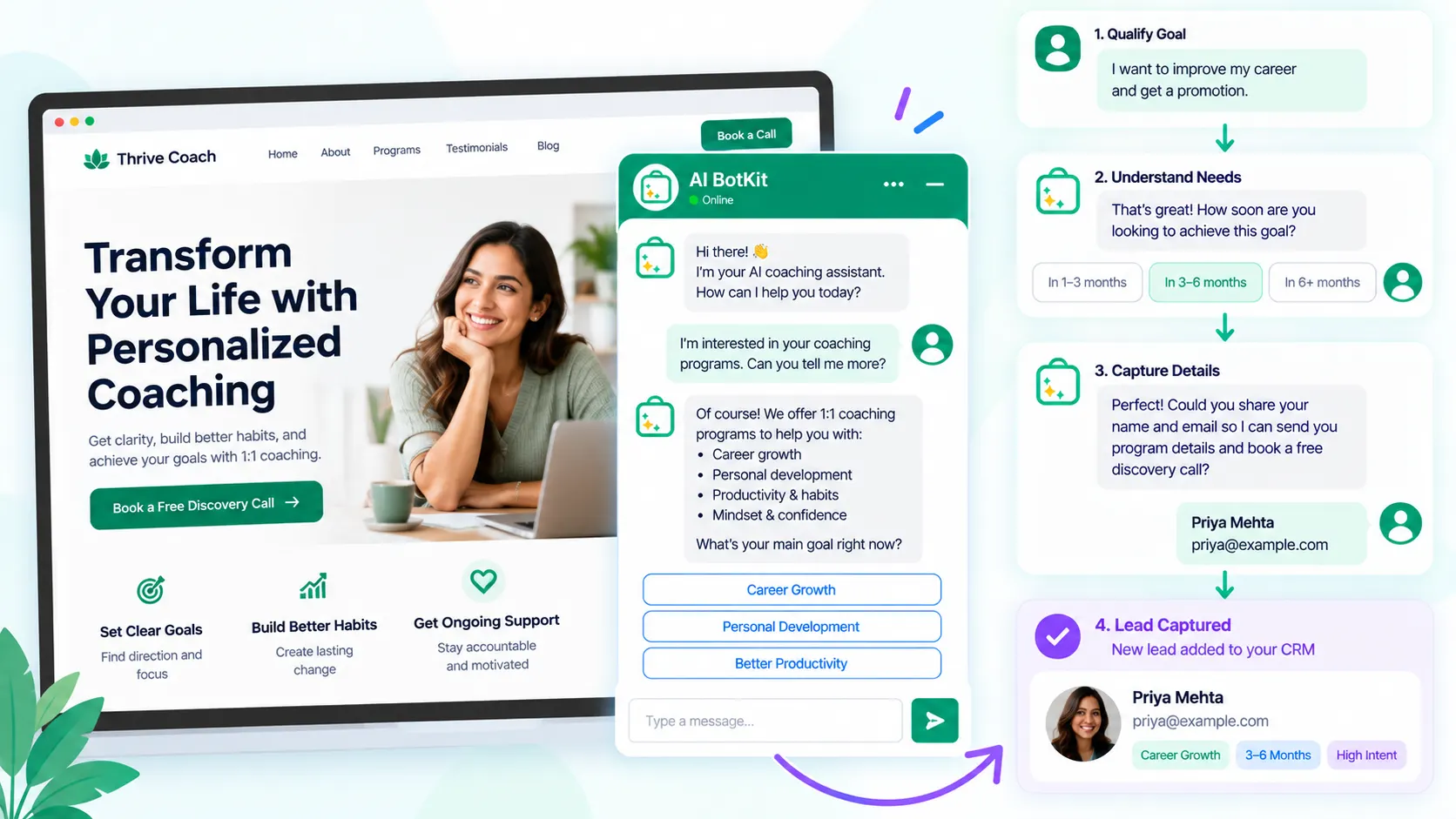
A chatbot for coaches can handle that first conversation. It can answer questions from your own content, ask useful qualification questions, capture contact details, and guide interested prospects toward the next step.
The important part is knowing where automation helps and where the coach still needs to be involved.
At AI BotKit, we built around that distinction: give visitors useful answers from your content, capture relevant lead information, and hand conversations to a person when they need more personalized help.
What Can a Chatbot for Coaches Actually Do for Lead Generation?
A coaching chatbot can become the first layer of your lead-generation process. Instead of asking every visitor to fill out a contact form, it can let them ask questions and provide information naturally through a conversation.
The goal isn’t to collect the most leads. It’s to make it easier for the right prospects to continue the conversation.
Answer questions before the first call
Potential coaching clients may want to know:
- What does your coaching process involve?
- Who is the program designed for?
- How long does coaching last?
- Is coaching one-to-one or group-based?
- What topics do you cover?
- How does someone get started?
- What happens during an initial consultation?
Your chatbot can answer these questions using information from your website and other approved content.
That matters because a prospect can get useful information without waiting for you to respond manually.
Qualify prospects without turning the chat into a form
Lead generation isn’t just about getting an email address. For a coach, context can be just as useful.
A chatbot can ask questions such as:
- What would you like help with?
- Which coaching program are you interested in?
- What are you hoping to achieve?
- Are you looking for one-to-one or group coaching?
- Would you like to speak with the coach?
The exact questions should depend on your offer. Keep them relevant and avoid turning the conversation into a long questionnaire.
Capture the lead when intent is clear
Once someone has received an answer and shown genuine interest, the chatbot can ask for their contact information.
That can include their name, email address, and the information they shared during the conversation.
The result is more useful than a blank form submission because you already have some context about what the prospect wants.
Where Does a Coaching Chatbot Fit Into Your Sales Process?
A chatbot doesn’t have to replace your existing lead-generation process. It can sit between your website visitor and the next human interaction.
Chatbot vs. contact form
A contact form is useful when you already know what information you need. But it gives the visitor little opportunity to ask questions before submitting it.
A chatbot creates a conversational path:
| Contact form | Chatbot |
|---|---|
| Visitor fills in fields | Visitor starts a conversation |
| Usually static | Can respond to questions |
| Limited context | Can collect conversational context |
| Lead arrives after submission | Qualification can happen before capture |
For example, someone might ask whether your executive coaching program is suitable for first-time managers. The chatbot can answer from your coaching content, ask whether they’re currently managing a team, and then offer to capture their details.
That is a different experience from asking the visitor to submit a six-field form immediately.
Chatbot vs. live chat
Live chat can be valuable when you or your team are available to respond. But it depends on someone being there.
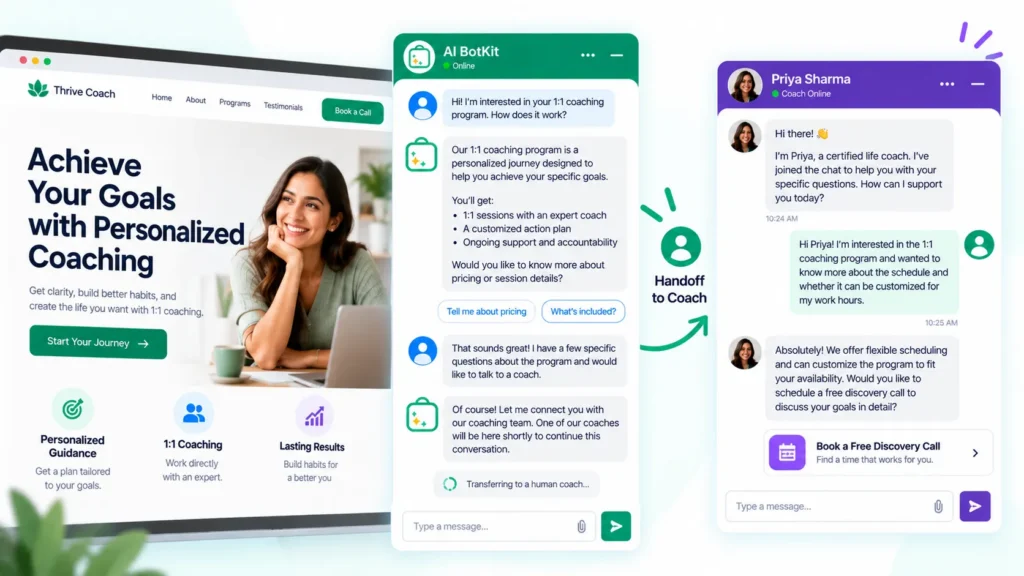
A chatbot can handle the initial conversation when you’re unavailable. If the conversation requires personal judgment, the coach can take over instead.
Current AI BotKit functionality supports lead capture and human handoff, so the chatbot can collect information before a person continues the conversation.
Chatbot + discovery call
For many coaching businesses, the discovery call remains the important human step.
The chatbot’s role is to make that step easier.
It can answer basic questions, identify the prospect’s goals, collect context, and direct the person toward a consultation when appropriate.
The chatbot should handle the predictable first layer while the coach remains responsible for conversations requiring personal judgment.
Zendesk’s 2025 CX research found that 64% of surveyed consumers were more likely to trust AI agents that displayed traits such as friendliness and empathy. The same research reinforces the broader point: conversational automation still needs to feel appropriate to the person using it.
What Should You Train Your Coaching Chatbot On?
The quality of a coaching chatbot depends heavily on the information available to it.
A chatbot cannot reliably answer questions that your source content does not answer.
Start with the content you already have
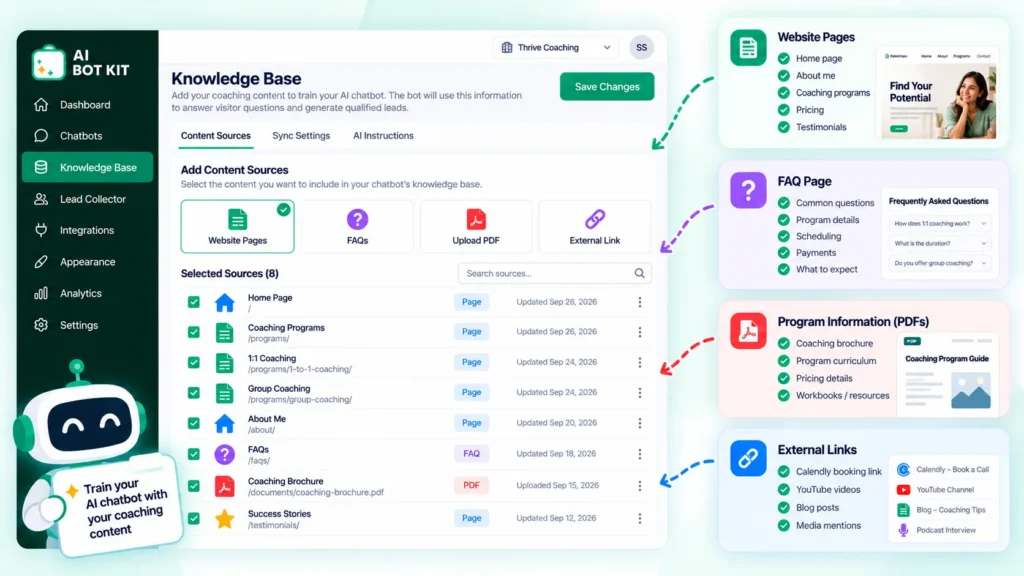
You may already have enough material to create a useful knowledge base:
- Coaching service pages
- Program pages
- FAQs
- Your coaching methodology
- About page
- Program descriptions
- Policies
- Pricing information
- Blog posts
- Guides and PDFs
- Educational resources
AI BotKit can use website content and documents as sources for its chatbot.
If you already have a detailed coaching website, you don’t necessarily need to write a completely new knowledge base from scratch.
Build around real prospect questions
Your best chatbot content ideas can come from conversations you already have.
Look at:
- Questions from discovery calls
- Emails from prospects
- Contact-form submissions
- Questions received through social media
- Existing FAQ entries
- Questions people ask before purchasing a program
If five prospects ask the same question every month, that question deserves a clear answer.
Keep the source content current
A chatbot can only be as useful as the content behind its answers.
If your program structure changes but the old information remains available, the chatbot may give an outdated response.
That means chatbot maintenance is partly a content-maintenance job.
Update the underlying pages when your coaching offer changes, and regularly review conversations for questions that expose gaps in your content.
Which Questions Should Your Chatbot Ask Potential Coaching Clients?
The questions should help you understand whether the visitor is a relevant prospect and what they need next.
Understand the prospect’s goal
Start with the problem they want to solve.
For example:
What would you most like help with right now?
For a career coach, that might reveal whether the person needs help with interviews, career direction, leadership, or a job transition.
For a fitness coach, it might reveal whether the visitor is interested in weight management, strength training, or general fitness.
Understand fit
Next, ask questions that help identify whether your offer matches the visitor’s situation.
Examples include:
- Which program are you interested in?
- Are you looking for one-to-one or group coaching?
- Have you worked with a coach before?
- What stage are you currently at?
Don’t ask these questions simply because you can. Each question should have a reason.
Determine intent
Not every visitor is ready to become a lead.
You may have:
Information seekers: They are researching and aren’t ready to speak with you.
Interested prospects: They understand your offer and want to explore whether it’s suitable.
High-intent prospects: They want to book, ask about availability, or discuss working with you.
Your chatbot should support all three without forcing everyone into the same conversion path.
Know when to stop asking questions
Too many qualification questions can make a chatbot feel like a form wearing a chat interface.
If you already know what you need, capture the lead and move the visitor forward.
Three useful questions can be more valuable than ten fields that a prospect has to complete before getting help.
How Do You Turn a Coaching Chat Into a Qualified Lead?
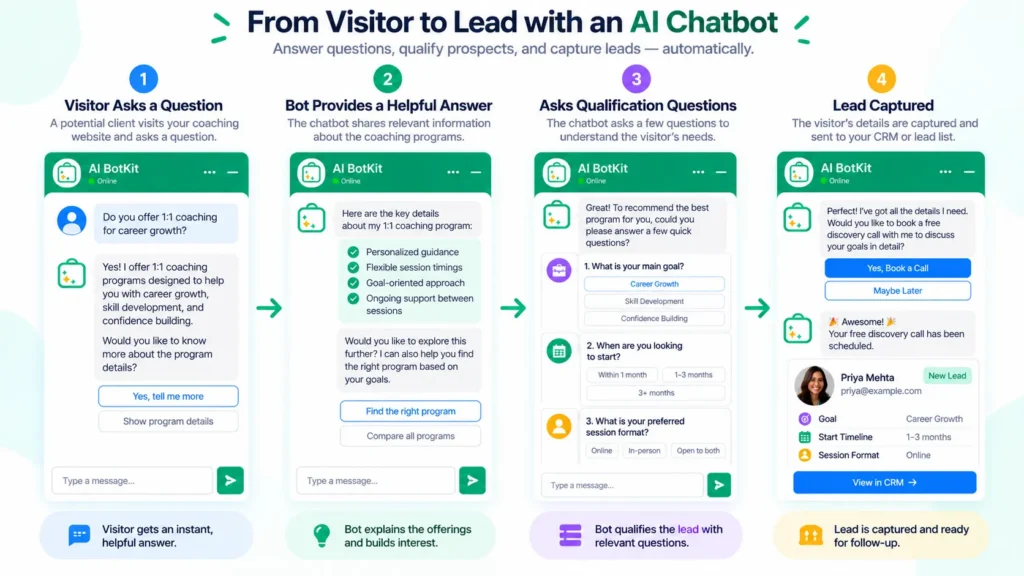
The basic workflow is straightforward.
Step 1: Answer the immediate question
Give the visitor something useful before asking for their information.
If someone asks what your leadership coaching program covers, answer the question using your actual program content.
Step 2: Ask a relevant follow-up
Use the visitor’s question to decide what to ask next.
For example:
Are you currently managing a team, or are you preparing for your first management role?
That question can tell you more than simply asking someone to select “interested in coaching” from a form.
Step 3: Identify the appropriate coaching offer
If your business has several programs, the conversation can help direct the visitor toward the relevant one.
The chatbot should only make recommendations that are supported by the information you’ve provided to it.
Step 4: Capture contact information
When the visitor has shown enough intent, ask for their details.
You might ask for their name and email address along with the context needed for you to follow up.
AI BotKit supports conversational lead capture, allowing contact information and intent to be collected within the conversation rather than requiring a separate form.
Step 5: Provide a human next step
The final step might be:
- Book a discovery call
- Request a consultation
- Ask the coach to follow up
- Contact the coaching team
The right action depends on how your coaching business sells.
A good lead-generation chatbot moves the visitor toward a clear next step instead of keeping them trapped in conversation.
What Should a Coaching Chatbot Not Do?
Automation works better when you define its boundaries.
Don’t let it invent coaching information
Your chatbot shouldn’t make up program details, policies, pricing, credentials, availability, or promises.
Keep it grounded in the content you provide.
If the answer isn’t available, the safer response is to acknowledge that and direct the visitor toward a human.
Don’t automate sensitive conversations blindly
Coaching can involve personal circumstances where context and judgment matter.
A chatbot can handle straightforward questions about your services, but it shouldn’t be treated as a replacement for the coach when a situation requires personalized assessment.
Don’t force every visitor through lead capture
Some people simply want an answer.
That doesn’t make their conversation worthless.
A useful answer can build confidence and help the visitor return later when they’re ready to work with you.
Don’t hide the human option
Human handoff is particularly important for coaching businesses because the relationship with the coach is often part of the product.
Current consumer research from Zendesk found that 84% of surveyed consumers believe human interaction should remain an option when using AI assistants.
The practical lesson is simple: make the human path visible.
How Can You Tell Whether Your Chatbot Is Generating Better Leads?
Don’t judge the chatbot only by how many conversations it starts.
The important metric isn’t how many people chat with your bot; it’s what happens after those conversations.
Track conversations that become leads
Useful measures include:
- Conversations started
- Leads captured
- Lead-capture rate
- Qualified conversations
- Discovery calls generated
- Consultations requested
You don’t need a complicated analytics setup on day one. Start with the numbers that connect the chatbot to your existing sales process.
Review unanswered questions
The chatbot’s failures can become a content roadmap.
If visitors repeatedly ask a question that your chatbot cannot answer, ask whether your website should answer it.
That could lead to a new FAQ, a clearer program page, or an updated coaching resource.
Look at lead quality
A higher lead count isn’t automatically better.
Review whether the leads:
- Match your coaching niche
- Understand what you offer
- Have a relevant problem
- Know what the next step is
- Provide enough context for you to follow up
A chatbot that generates fewer but more relevant enquiries may be more useful than one that collects hundreds of low-intent contacts.
A 6-Question Checklist Before Adding a Chatbot for Coaches
Use these questions to decide whether your coaching website is ready for conversational lead generation.
- Do prospects repeatedly ask the same questions before booking?
- Do you have enough website content to answer those questions?
- Can you clearly explain who your coaching is for?
- Do you have a defined next step for interested prospects?
- Do you know which questions help determine client fit?
- Is there a clear point where a human should take over?
If you answered yes to five or six, your website is a strong candidate for testing a chatbot.
Three or four yes answers suggest that a chatbot may help, but your content or lead process could use some preparation first.
If you answered yes to two or fewer, start by clarifying your offer, FAQs, and lead journey before automating the conversation.
FAQ
What is a chatbot for coaches?
A chatbot for coaches is an AI-powered website assistant that can answer questions about coaching services, programs, and other information using the content supplied to it. It can also support lead generation by asking qualification questions and capturing contact information.
Can a chatbot qualify coaching leads?
Yes. A chatbot can ask predefined qualification questions about a visitor’s goals, situation, program interest, or preferred next step. The questions should be kept relevant, and a human should handle situations requiring personalized judgment.
What should a coaching chatbot ask potential clients?
Start with questions that help identify the visitor’s goal and whether your coaching offer fits their situation. Depending on the business, this might include what they want help with, which program interests them, their current situation, and whether they would like to speak with the coach.
Can a chatbot capture leads from a coaching website?
Yes. A chatbot can ask for contact details during the conversation rather than sending every visitor to a separate form. AI BotKit supports conversational lead capture, including collecting visitor information and intent.
Should a chatbot replace a discovery call?
No. A chatbot can handle common questions and prepare the conversation, but a discovery call can still provide the personal interaction needed to assess fit, understand the prospect’s situation, and discuss the coaching relationship.
If your coaching website already receives questions that could be answered from your existing content, a chatbot can take over that first layer without taking the coach out of the relationship.
At AI BotKit, we built the product around that workflow: train the chatbot on your content, let it answer visitor questions, capture relevant leads, and hand conversations to a human when needed. You can start by testing it against the questions your prospects already ask.