
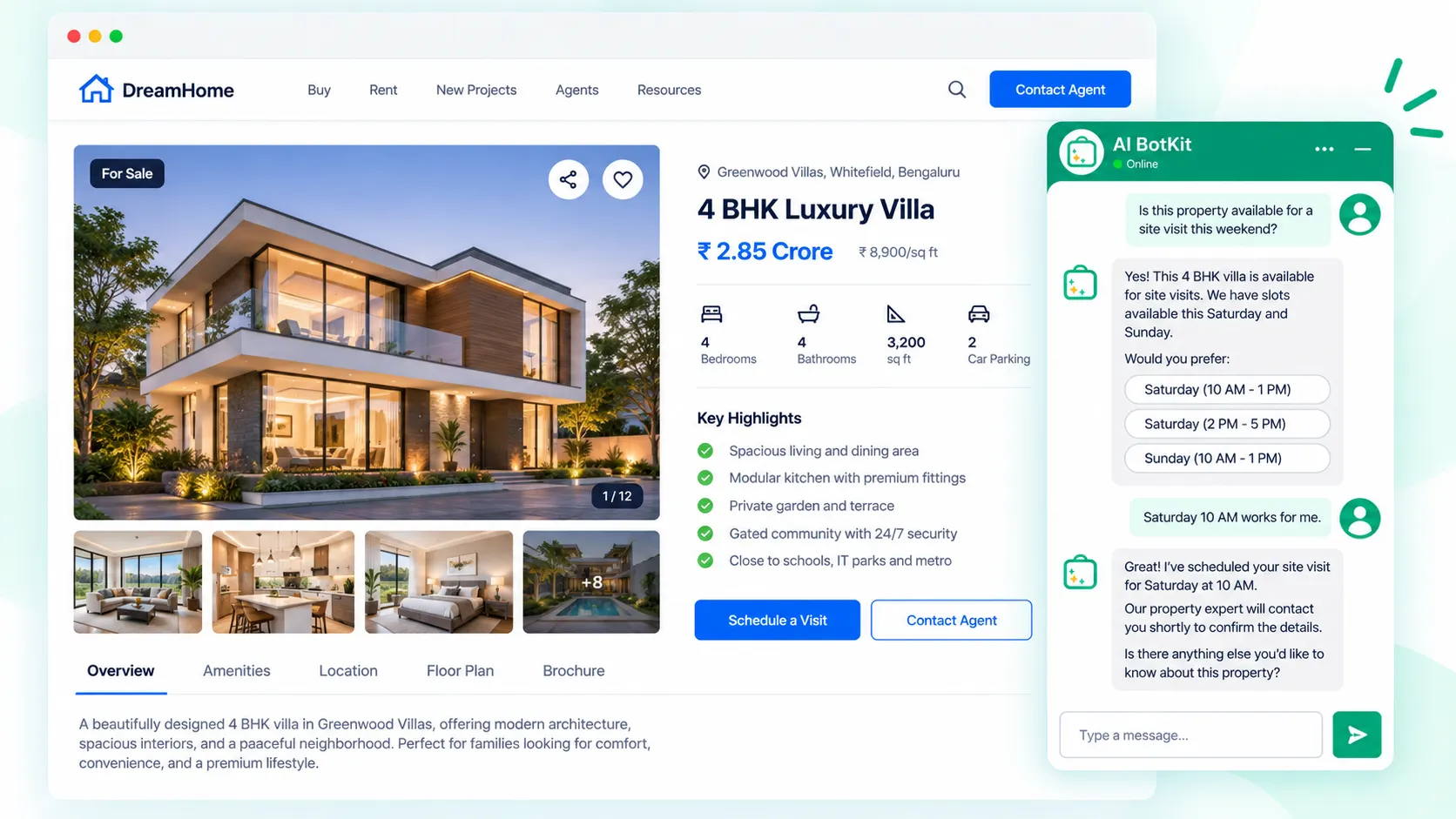
A chatbot for real estate is a chat widget that answers buyer and seller questions from your own listing pages, asks a few qualifying questions, and passes the lead to you. A good real estate chatbot closes the gap between a 9pm inquiry and your reply next morning, if your pages are accurate and someone owns every handoff.
It’s 9:40 on a Saturday night, and someone is reading your listing for the three-bed on Maple Street. They want to know if it’s still available and whether the seller would consider a later close. Your contact form asks for a name, an email and a message. They close the tab and try the next agent’s site.
Most agents don’t have a lead volume problem. They have a gap between an inquiry arriving and someone replying, and that gap is widest on evenings and weekends, exactly when buyers browse. At AI BotKit, we see the same pattern across small business sites: visitors with one unanswered question leave quietly, and nobody ever knows they were there.
This guide covers what a real estate chatbot should and shouldn’t do, how to set one up so it keeps leads instead of just acknowledging them, and how to tell whether your site is ready for one.
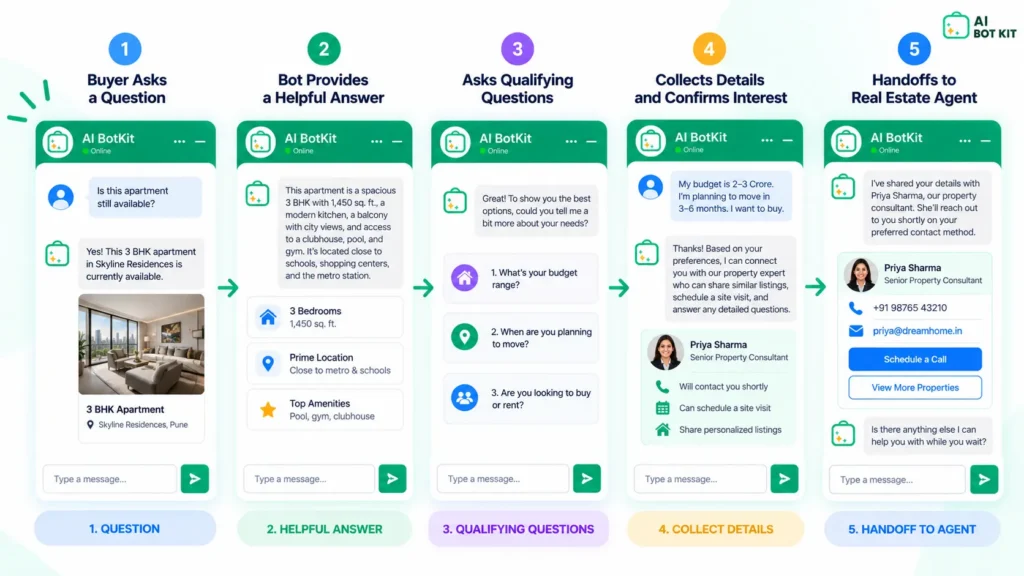
What does a chatbot for real estate actually do on your site?
A chatbot for real estate answers questions from the content you’ve already published, then collects enough detail for you to follow up well. It isn’t a live link to your MLS, and it doesn’t replace you. Think of it as the first two minutes of a conversation, handled at any hour.
If you want the general mechanics of chat-based lead capture, our lead generation chatbot guide covers them. This post stays with property: listings, viewings, and the handoff to an agent.
What it can answer
It can answer anything your pages already say clearly: whether a listing is still showing as available, which neighborhoods you cover, how your buying process works, what your fees include, and when viewings usually run. If the answer isn’t on your site, it shouldn’t be answering it.
What it collects
The useful details are the ones you’d ask on a first call: buying, selling or renting; the area and rough budget; the timeline; and how to reach them. Collected in the chat, these arrive alongside the question the person actually asked, which a form rarely captures.
What it should hand straight to you
Some conversations belong to a person from the first message. Offers, price negotiation, contract terms, inspection issues and anything legal or financial should go to you, with the conversation attached.
A good real estate chatbot knows where its job ends, and that line is something you set, not something it works out.
Why do real estate leads go cold before you reply?
Leads go cold because interest peaks at the moment someone asks, and it fades fast. Harvard Business Review’s study The Short Life of Online Sales Leads analyzed 1.25 million leads and found that firms contacting a lead within an hour were nearly seven times as likely to qualify it as those that waited even an hour longer.
That study wasn’t specific to real estate, and it dates from 2011. Most agents will still recognize the pattern: the buyer who was keen on Saturday has booked a viewing with someone else by Monday.
Buyers still want an agent; they just start without one. NAR’s 2025 Profile of Home Buyers and Sellers reports that 88% of buyers used a real estate professional, while 52% found the home they bought online. The first contact happens on a screen, and the agent who responds keeps the conversation.
The after-hours gap
Evenings and weekends are when people browse listings, and when you’re at showings, with family, or asleep. A form collects their details but leaves the question unanswered until you’re back. That delay is where a chatbot earns its place: the question gets answered while the person is still on your page.
Acknowledged isn’t the same as owned
An instant reply is only half the fix. In a recent BiggerPockets thread on the gap between a lead arriving and someone responding, Rochester broker Mark Updegraff said he separates a lead being “acknowledged” from being “owned.” Technology can acknowledge a lead in seconds without anyone actually working it.
A property manager in the same thread made the point from the other side. Automation can handle basic after-hours questions, he said, but once someone shows real intent, a specific person has to own that lead. Waiting for whoever happens to see it first isn’t a process.
An instant reply buys you time. Someone still has to pick up the lead.
Contact form, scripted bot or AI chatbot: which fits your site?
The right choice depends on how many inquiries you get and how fast you can answer them yourself. Here’s how the three common options compare for a small real estate site.
| Contact form | Scripted chatbot | AI chatbot trained on your content | |
|---|---|---|---|
| Answers questions after hours | No | Only the ones you scripted | Yes, from your pages |
| Handles unexpected questions | No | No, falls back to “leave your details” | Yes, if the answer is on your site |
| Qualifies the lead | Only through extra form fields | Yes, through fixed flows | Yes, within the conversation |
| Setup effort | Low | Medium to high (building flows) | Low to medium (tidying your pages) |
| Main risk | Visitors leave without asking | Feels like a form in disguise | Confident answers from outdated pages |
If you get a handful of inquiries a month and call every one back within the hour, a short, clear form may genuinely be enough. A chatbot pays off when questions arrive faster than you can answer them, or at times you can’t.
Scripted bots are where many agents got put off. Broker Bryn Kaufman wrote in Inman about testing a highly recommended one that couldn’t answer any of his questions and simply pushed him to leave his contact details. In practice, it was an automated contact form.
We’ve compared the conversion side in more detail in chatbot vs contact form: what the data actually says. Whichever option you choose, it has to answer the question the visitor actually asked.
How to set up a real estate chatbot that keeps leads
These six steps work whether you’re adding your first chatbot or fixing one that isn’t earning its keep. If you already run one, steps 2, 4 and 6 are where most setups go wrong.
Step 1: Tidy the pages it will learn from
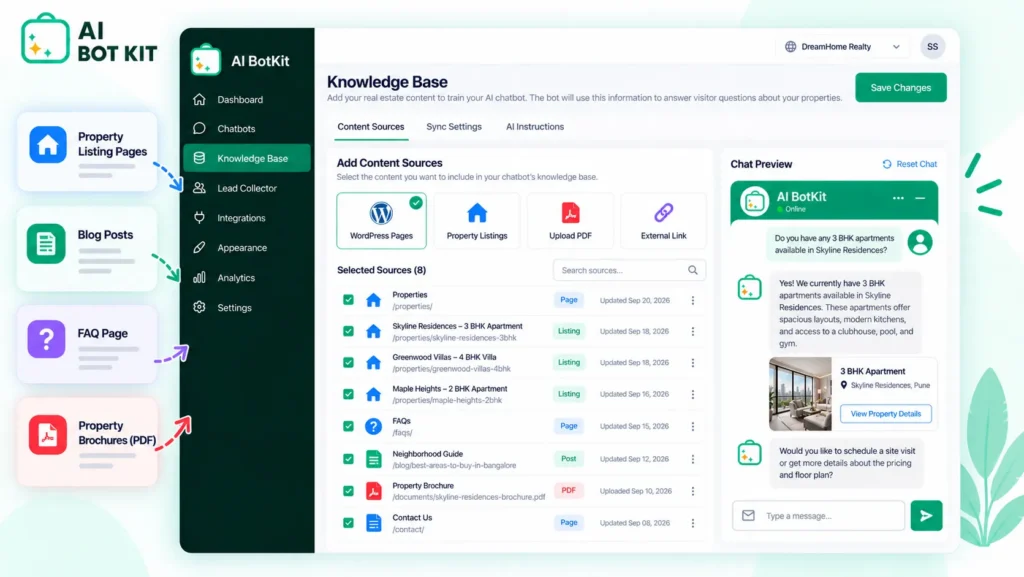
Your chatbot answers from your content, so start there. Check that each active listing page is current, and that you have pages covering the areas you serve, how you work with buyers and sellers, and what your fees include. The chatbot can learn from pages, posts, PDFs and external URLs.
If you don’t have an FAQ page, write down the ten questions you answer most often by email or text, and publish the answers. That one page does more for accuracy than any setting. Our guide to training a chatbot on your website content covers what to include and what to leave out.
Step 2: Decide what it must never answer
Write a short list of topics the bot should always hand to you: contract terms, HOA or disclosure details that aren’t on the page, mortgage advice, and anything legal. Put that list into the bot’s instructions and its fallback message.
This matters more in real estate than in most industries. A Boulder Realtor in a BiggerPockets discussion about how agents use AI described clients whose AI tools cited real estate laws from other states as if they applied locally. A chatbot limited to your own pages avoids that, as long as you keep it inside them.
Ed Neuhaus makes the stakes plain on the Neuhaus Realty blog: if the chatbot on your site tells a buyer a property has no HOA when it does, you’re the one responsible, not the software vendor. Treat anything your chatbot says as something you said.
Step 3: Keep qualifying to three questions, and answer first
Answer the visitor’s question before asking anything. Then ask no more than three things: buying, selling or renting; area and budget; and timeline. Contact details come last, once they have a reason to share them.
Visitors can tell a helpful assistant from an interrogation. As a California agent put it in the same BiggerPockets AI thread, people would still rather talk to a human than work through a string of qualifying questions from a bot. For the questions worth asking, see 15 chatbot qualifying questions (and the 5 you’ll actually use).
Step 4: Set the handoff: a named owner, a backup and a clock
Decide who picks up a lead when the chatbot flags it, who covers when that person can’t, and how quickly each type of lead needs a reply. A request to see a property deserves a shorter clock than a general question about the area.
For a solo agent, the “team” might be you plus a partner, an assistant, or an agent you trade cover with. Updegraff’s advice in the BiggerPockets thread still applies at that size: name a primary and a backup rather than a shared pool, because a pool recreates the problem of everyone assuming someone else has it.
The chatbot handles the first two minutes. Your handoff rule decides whether the lead survives the next two hours.
Step 5: Install it on your site
On WordPress, we built AI BotKit as a one-click plugin, so there’s no code to paste into your theme. On Wix, Squarespace or a custom site, you add a short embed snippet instead. You can see a real estate example on our AI chatbot for WordPress page, and the Getting Started documentation walks through each step.
Set up lead capture inside the conversation rather than sending people to a separate form: choose the fields you need, and decide where leads land. Capturing leads inside the chat explains the setup.
Handing a conversation to a person is available on our higher-tier plans, and it arrives with the full thread attached, so nobody has to repeat themselves.
Step 6: Test it with ten real questions
Before you switch it on, take ten questions from your own inbox or texts and ask them in the chat. Check every answer against your pages, and check that the topics from Step 2 actually get handed off.
If you’re already running a chatbot and the answers are off, this is the fastest way to find out why. Wrong answers almost always trace back to a missing, outdated or vague page, not to the bot.
How accurate will it be about your listings?
It will be as accurate as your pages, and no more. The chatbot retrieves answers from the content you’ve given it rather than from general knowledge, which is what keeps it from inventing a school district or an HOA fee. It also means a thin or outdated listing page produces a thin or outdated answer.
When a listing changes
Our WordPress plugin syncs when you publish changes and re-crawls your site daily. Mark sold or withdrawn listings on the day they change, and treat your MLS and the portals as the source of truth for status. If a property is moving fast, say so on the page.
When it doesn’t know
When someone asks something your pages don’t cover, the chatbot should say so and bring you in, not guess. That’s why we built AI BotKit to show a fallback message and ask for contact details instead of improvising an answer.
Thin or outdated pages produce thin or outdated answers, so the best accuracy upgrade is usually a better page.
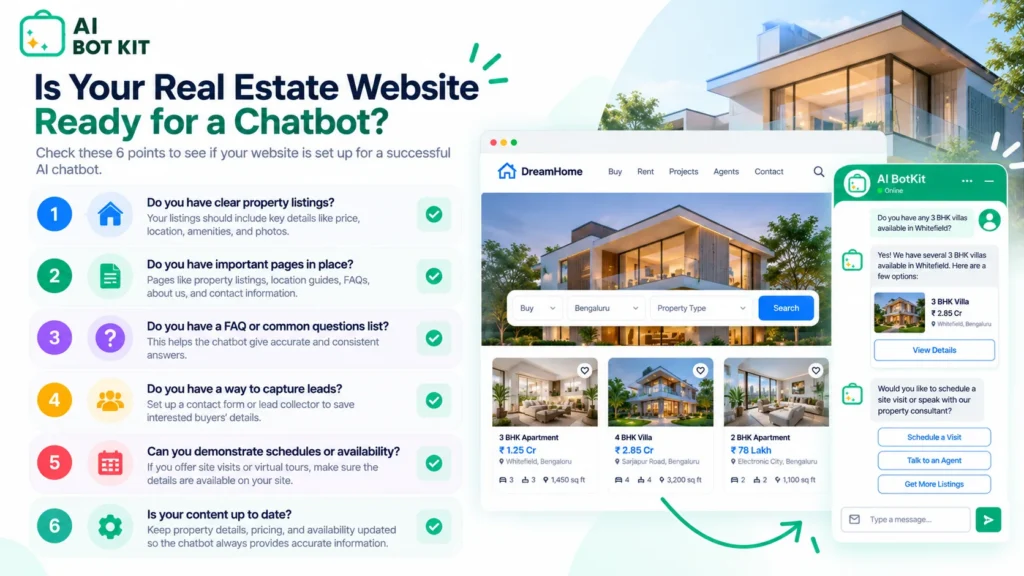
Is your real estate website ready for a chatbot?
Answer yes or no to each question. It takes about a minute, and it tells you whether to start now or fix a few things first.
- Are your active listing pages up to date, including sold and withdrawn properties?
- Do you have a page explaining the areas you cover and how you work?
- Could you list the ten questions buyers and sellers ask you most?
- Can someone reply to a serious lead within an hour during the day?
- Is there a named person covering evenings and weekends, even if it’s you on alternate days?
- Do you know where new leads should land: your email, your phone, or a CRM?
Mostly yes: you’re ready. A chatbot will answer from pages you trust and pass leads to someone who will pick them up.
Mostly no: start with your pages and your handoff rule. A chatbot added now will show those gaps to visitors rather than hide them.
What happens to the conversations and leads it collects?
Any chatbot that collects names, emails and phone numbers is handling personal data, so check a few things before you go live. Find out where leads and transcripts are stored, who on your side can read them, and what your local privacy rules require for storing contact details and handling deletion requests.
For our part, you can update, replace or delete your training content at any time, and removed content is gone from the bot. Your chats and training data aren’t used to train other models. Our privacy policy has the details, and if you’re unsure about your own obligations, ask your broker or a local advisor.
FAQ
Is a real estate chatbot worth it for a solo agent?
It’s worth it if inquiries arrive when you can’t answer them, which for most solo agents means evenings, weekends and during showings. If you get only a few inquiries a month and return every one within the hour, a short contact form may be enough. Starting on a free plan lets you find out without committing a budget.
Can a chatbot answer questions about my listings accurately?
Yes, if the answer is on your listing pages and those pages are current. The chatbot answers from your content, so it’s only as accurate as what you’ve published. Anything not on the page, such as disclosure details or negotiation questions, should be set to go to you.
Will buyers be put off by talking to a bot?
They’re put off by bots that dodge their questions or interrogate them. A chatbot that answers first, asks two or three short questions, and makes it easy to reach a person tends to feel like help rather than a gate. Be clear that it’s an assistant, not a human.
Does a chatbot replace my CRM or follow-up?
No. A chatbot handles the first response and collects details, while your CRM and your follow-up process handle everything after that. Its job is to make sure a lead reaches the right person with context, not to work the lead for you.
What’s the difference between a real estate chatbot and an AI agent?
A real estate chatbot handles conversations: answering questions, qualifying, and passing leads on. An AI agent is designed to take actions across several systems on its own, which adds setup and risk. For most small real estate businesses, a chatbot is the sensible starting point.
If your listings are already online and inquiries keep arriving when you can’t answer them, you don’t need a bigger lead budget. You need those questions answered and the leads handed to someone who picks them up.
At AI BotKit, we built the free plan so you can test that on your own site first: build a chatbot trained on your listing pages, no credit card required.