
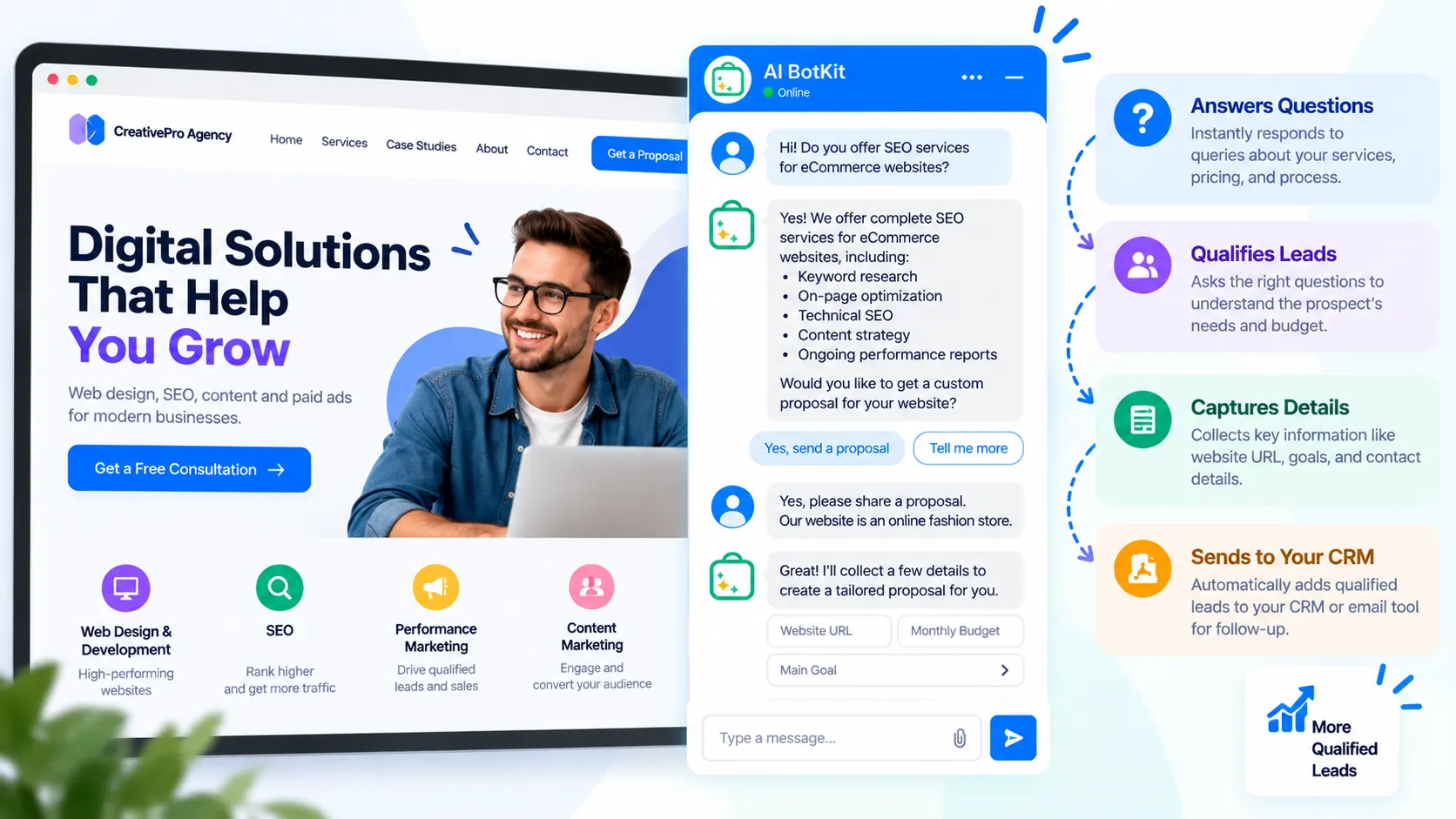
A chatbot for agencies is a chat widget on your agency website that answers prospects’ questions from your own service pages and case studies, asks two or three qualifying questions, and passes sales-ready enquiries to you. As a lead generation chatbot for agencies, it covers the first response, including after hours.
Picture a prospect landing on your services page at 9 p.m. with one question: do you work with companies their size? They can’t find the answer, fill in nothing, and open the next agency on their list.
At AI BotKit, we built our AI chatbot for that moment. It answers from your own content, asks a couple of questions, and hands you a lead worth calling. It only works as well as the content behind it, so this playbook covers what to feed it and when a person should take over.
What does a chatbot for agencies actually do for lead generation?
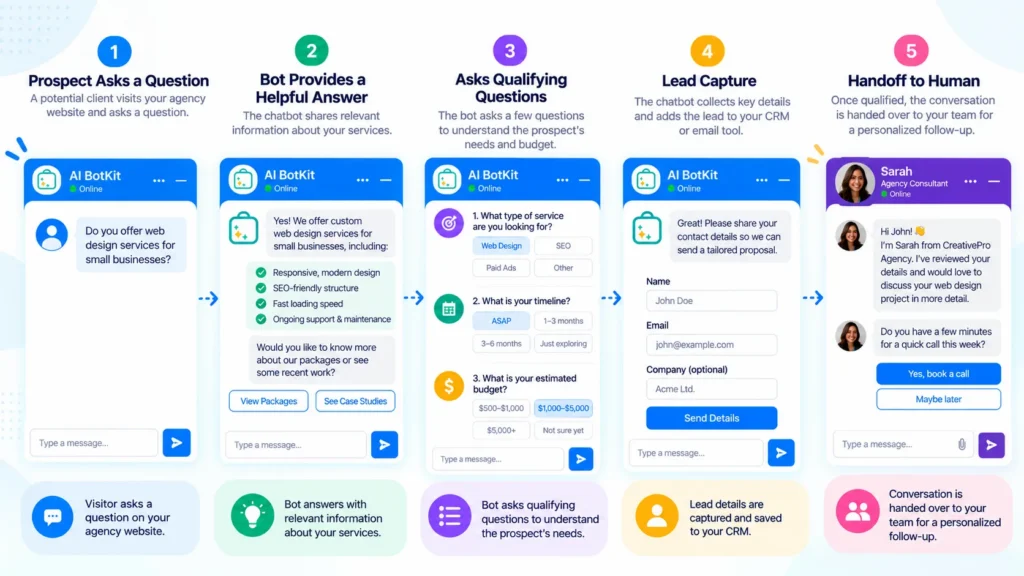
A lead generation chatbot does three jobs in order: it answers, it qualifies, and it hands over.
It answers prospects from your own content
The bot replies using the pages, posts and PDFs you give it, not general internet knowledge. A prospect asking whether you handle e-commerce migrations gets an answer drawn from your services page and case studies. If your content doesn’t say it, the bot shouldn’t claim it.
It qualifies before it captures
Once someone has an answer, the bot can ask two or three questions about their project, such as which service they want and when they need it. That context is what separates a lead worth a call from a bare name and email address.
It hands the conversation to a person
Some prospects want a human straight away, and some questions shouldn’t be answered by a bot at all. In AI BotKit, we pass the conversation to your team with its history attached, so the prospect doesn’t repeat themselves.
A form collects fields, while a chatbot can answer first. We’ve broken down what the conversion data does and doesn’t say if you want the evidence before deciding.
If this is your first AI chatbot for your website, the next section helps you decide whether it fits.
Is a chatbot right for your agency, or is a form enough?
A chatbot pays off when prospects ask the same questions before they enquire, and it adds little when they don’t.
Even then, the chat window isn’t the point. A tester who compared five WordPress AI chatbot plugins concluded that the useful ones behave like workflow tools: they qualify, route and follow up, and chat is only how the visitor reaches them.
When a chatbot earns its place
If you already answer the same prospect questions by email every week, such as typical timelines, who you work with, or how you handle pricing, a bot can take that first layer. This holds for a five-person studio and a twenty-person agency alike.
It also helps when enquiries arrive across time zones. The same split applies to other person-led services, as we outline in our chatbot for coaches guide: the bot handles the first conversation and a person handles the relationship.
When a contact form or a quick call is enough
If you get two enquiries a month and each one is bespoke, a bot has little to learn from and a form is fine. The same goes for agencies that sell mainly through referrals.
A bot also won’t fix a thin website. If you can’t list five questions prospects ask you repeatedly, start with your content, not the bot.
How fast do prospects need a reply?
Speed matters because online enquiries go cold quickly, and most businesses reply more slowly than they think.
The best-known evidence is the 2011 Harvard Business Review study “The Short Life of Online Sales Leads”. Across about 1.25 million leads, it found that firms contacting a prospect within an hour were:
- Nearly 7 times as likely to have a qualifying conversation as firms that waited one more hour
- More than 60 times as likely as firms that waited a day or longer
The data covers B2B and B2C companies, not agencies specifically. In a companion test, only 37% of firms replied to a web enquiry within an hour, and 23% never replied at all. That gap is the opening for a bot: it can reply in seconds, then your team follows up with context.
You’ll often see a “respond within five minutes, 21x more likely” claim credited to HBR. None of the summaries of the study that we found mention a five-minute figure, so we’ve kept to the numbers above. A fast first reply only helps if a person follows up on the leads it captures.
How do you set up a lead generation chatbot on your agency site?
Five steps get a bot live, and most of the effort sits in the first three.
Step 1: Decide the bot’s one job
Start with a single goal: new-business enquiries. Resist adding client support, recruitment questions and press requests on day one. A bot with one job is easier to test and easier to trust, and you can widen it once the first job works.
Step 2: Gather what it should answer from
List the questions prospects ask before they book a call, then check whether your site answers each one. Useful source material usually includes:
- Your services, and what you don’t do
- Your process and typical timelines
- Case studies with outcomes you can stand behind
- How you handle pricing, whether ranges or “from” figures
- The kind of client you work best with
If an answer exists only in your head, write it down before you train the bot.
Step 3: Train it on content you already have
Point the bot at your existing pages, posts and PDFs instead of writing a new knowledge base. In AI BotKit, we train on website pages, documents and external URLs, and for WordPress sites the bot updates when your content does.
Check our pricing page for which plan includes auto-retraining. Our walkthrough on how to train a chatbot on website content covers the details.
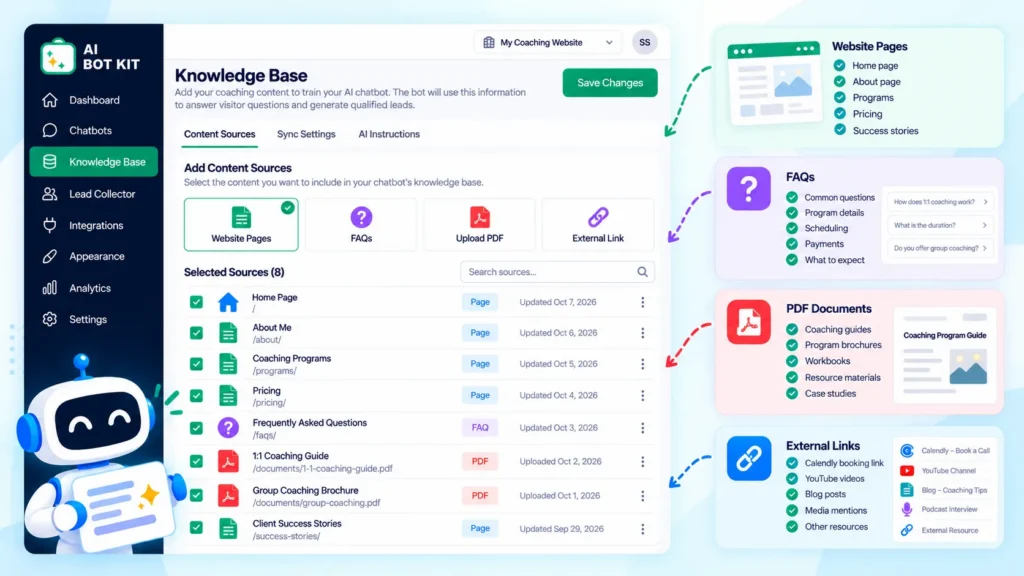
Expect to spend some time here. A G2 reviewer of a lead generation chatbot said initial setup and customization took longer than expected and updating the bot wasn’t simple. Thin or outdated pages produce thin or outdated answers, so clean up the content first.
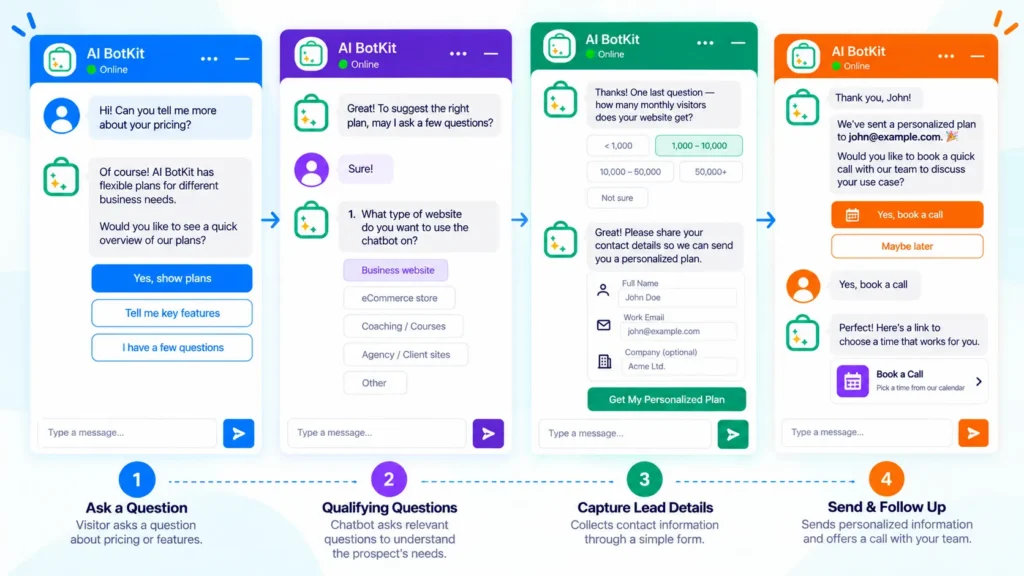
Step 4: Add three to five qualifying questions
Ask only what changes your next move. Offer ranges and a “not sure yet” option on sensitive questions, because a blunt budget question can end the chat.
| Question | What it tells you | What you do with it |
|---|---|---|
| Which service are you looking for? | Who on your team should follow up | Route the lead to the right person |
| Roughly what budget range are you working with? | Whether the project fits your minimums | Flag low-fit enquiries for a polite reply |
| When do you need to start? | How urgent the project is | Follow up first on near-term projects |
| Is this a new project or a rebuild? | The scope of the work | Prepare relevant case studies |
| Who else is involved in the decision? | Whether you’re talking to the decision-maker | Offer a call that includes them |
We list 15 options, and the five you’ll actually use, in our guide to chatbot qualifying questions.
Step 5: Install it, set the handoff, and test on the live site
Install the WordPress plugin, or paste one embed code or smart link on other site builders. Then send lead notifications to the inbox or WhatsApp number your team actually checks. Decide who picks up a handed-over chat and how quickly, because a lead nobody follows up wastes the speed the bot created.
Then test on the live page, not only in the dashboard. A site owner in a WordPress.org support thread reported good answers inside the plugin but poor answers and wrong links on the live site. Support suggested caching or JavaScript optimization as a possible cause.
Test the bot on the live site with ten real prospect questions before it goes public.
Is your agency ready? A six-question check
Answer yes or no to each question:
- Do prospects ask you the same questions before booking a call?
- Do your site pages already answer most of those questions?
- Can you say in one sentence who you work best with?
- Do you have a clear next step for a good lead, such as a booking page or a call?
- Do you know the two or three details you need before a first call?
- Will someone check handed-over chats and new leads within a working day?
Five or six yes answers: you’re ready to test a bot this week. Three or four: a bot will help, but fix the gaps first, starting with the questions your site doesn’t answer. Two or fewer: tighten your offer and your site content first, and a contact form will do the job until then.
Most “no” answers point to content gaps, and those are worth fixing whether or not you add a bot.
What should your agency bot never say?
Your bot should never promise anything you haven’t written down, including prices, availability, timelines and results.
Keep answers inside your content
A bot is only as accurate as the pages behind it. Tell it to say when it doesn’t know and to offer a person, especially for pricing, contract terms, availability and anything about a named client.
Wrong answers do real damage. A Shopify merchant reviewing a chatbot app said it answered a basic product question wrongly and overwrote their FAQ page after install. Check what any bot changes on your site during setup.
If you already run a bot and its answers feel off, first check whether the page it needs exists and whether it’s current.
Offer a human early
Set the bot’s tone to match how your team writes. Zendesk’s 2025 CX Trends Report found that 64% of consumers are more likely to trust AI agents that show friendliness and empathy. A short line telling visitors a person can join the chat supports that trust.
Handle conversation data plainly
Conversations can contain names, emails and project details, so treat them like any other enquiry data. We state that your bot’s training data and customer chats are never shared or used for other purposes, and you can update or delete your bot’s content from your dashboard.
Read our privacy policy, mention chat data on your own privacy page, and check local rules with your own advisor if you work with clients in regulated sectors.
How do you know it’s generating better leads?
Count what happens after the chat, not how many chats start. Useful measures include:
- Conversations started
- Leads captured, and your capture rate
- Qualified conversations
- Calls booked from chat
Then read the questions the bot couldn’t answer each week. Each one is either a gap on your website or a question a person should handle. Our analytics show what visitors ask and where the knowledge gaps are, so that list becomes your content to-do list. The depth of analytics varies by plan, so check what yours includes.
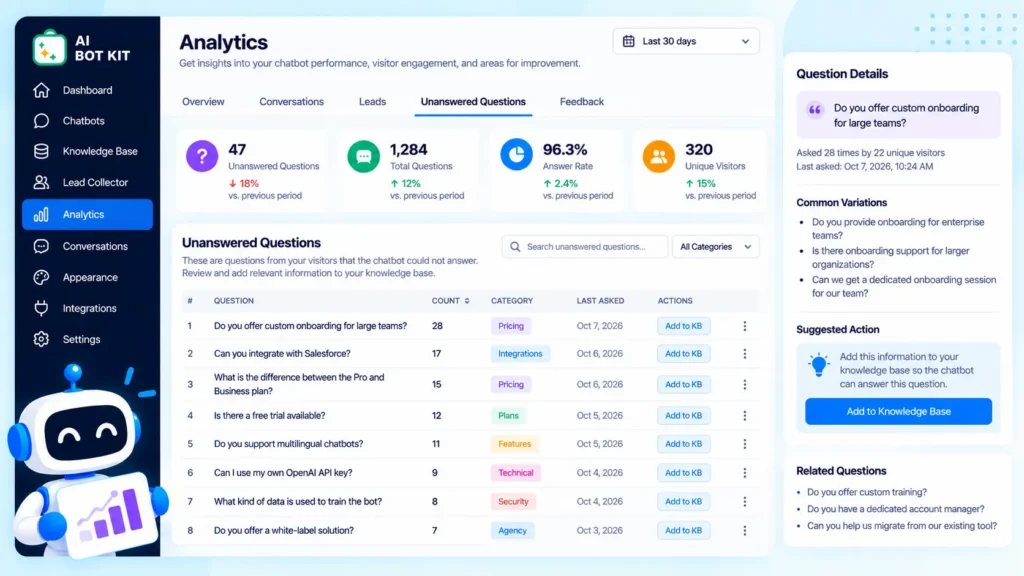
After a month, ask whoever takes the calls whether chat leads fit your work and arrive with enough context. Judge the bot on lead quality and calls booked, not on chat volume. For the wider picture beyond agencies, see our complete guide to lead generation chatbots.
Can you run it for your clients too?
Yes, but plan the economics before you promise it to clients.
What changes when the bot is for a client
Running a bot for a client works the same way as running your own: one bot per site, trained on that client’s content, with a clear owner for updates. The bigger questions are commercial. Who maintains the content, who reviews the chats, and who answers when the bot hands over?
Check the plan limits before you quote
Check plan limits against your client count. At the time of writing, our pricing page lists up to 7 chatbots on the Business plan, which also removes the “Powered by” branding, and Managed Chatbot Service is a paid add-on. If you’d rather not build flows yourself, we also offer advanced automation services.
If white-labelling dozens of client bots is the core of your offer, compare tools that advertise it directly. Dante AI, for example, promotes packaging its chatbot and selling it to clients as the agency’s own. Match the number of client bots you plan to run to the plan limit before you quote anyone.
FAQ
Will a chatbot replace my agency’s contact form?
No. Keep the form for visitors who prefer it and use the chatbot for those who have questions first. Running both costs little, and you can compare lead quality before removing anything.
Can it handle prospects interested in more than one service?
Yes, if each service is described in your content. The bot answers from your pages, so a prospect asking about SEO and web design gets answers from both, and a qualifying question can capture which service matters most. If a service isn’t on your site, the bot has nothing to say about it.
What happens to enquiries that arrive outside business hours?
The bot can answer and capture details at any hour, and you receive lead notifications by email or WhatsApp. A person still needs to follow up, so decide who checks overnight leads first thing in the morning.
What does the bot do when it doesn’t know the answer?
Ideally, it says so and offers a person. We support human handoff with the conversation attached, so the prospect doesn’t repeat themselves. How well this works depends on your instructions and content, so test it with questions your site doesn’t answer.
How long does setup take?
Our setup steps are to add your content, customize the bot, and install it, and installation takes minutes. The longer part is checking that your pages answer prospects’ questions. Plan an afternoon to gather content and test it on the live site.
If your agency already answers the same prospect questions by email every week, test a bot against exactly those questions before you commit to anything. At AI BotKit, we offer a free plan with no credit card needed, so you can start on the free plan and see what the bot does with your own content.