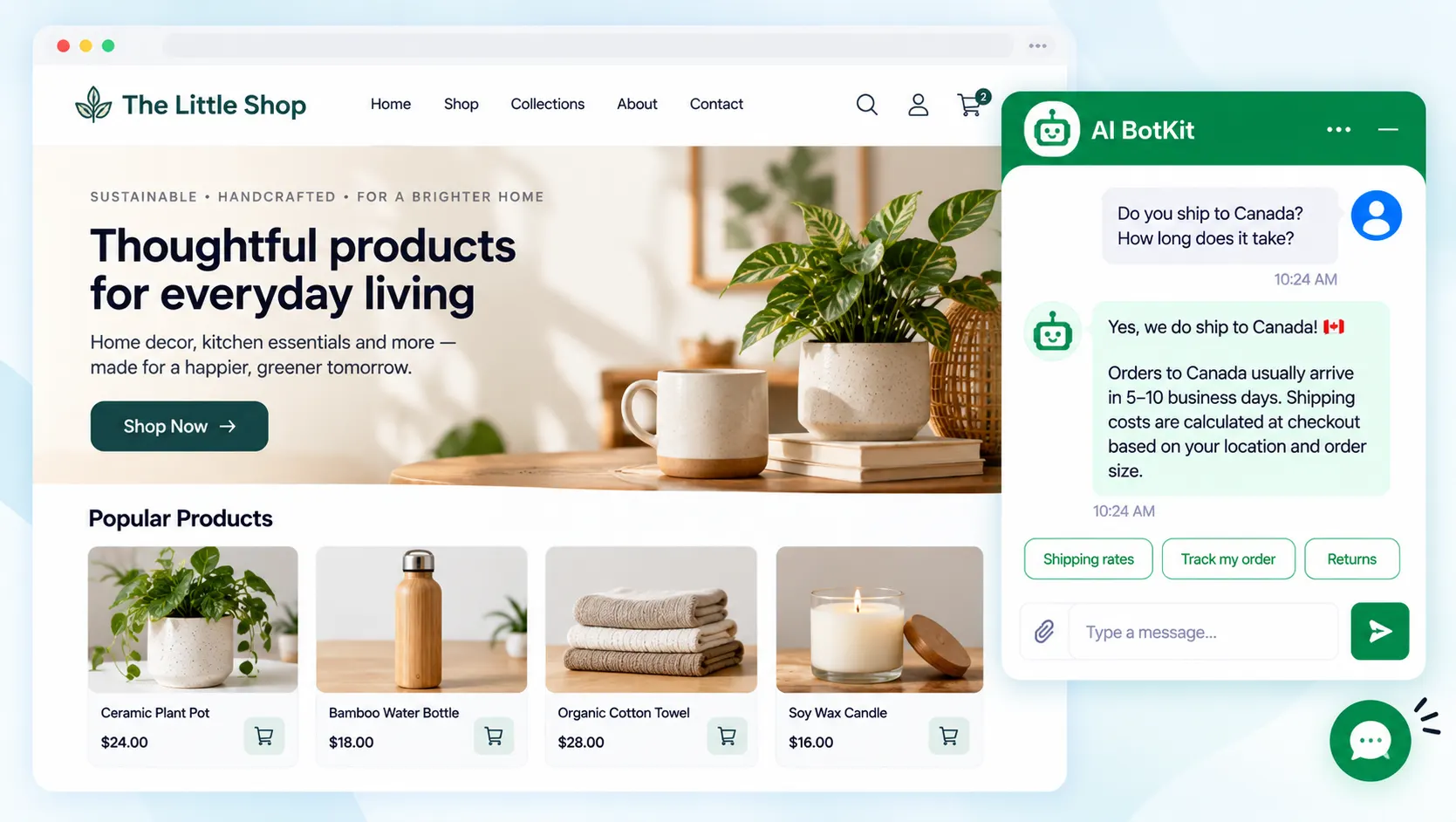
AI customer support small business owners can run alone is a chatbot that answers questions from your own pages and documents, then passes the rest to you. It works when your content is accurate and a person stays reachable. This guide shows what to automate first, what to keep human, and how to set up an AI customer service chatbot.
Gartner’s August 2026 survey found that 87% of customers say a company using generative AI for support must offer a way to reach a human, while 50% said AI made their interactions easier. For a small business, that means customers will try a bot as long as a person is still reachable.
That idea shaped how we built AI BotKit, and it shapes this guide. You do not need a developer or a support team to follow it.
What does AI customer support do for a small business, and where does it fall short?
It is already common. A guide from the NSW Small Business Commission cites a survey in which one in four businesses use AI tools, and almost half of those users report a positive effect on their business.
What “trained on your own content” means
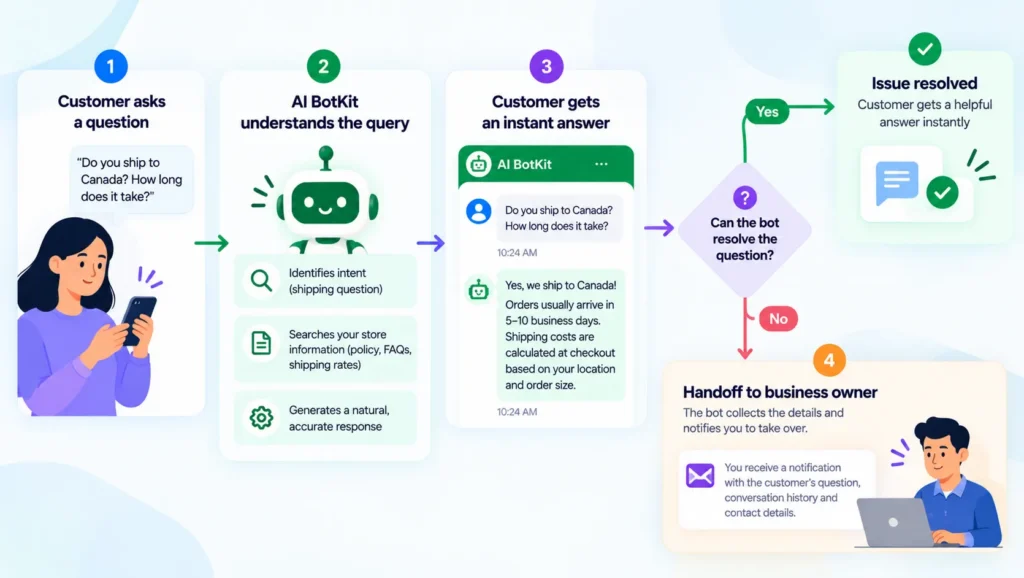
“Trained on your own content” means the chatbot answers from the pages, documents and links you give it, not from general internet knowledge. You add your shipping page, your price list and your FAQ. The bot finds the relevant part and writes a reply from it.
That is the benefit: the bot can only say what you have published, so you control its answers.
Where it falls short
The bot is only as good as the content behind it. Thin, outdated or contradictory pages produce thin, outdated or contradictory answers.
Reviewers report this. One reviewer on Capterra said a chatbot shared information from outside the material it was trained on, which led to wrong answers and made it hard to rely on.
A chatbot does not know your business. It reads your pages, so wrong pages mean wrong answers. Some conversations should never go to a bot at all, and we cover those below.
Which support option fits you: a FAQ page, a shared inbox, or an AI chatbot?
The right option depends on how many questions you get and how repetitive they are. A bot is not always the answer.
| Option | Best for | Cost shape | Main limit |
|---|---|---|---|
| FAQ page | Few questions, same answers each time | Your time to write it | Customers must find and read it themselves |
| Shared inbox or live chat | Questions that need judgment | Your time or staff time | Only works while someone is online |
| Rule-based bot (fixed menus) | Short, predictable paths such as order status | Usually low | Breaks on anything off-script |
| AI chatbot trained on your content | The same questions in many wordings, including after hours | A monthly plan, based on message volume | Only as good as your content, and needs a human exit |
The U.S. Small Business Administration makes a similar point. If most of your questions are about the same few things, an automated reply saves time, and less common questions can go to a real person.
When a FAQ page is enough
If you get a handful of questions a week and have around 15 pages, a clear FAQ page may be all you need. A bot adds something you have to maintain.
The same goes if every enquiry in your business needs a real conversation.
When an AI chatbot earns its place
If you answer the same questions by hand every week, in different wordings, or customers ask outside your working hours, a bot starts to pay off. We built our AI chatbot for websites for this case, and it works on any platform.
Online shops see it most with questions about shipping, returns and sizing, which we cover in our guide to pre-sales questions. If you run a store and are comparing tools, we also wrote a Tidio alternative comparison.
If you answer the same questions by hand every week, a bot saves you time. If you don’t, a FAQ page is enough.
What should you automate first, and what should stay with you?
Start with the questions you answer every week
Pull your last 30 days of emails, DMs and contact forms, and list the questions that repeat. Opening hours, shipping times, prices, returns and booking usually come first.
Start with your top ten. You can add more once you see real chats.
If your goal is capturing leads rather than answering support questions, run the same exercise on what prospects ask before they book or buy.
Keep these conversations with a person
Some conversations need you:
- Refund and billing disputes
- Complaints and upset customers
- Anything involving health, legal or safety advice
- Exact wording you have not tested, such as returns links and prices
One merchant on the Shopify App Store found that a bot changed the returns link they had set up, and called it “Not reliable for customer-facing support.” The vendor replied that a fixed answer can prevent this.
So test exact wording before launch. Ask the bot for your returns link, your prices and your hours, then compare each reply with your page.
Automate the repeat questions. Keep disputes, complaints and anything with money at stake.
Is your content ready? A seven-point launch checklist
Your bot answers as well as the pages behind it, so check them before you switch it on. If you have no documentation yet, that is fine. Write one short page for each of your top questions, which also helps customers who never open the chat.
A reviewer on Trustpilot complained that a chatbot tool was not reading uploaded PDFs properly, so test every file you add.
- Write down your ten most common questions and confirm each has a clear answer on a page you will upload.
- Check that prices, hours, shipping times and return rules are current on those pages.
- Fix or remove pages that contradict each other.
- Upload each PDF, then ask the bot a question only that PDF can answer.
- Ask the bot for every link, price and policy, and compare each reply with your page.
- Put a clear way to reach you in the welcome message.
- Ask five questions the bot should not answer, and check how it responds.
If a new employee could not find the answer on your pages, the bot cannot either.
How do you keep a human in the loop?
What customers expect
Gartner’s 2026 survey found that 87% of customers say a human option is essential when a company uses generative AI, even though half say AI makes interactions easier. Gartner’s analyst also advises against making AI a mandatory first step, since customers pushed through several failed bot attempts are less likely to use it again.
The earlier survey was blunter. In 2024, 64% of customers said they would prefer companies not use AI for support, and 53% would consider switching.
A bot can also go wrong in public. After an update, a delivery company’s chatbot swore at a customer and criticised the company itself, The Register reported, and the company switched the AI element off.
As one store owner put it in a Shopify Community thread, it is a “huge turnoff to customers” when they expect a person and get a bot. Other replies in the same thread said bots handle repeat questions well. Both can be true: the problem is a missing exit, not the bot.
Customers accept a bot when they can reach a person. They resent one that blocks the way.
How handoff works in AI BotKit, by plan
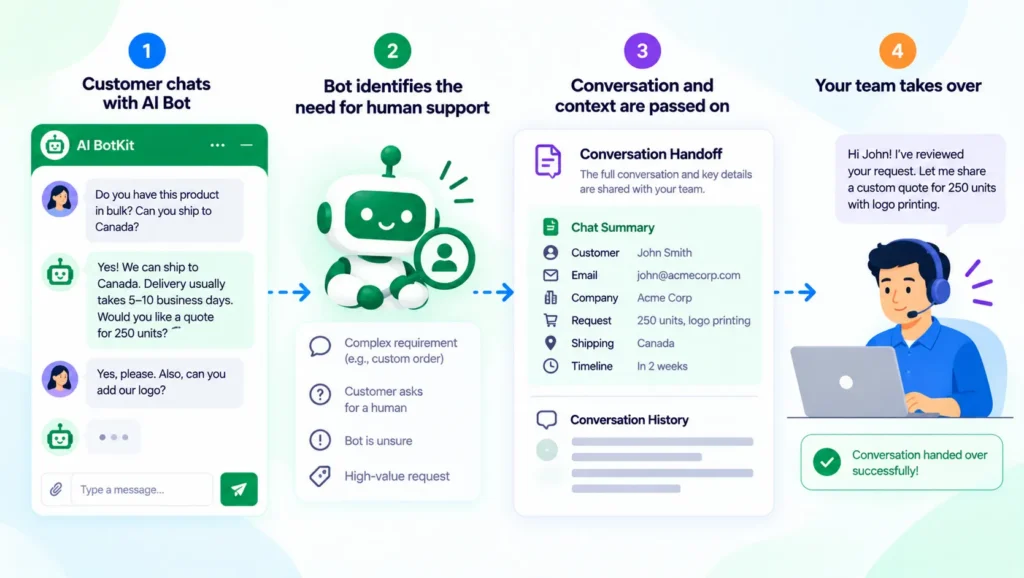
We built AI BotKit to pass a chat to you when the bot cannot answer, with the conversation attached so the customer does not repeat themselves.
On our pricing page, Human Handover by email starts on the Essential plan ($24 a month billed yearly), along with instant handover to WhatsApp, Instagram, Messenger and Telegram. Live Chat is on Business ($41 a month billed yearly).
The free plan includes every feature while its 100 one-time AI messages last, so you can test handoff before you pay.
If your plan has no handoff
Then make the exit manual. Put your email address, phone number or contact page link in the welcome message and in the bot’s instructions, and check that inbox every day.
A bot with no visible exit costs you more trust than it saves in time.
How do you set it up this week?
Setup is three steps on any platform. Here is how it works in AI BotKit, which we built so a non-technical owner can finish it without a developer.
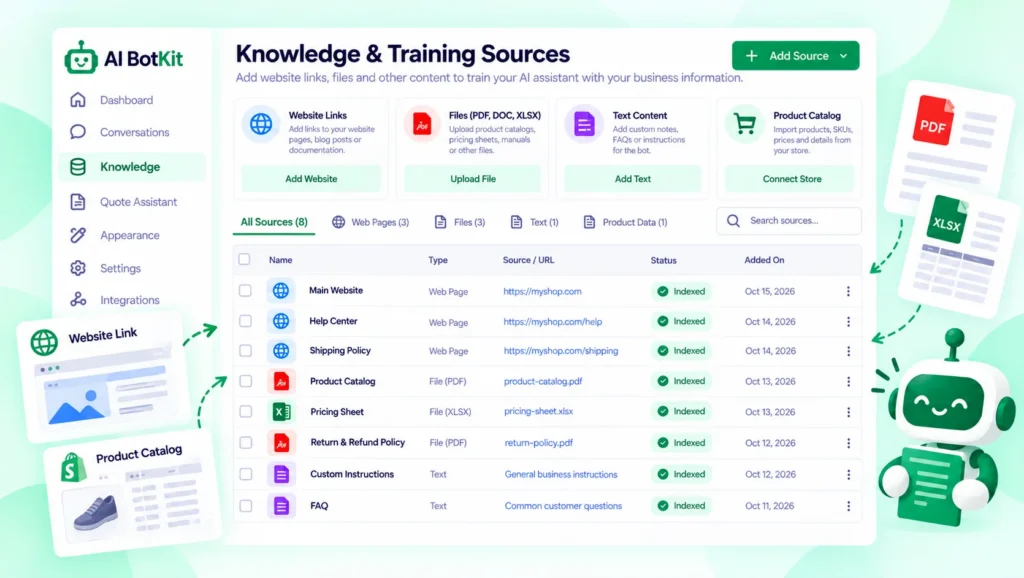
Step 1: Add your content
Upload website links, PDF, DOCX and TXT files, or YouTube video links, and the bot learns from them. If you use WordPress, our plugin can train the bot on your pages and posts directly.
Most of the work is checking your content, not configuring the tool.
Step 2: Set tone and welcome message
Choose a welcome message, a tone, an avatar and colours that match your brand. Keep the welcome message short, and say what the bot can help with and how to reach you.
Step 3: Publish on your platform
On WordPress, install our plugin from the WordPress.org plugin listing. We have spent over a decade building WordPress products at WisdmLabs, and our install guide walks through each step.
On Shopify, Squarespace, Wix or a custom HTML site, paste the embed code or share the chatbot’s smart link. For more on WordPress options, see our guide to the best chatbot for WordPress.
Where to get help:
- Our documentation covers each step
- Paid plans include installation support, and our services page lists the Managed Chatbot Service, a paid add-on on Business
What does it cost, and what should you check before you pick a plan?
Chatbot pricing usually turns on message volume and features. Our pricing page, checked on October 18, 2026, lists these plans:
| Plan | Price, billed yearly | Monthly AI messages | Human handoff |
|---|---|---|---|
| Free | $0, no card needed | 100 (one-time) | Included while trial messages last |
| Basic | $10 a month | 1,000 | Not on this plan |
| Essential | $24 a month | 2,000 | Human Handover (Email) and instant handover to apps |
| Business | $41 a month | 3,000 | Adds Live Chat |
Monthly billing costs $12, $29 and $49 for Basic, Essential and Business. Lead collection starts on Basic, and you can top up anytime, starting at 50 AI messages for $9.
Before you pick a plan, ask any vendor, us included, how messages are counted and what happens when you reach the limit.
Choose the plan by the features you need first, then check the message limit against your real traffic.
How do you know it’s working?
Read the chats. Each week, look at the questions the bot answered badly or could not answer, and fix the page behind each one. Our analytics show what visitors ask and where your content has gaps.
Compare two numbers each month: the questions you still answer by hand, and the chats that ended in a handoff. If the first falls and the second holds steady, the bot is doing its job.
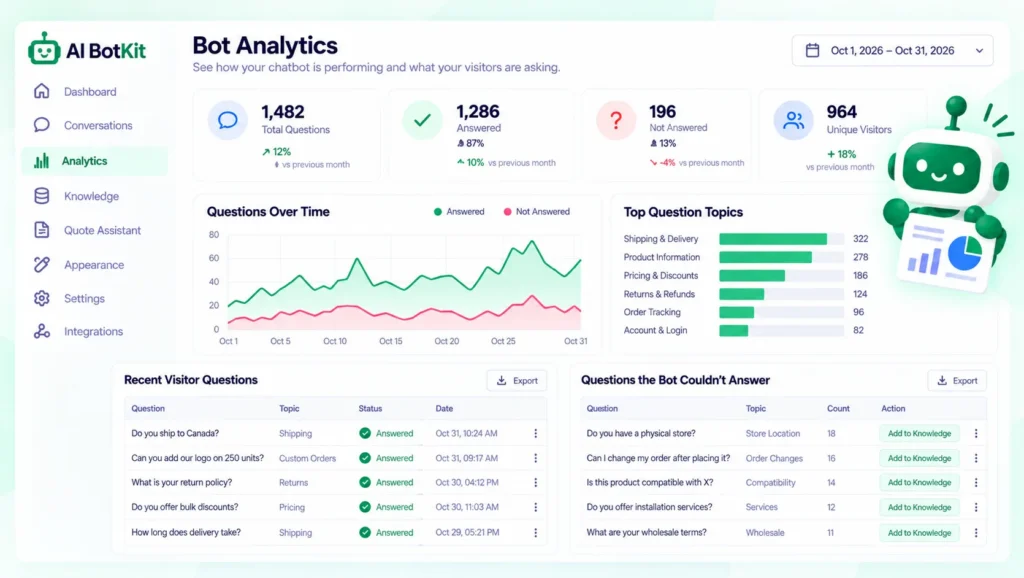
Every wrong answer points to a page you can fix.
What should you check about customer data before you launch?
A chatbot stores visitor conversations and any details people type in, such as names and emails. Before you launch, read the tool’s privacy policy, find out where conversations are stored and for how long, and decide what you will tell visitors.
Our privacy policy is public, and our homepage says your training data and customer chats are not shared or used for other purposes. Read it and confirm it fits your needs. Do not upload documents that contain customers’ personal details.
If you serve customers in regions with privacy laws such as GDPR, ask a qualified adviser what you must disclose. We can’t give legal advice.
Check the policy before you collect a single email address.
FAQ
Will AI customer support replace me or my staff?
No. A bot handles repeat questions, and people handle complaints, disputes and judgment calls. Gartner’s 2026 survey found that 87% of customers say a human option is essential when a company uses generative AI.
What happens if the chatbot doesn’t know the answer?
It depends on how you set it up. On our Essential plan and above, the chat can go to you by email or to an app such as WhatsApp. On other plans, put your contact details in the welcome message, and test with questions outside your content.
Can I use an AI customer service chatbot on Shopify, Wix or Squarespace?
Yes. Paste the embed code into your site, or use the WordPress plugin if you are on WordPress. The embed code also works on custom HTML sites.
How much does AI customer support cost for a small business?
You can start free, with 1 chatbot and 100 one-time AI messages. Paid plans start at $10 a month billed yearly, and human handoff starts at $24 a month on Essential. Check the pricing page for current limits.
Do I need a developer to set it up?
No. You add your content, choose a welcome message and tone, then paste an embed code or install the plugin. If you would rather not do it yourself, paid plans include installation support.
If you answer the same questions every week and have a few clear pages, start small. Pick your ten questions, check the pages behind them, and run the bot on the free plan for a week. When you are ready, start free with AI BotKit, our AI customer service chatbot. No card is needed.