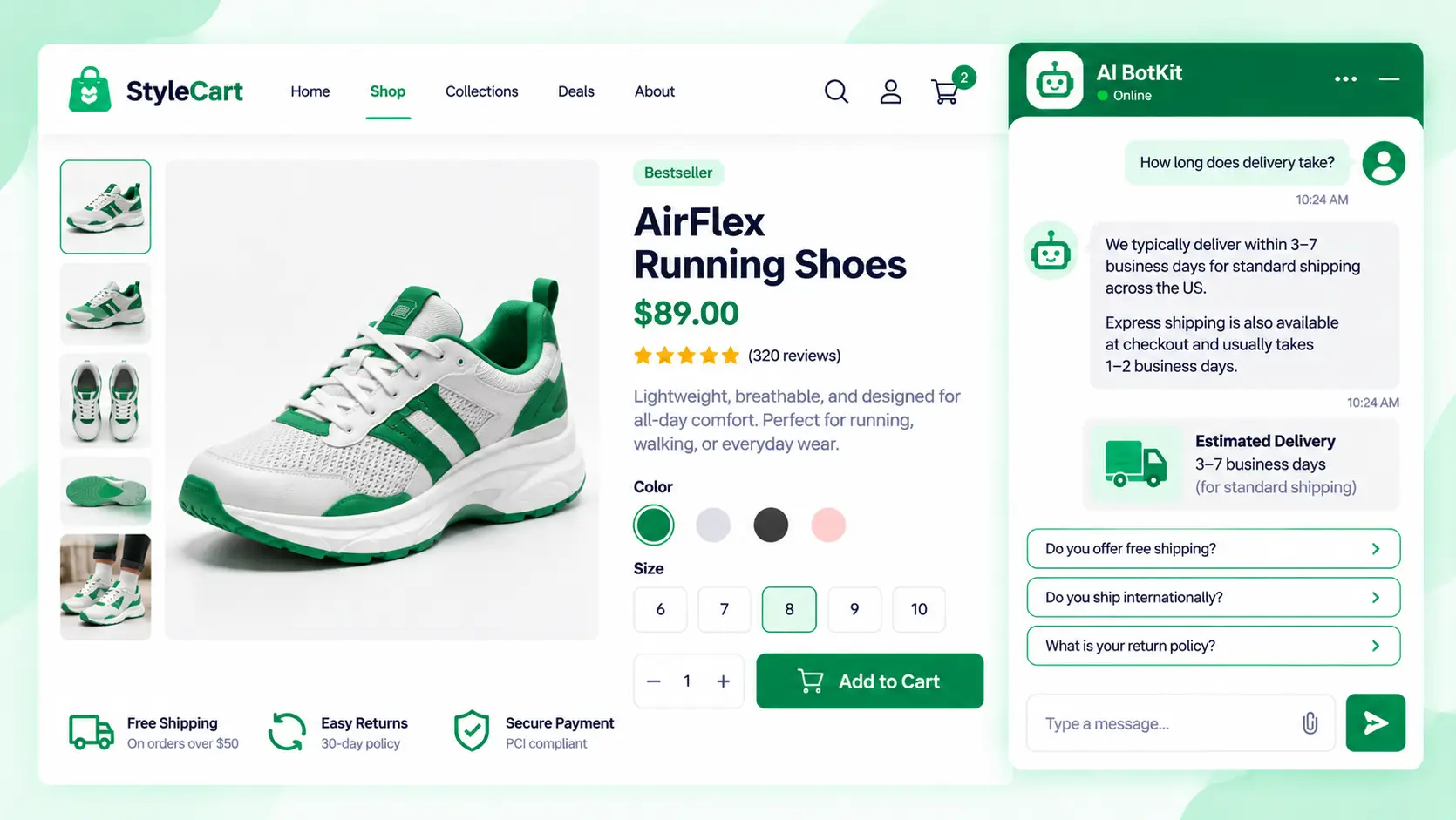
Pre-sales questions ecommerce shoppers ask are the doubts they need cleared before buying: shipping time, returns, sizing, stock and fit. They cost you sales when the answer isn’t on the page and nobody replies in time. A pre-purchase chatbot trained on your pages can answer the ones your site covers and hand the rest to you.
A shopper has your product page open and one question: will this arrive before Friday? Your inbox answers tomorrow. As one store owner noted in a Shopify Community thread, “Once people leave to double check something, they often don’t come back.”
At AI BotKit, we built a chat widget for exactly that gap. This guide shows which questions cost you sales and which a bot can safely answer. Deciding whether a chatbot is worth adding? Start at the top. Already running one with off answers? Jump to what to check before you trust it.
What pre-sales questions do ecommerce shoppers ask before they buy?
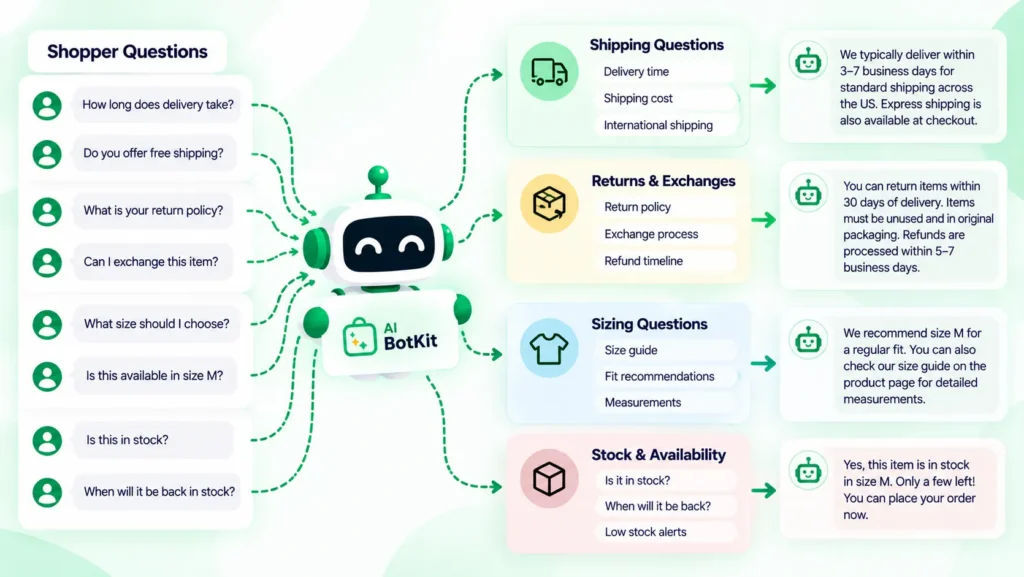
Four groups cover most pre-sales questions, and each one maps to a reason shoppers leave. Most of them are short answers that should already live on your pages.
Shipping and delivery
Cost and delivery lead the list of doubts. Among shoppers who left for reasons other than just browsing, Baymard Institute found 40% cited extra costs, 20% cited slow delivery, and 12% couldn’t see the total cost up front. The shopper’s questions are simple: how much, how long, and do you ship to me?
Returns and exchanges
Returns questions are really trust questions. In the same Baymard survey, 13% of those shoppers said the returns policy wasn’t satisfactory. “Can I send this back if it doesn’t fit?” is the sentence behind that number, and a clear returns page answers it in one line.
Sizing, fit and compatibility
Fit questions are the hardest to answer with a static page. A size chart lists measurements but can’t say whether a jacket runs small. Remark, a chat vendor, found that the topics converting best in its own chat data were late-funnel ones, including promotions, sizing and fit, and shipping. Treat that as one vendor’s data, not a benchmark.
Stock, discounts and payment
These are the last-minute checks: is it in stock, is anything on sale, do you take my payment method. Baymard’s list also shows 19% of those shoppers didn’t trust the site with their card details, and 9% found too few payment methods. They’re short questions, and they arrive at the moment of purchase.
Why do unanswered pre-sales questions cost you sales?
Unanswered questions cost sales through speed, access, and a limit worth stating honestly. If asking takes more effort than leaving, some shoppers will leave.
Speed: how long shoppers will wait
A PowerReviews survey of 7,528 consumers found that 56% expect an answer to a product-page question within 24 hours, and 21% expect one in four hours or less. That survey is about product-page Q&A, not chat. Still, an email reply the next morning is worth planning around.
Access: when asking is harder than leaving
Sometimes the barrier isn’t the wait, it’s the route. In a WordPress.org review, a buyer who said the plugin looked perfect for their needs gave up because asking pre-sales questions meant creating an account first.
On a separate forum thread, a shopper couldn’t ask whether a yearly plan could be upgraded to lifetime later. The vendor’s chatbot was broken and non-customers had no contact option. When the answer came, it was a plain yes.
A third buyer waited 10 days for answers about card tokens before buying and got none. These are plugin buyers rather than physical-goods shoppers, but the pattern holds for any store.
When it isn’t a question problem
Not every abandoned cart is waiting on an answer. Baymard puts average cart abandonment at 70.22% across 50 studies, and 42% of US shoppers in its survey had abandoned a cart because they were just browsing. Shipping cost matters too, and so does traffic quality.
A Shopify Partner in a thread on browsing without buying advised checking whether the visitors fit your store before changing any pages. A chatbot won’t fix cart abandonment by itself, but a shopper with an open shipping question is still reachable before they leave.
How do you find the questions your store is losing sales to?
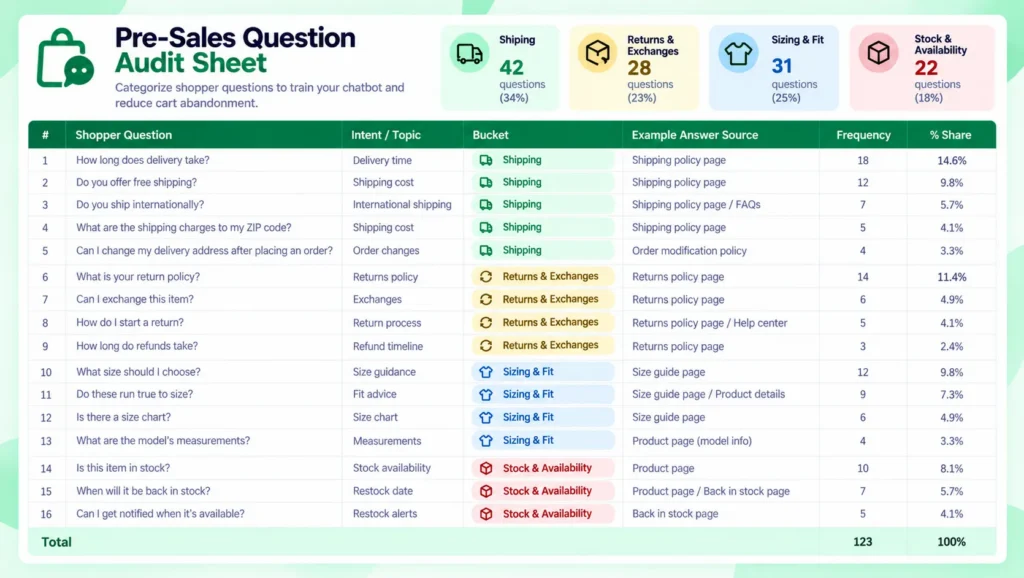
You don’t need new software to find them, just your inbox and about 30 minutes. Every repeated question marks a page that isn’t doing its job.
Pull a month of messages
Gather a month of shopper messages from email, DMs, your contact form and any chat. Include the ones you answered quickly, because they show what people ask most.
If you’re early and have few messages, write down the questions you’d ask as a first-time buyer on your own product pages.
Sort each question into three buckets
Tag every pre-sales question with one of three buckets. The bucket matters more than the topic, because it decides what can be automated.
| Bucket | Typical question | What answers it |
|---|---|---|
| Answered from your pages | “How long does shipping to Canada take?” “What’s your return window?” | Your shipping and returns pages, on an FAQ or through a bot |
| Needs live store data | “Is the blue one in stock right now?” “Where is order #1234?” | Your live inventory or order system |
| Needs a person | “My item arrived damaged.” “Can you make an exception on the return window?” | You |
Other owners do something similar. In the same Shopify Community thread, one store owner wrote that customer questions “often highlight missing information on the site.” That’s the audit’s point: each repeat tells you which page to fix.
Count and rank
Count how many messages land in each bucket, then rank the questions in the first one. The top three or four are your first fixes, whether you fix them with a clearer page or a chatbot. If most of your pre-sales messages land in the first bucket, a bot can help with a content-and-speed problem.
Which pre-sales questions can a chatbot answer automatically?
A chatbot can answer the questions your pages already answer. In AI BotKit, we ground answers in the content you train it on, such as your pages, posts, PDFs and external URLs, not in general model knowledge.
Questions your pages already answer
Shipping times, return windows, sizing notes, warranty terms and “which one should I pick?” questions work when your pages spell them out. The bot is only as good as the pages behind it: thin or outdated pages produce thin or outdated answers.
If you’re adding your first chatbot, start here. Fix the page, then train the bot on it.
Questions that need live store data
A bot trained only on your pages can’t look up one customer’s order or check a live stock count, because that data isn’t on a page. A stock answer is only as current as the page it came from.
When a WooCommerce store owner asked for an AI that answers product questions and builds carts, a WooCommerce support reply said no single official extension does all of that. That doesn’t make a chatbot pointless. It means you decide which job you need before you choose a tool.
Questions that should go to a person
Refund disputes, damaged items, payment problems and requests for exceptions should go to you. A bot that keeps guessing at these costs you more than a slow reply would. We built our chatbot to hand a conversation to a person when it can’t answer, so decide in advance which questions are yours.
Is a chatbot the right fix, or is a better FAQ page enough?
It depends on how often you answer the same questions. If you get a handful of pre-sales questions a month, a clear FAQ and a visible returns policy may be all you need, because a chatbot is one more thing to test and maintain.
eDesk, an ecommerce helpdesk vendor, says up to 60% of customer messages are pre-sales, depending on category. That’s a vendor estimate, so check your own inbox with the audit above.
| Option | Works best when | Watch out for |
|---|---|---|
| FAQ page | You get a handful of questions a month and answers rarely change | Shoppers have to find it, and it covers only what you guessed they’d ask |
| Product-page Q&A | Shoppers benefit from seeing each other’s questions | Someone has to moderate and answer, and email replies are slow |
| You on live chat | You have few, high-value conversations | It only works while you’re online |
| Content-trained chatbot | You answer the same shipping, returns and product questions every week | It’s only as good as your pages and needs a handover route |
Questions you answer by hand every week are the clearest sign a page alone isn’t enough. For a closer look at how a bot compares with a form, read our chatbot vs contact form breakdown.
How do you set up a chatbot to answer them?
Setup is short, and our WooCommerce chatbot setup guide has the full walkthrough. Fix the page first, because the bot can only repeat what your pages say.
Get your pages ready
Read your shipping, returns, FAQ and top product pages as a first-time shopper would. If a question from your audit isn’t answered on any page, write the answer down now. A short PDF works too.
Create and train the bot
We built AI BotKit as a one-click WordPress plugin, with an embed snippet that also works on Shopify, Squarespace, Wix and custom HTML. We’ve spent over a decade building WordPress products at WisdmLabs, so the install works like any other plugin.
Add your pages as training sources: pages and posts, PDFs and external URLs. Our guide to training a chatbot on website content covers what to include, and our documentation walks through each source type. Our WordPress chatbot plugin page shows the install route.
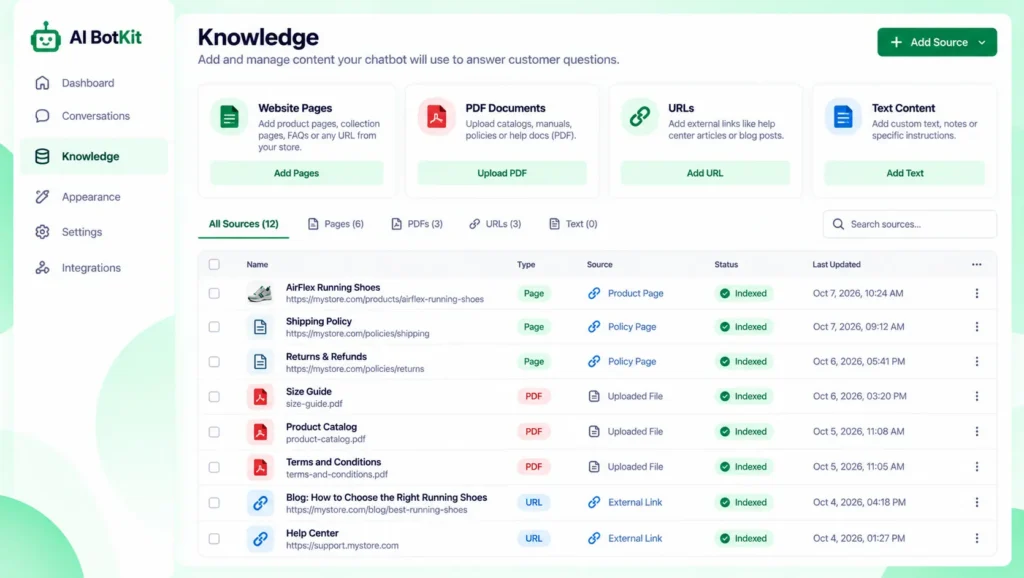
Set a fallback and handover
Write a fallback message for questions the bot can’t answer, and make it useful: “I’m not sure about that. Email us and we’ll reply as soon as we can.” Then decide which questions should go to a person.
Test with real questions, then publish
Take 10 to 15 real questions from your audit and ask them before you publish. Mark each answer right, wrong, or “not on any page”. Fix wrong answers by editing the page behind them, not by arguing with the bot. Then publish and read the first conversations.
What should you check before you trust a chatbot with pre-sales answers?
Check three things: stale answers, data handling and cost. Retest the bot every time you change a product, price or policy page.
Stale answers after product changes
How well a tool tracks changes depends on how it reads your content. After you rename, reprice or remove a product, ask the bot about that product again. If you use several sources, such as pages and a PDF, update each one.
Privacy and data handling
Tell shoppers they’re chatting with a bot, and keep documents with customer details out of the training sources. Before you publish, read the provider’s privacy policy to see where conversations are stored and who can see them. This isn’t legal advice.
What it costs to test
You can start on a free plan, which has a monthly message limit. The pricing page lists current limits and prices. Test on your own pages before you pay for anything.
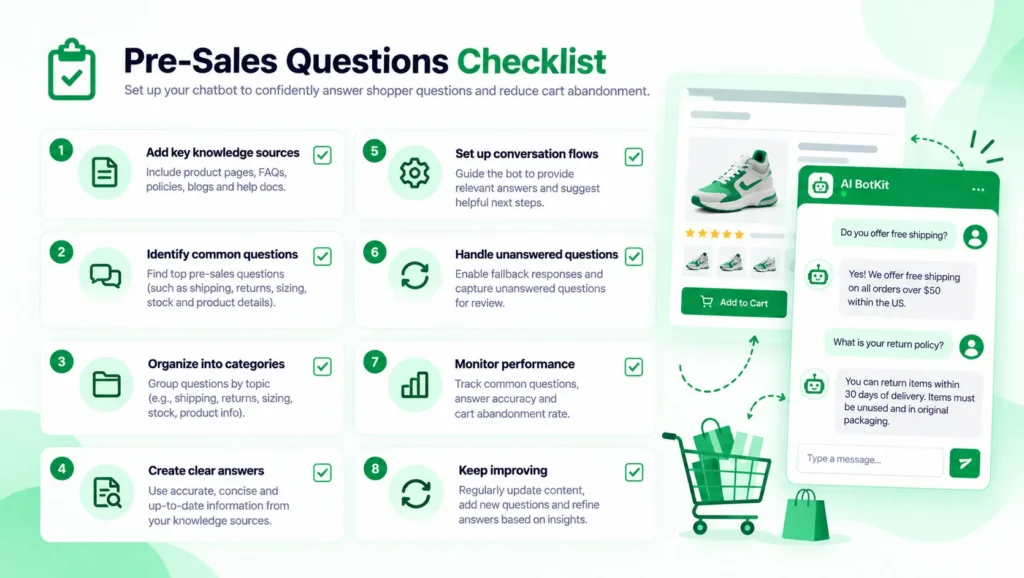
Your pre-sales questions checklist
Run through this list before you publish a bot, or use it to fix your pages without one. Fix the repeated questions first; everything else supports that.
- Pull a month of shopper messages from email, DMs, forms and chat
- Tag each pre-sales question: your pages, live data, or a person
- Fix the three most repeated questions on the page itself
- Read your shipping, returns and FAQ pages as a first-time buyer would
- Add those pages and any PDFs as the bot’s training sources
- Write a fallback message that points shoppers to you
- Test 10 to 15 real questions before you publish
- Retest after every product, price or policy change
FAQ
What are pre-sales questions in ecommerce?
Pre-sales questions in ecommerce are the questions shoppers ask before buying, such as shipping time, returns, sizing, stock and fit. They differ from post-purchase questions about an order that already exists. Left unanswered, they can send a shopper away.
Can a chatbot answer pre-sales questions automatically?
Yes, for questions your pages already answer, such as shipping policy, return windows and product details. The answers are only as good as the pages the bot was trained on. Questions about refunds, damaged items or payment problems should go to a person.
Can a chatbot check stock or look up orders?
Not from pages alone. A bot trained only on pages can repeat what a page says about stock, but it can’t see a live count or one customer’s order. That needs a live connection to your store’s data, so check what any tool supports. Our guide to how WordPress chatbot plugins work and how to choose one explains more.
Do I need a chatbot, or is an FAQ page enough?
If you get a handful of pre-sales questions a month, a clear FAQ page and a visible returns policy may be enough. If you answer the same questions by hand every week, a bot trained on those pages can save you the repeat replies. Run the inbox audit first, because it will tell you which one you are.
What should a chatbot do when it doesn’t know the answer?
It should say so and send the shopper to a person instead of guessing. Write a fallback message that points to your email or contact route, and decide in advance which questions are yours. Then read the first conversations to see which pages to write next.
Shoppers who can’t get a quick answer to a shipping or returns question can leave before you ever see the message. Start with your inbox, sort the questions into the three buckets, and fix the pages behind the repeats.
If you’re answering the same questions by hand every week, we built AI BotKit for stores in exactly that spot, with a free plan so you can test it first. Start free and train it on your own pages today.