
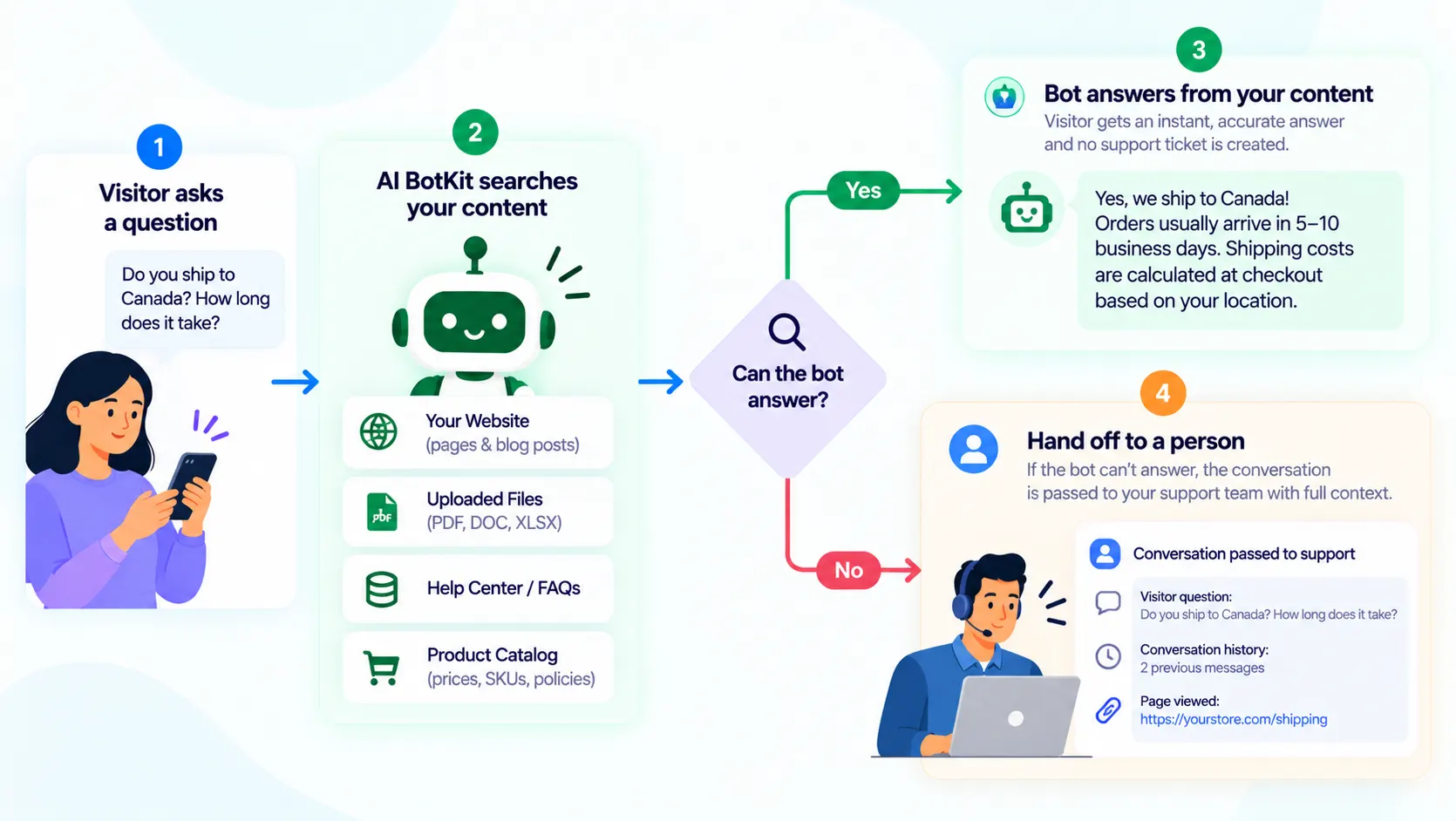
To deflect support tickets with AI, train a chatbot on your own pages and documents so it answers repeat questions before they reach your inbox, and let it hand off the rest. That’s how to reduce support tickets as a small team. Expect a share of your repeat questions at first, not 80% of everything.
If you run a small site or store, you know the Tuesday-morning inbox: the same five questions about shipping, refunds, hours and compatibility, arriving in slightly different words. Each takes two minutes, and none needs you.
At AI BotKit, we build a chatbot for exactly this job. This guide shows you how to set one up, what results to expect, and where it should step aside.
What does it mean to deflect support tickets (and what counts as a ticket)?
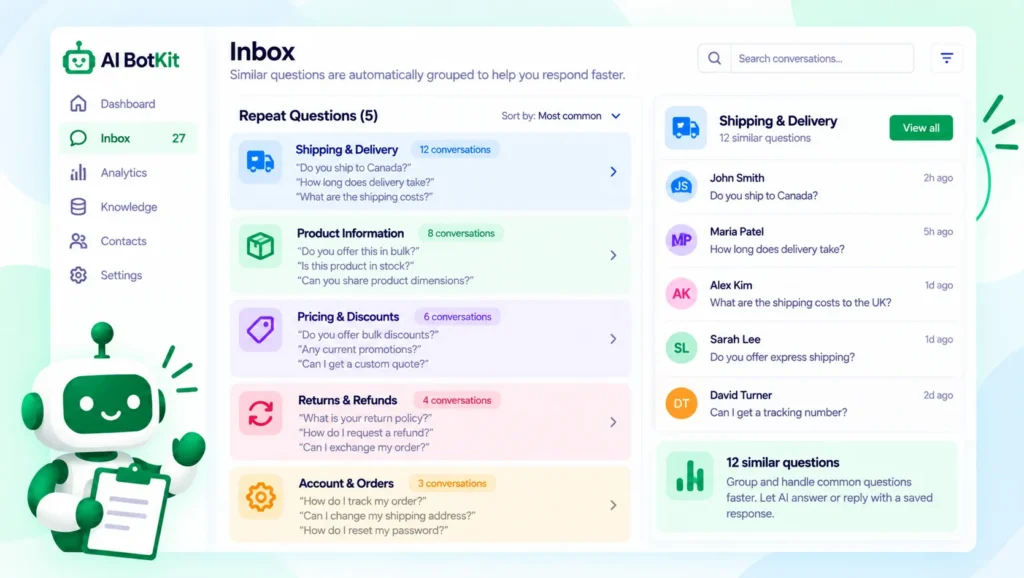
To deflect support tickets means a customer gets their answer from a chatbot or help page and never writes to you at all. A “ticket” here is any message that lands on you: an email, a contact form entry, a WhatsApp message or a DM.
It can also be a case in a helpdesk like Zendesk or Freshdesk, but you don’t need a helpdesk to have a ticket problem.
Deflection is not the same as resolution. A question is deflected when it never reaches you. It is resolved only when the person got the right answer and didn’t need to ask again.
A bot that closes a conversation the customer abandoned has deflected a ticket and solved nothing.
Is 80% realistic? What the numbers actually say
You’ll see 80% quoted often, so it helps to know what it measures before you plan around it.
Where the 80% comes from
Gartner predicted in March 2025 that by 2029, agentic AI will autonomously resolve 80% of common customer service issues without human intervention. Agentic AI means systems that take actions for the customer, such as cancelling a membership, not just retrieving an answer.
A chatbot that answers from your own pages is a smaller thing, and 2029 is not this month.
Why deflection numbers often look better than they are
The measured picture is more modest. Gartner surveyed 5,728 customers in December 2023 and found only 14% of issues were fully resolved in self-service, and only 36% even when customers called the issue very simple. That survey predates today’s chatbots, so treat it as a baseline for help pages and FAQs, not a ceiling for AI.
Vendor numbers vary too. In an Intercom Community thread, a staff reply says a good AI resolution rate starts around 30 to 50 percent, while one customer wrote, “Here our average is 25%.” Another reported 55 to 60 percent.
The same reply explains that a conversation counts as resolved if the customer says it helped or simply goes quiet.
| Source | What it claims | What it measures | Caveat |
|---|---|---|---|
| Gartner forecast (March 2025) | 80% of common issues resolved autonomously by 2029 | A prediction for agentic AI | A forecast, not today’s result |
| Gartner survey (August 2024) | 14% of issues fully resolved in self-service | Customer-reported outcomes, December 2023 | Predates today’s chatbots |
| Intercom Community thread | Staff: 30 to 50% is a good start; customers report 25% to 60% | Intercom’s own definition of “resolved” | Silence can count as resolved |
Your useful target isn’t a headline percentage. It’s how many of your own repeat questions the bot answers correctly.
Do you have enough repeat questions for a chatbot to help?
A chatbot earns its place only if the same questions keep coming and the answers already exist somewhere. Score yourself honestly:
- Do you answer the same handful of questions several times a week?
- Does a correct answer already exist on a page, in a PDF or in a policy you could paste from?
- Do questions arrive when you’re not working, such as evenings, weekends or other time zones?
- Are most of them factual: shipping times, hours, policies, how something works?
- Would a slow reply cost you a sale or an unhappy customer?
- Can you spend 30 minutes a week reading what the bot was asked?
- 0 to 2 yes: a clear FAQ page or a set of saved replies is probably enough for now.
- 3 to 4 yes: try a free plan on your top five questions.
- 5 to 6 yes: you have a strong case, so start with step 1 below.
Question 2 matters most: if no answer is written down, the bot has nothing to answer from.
If you answer by email or a contact form
Most small teams have no helpdesk, just an inbox. Your ticket log is the last month of sent mail. Tally the questions you answered more than twice. Thirty or forty emails a week is plenty to learn from.
If you run a store
The questions that repeat most in stores are usually pre-sales ones: shipping time, returns, sizing and stock. We cover them in our guide to pre-sales questions ecommerce stores leave unanswered.
If you already run a helpdesk
Filter the last month by topic and start with the two or three question types that repeat most. Leave billing disputes, bug reports and anything emotional with a person for now. Widen the scope after a few weeks of reading real conversations.
If you build for clients
Build one bot per site, trained only on that client’s content, so one client’s policies stay out of another’s answers. Agree the fallback message and handoff with the client before launch, because those decide who receives the messages.
How to deflect support tickets with a chatbot, step by step
Here is the setup we’d use for a first month. You can start on a free plan and stop after any step.
1. Find your five most repeated questions
Skim the last month of emails, DMs and contact-form messages and tally the questions that repeat. Write the top five in the words customers actually use, not your internal terms. Keep the list: it becomes your test set in step 5.
2. Check that your content actually answers them
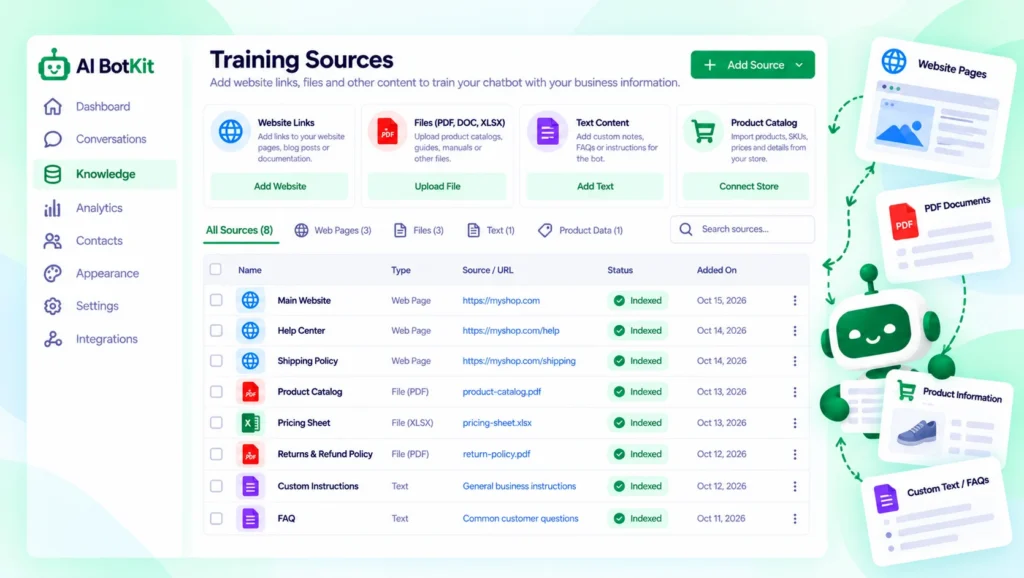
A chatbot can only answer from what you give it, so thin or outdated pages produce thin or outdated answers. For each of the five questions, find the page, PDF or policy that answers it today.
If you can’t find one, write the answer first, because that question isn’t ready to deflect.
3. Train the bot on those pages, PDFs and URLs
Now add the sources. We built AI BotKit so you can train a no-code chatbot trained on your own content: your website pages, posts, PDFs and external URLs. On WordPress there’s a plugin, and our install guide walks through it. On Shopify, Squarespace, Wix or custom HTML, you paste an embed snippet instead.
If you’re wondering how this differs from a generic chat widget, AI BotKit vs ChatGPT Widgets covers it. The short version: a trained bot answers from your content, so your content sets the ceiling. Setup details are in our documentation.
4. Decide what it says when it doesn’t know
Every bot meets questions it can’t answer, so decide that moment in advance. We let you set the fallback message, for example one that apologises and points the visitor to you. Write it as if you were replying personally. A fallback that sends people somewhere useful beats a confident guess.
5. Test it with real questions before it goes live
Ask the bot your five questions, plus five rephrased versions, and compare each answer with what you’d say. When one is wrong, check the source page first, since wrong answers often trace back to unclear or outdated content.
Expect some variation. One user testing a different WordPress chatbot plugin called it “a little unpredictable” and blamed the underlying language model, in a 2023 thread on WP Tavern’s forums. If your store runs on WooCommerce, our WooCommerce chatbot setup guide covers the store-specific steps.
6. Go live, then read the conversations weekly
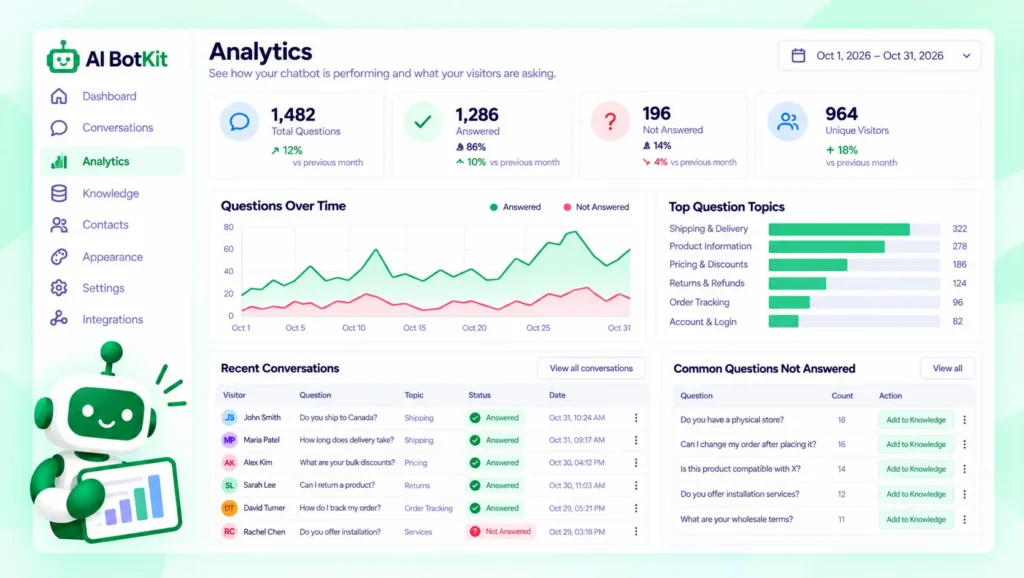
Launch on one page or site-wide, then spend 30 minutes a week reading what visitors asked. The analytics show what people ask and where the gaps are, so each unanswered question becomes a page to write or fix.
The bot improves because your content does, not because you tweak the bot.
When should the bot step aside and hand off to you?
Some questions should go straight to a person: refund disputes, billing problems, upset customers, and any question where a wrong answer costs real money. A bot with no way out is worse than no bot.
What a bot with no way out looks like
You can see the failure from the customer side in the Shopify Community, where merchants describe Shopify’s own support assistant. In one thread, a merchant writes that “the AI chat forgets that we have spoken and asks all over again.”
In another, several users say the assistant never connects them to a person, and one is thinking of closing their account.
Set up your handoff so the visitor reaches you with the conversation attached, and tell them how long a reply will take. In AI BotKit, we include a human handoff so a conversation can move to your team. How it works depends on your plan, so check our documentation.
What to check about data
Treat chat conversations as customer data. Before you train any bot, check what the tool stores, where, and for how long, and read its privacy policy. Keep documents containing customers’ personal details out of your training sources.
Ours is on our privacy policy page. Check any tool against your own obligations, because only you know which ones apply to your business.
How do you know it’s working?
Track one number and one habit. The number is your deflection rate: the share of chat sessions that ended without the visitor contacting you. Magentrix gives the formula as sessions minus tickets created, divided by sessions, times 100.
Say 100 visitors use the bot in a month and 60 of them still email you about the same thing. That’s 100 minus 60, divided by 100, so 40%. These numbers are illustrative.
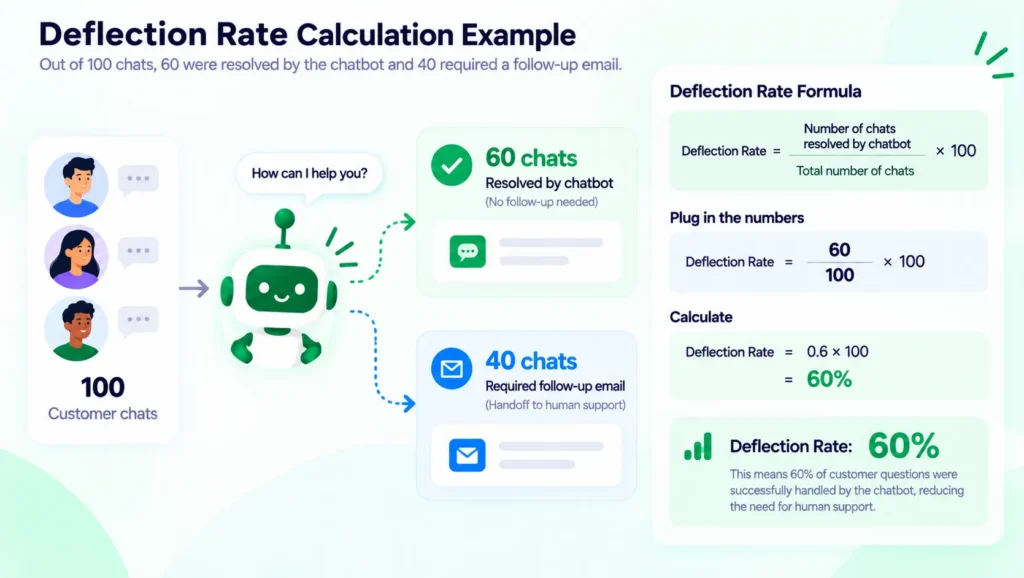
The formula can’t see someone who got a poor answer and left. So add the habit: each week, check whether anyone emailed you about something the bot had already answered. A rising follow-up rate means the bot is closing conversations, not solving them.
FAQ
What’s a realistic ticket deflection rate with AI?
It depends on your content and your mix of questions, so there’s no honest single number. Intercom’s staff say a good AI resolution rate starts around 30 to 50 percent, and customers in the same thread report anywhere from 25 to 60 percent. For a small team, measure your own five repeat questions first.
What’s the difference between ticket deflection and resolution?
Deflection means the question never reached you. Resolution means the customer got a correct answer and didn’t need to ask again. The two drift apart when a customer gives up, which is why you should check for follow-up emails.
Can I deflect support tickets without a helpdesk?
Yes. Your inbox, contact form and messaging apps are your tickets. List the questions you answer most, train a chatbot on the pages that answer them, and read the conversations weekly. A helpdesk helps at scale, but it isn’t required.
What happens when the chatbot doesn’t know the answer?
It shows the fallback message you’ve set, so write one that points visitors to you. Whether it can also pass the conversation to your team depends on your tool and plan.
Will customers be annoyed by a chatbot?
They are when it traps them, as the Shopify merchants above describe. A bot that answers clear questions quickly and hands off cleanly is a different experience.
If you counted five or more questions you answer every week, the quickest way to see what a bot would handle is to try it on those five. We built AI BotKit with a free plan so you can build a free chatbot trained on your own pages and read a week of real questions before you decide anything.