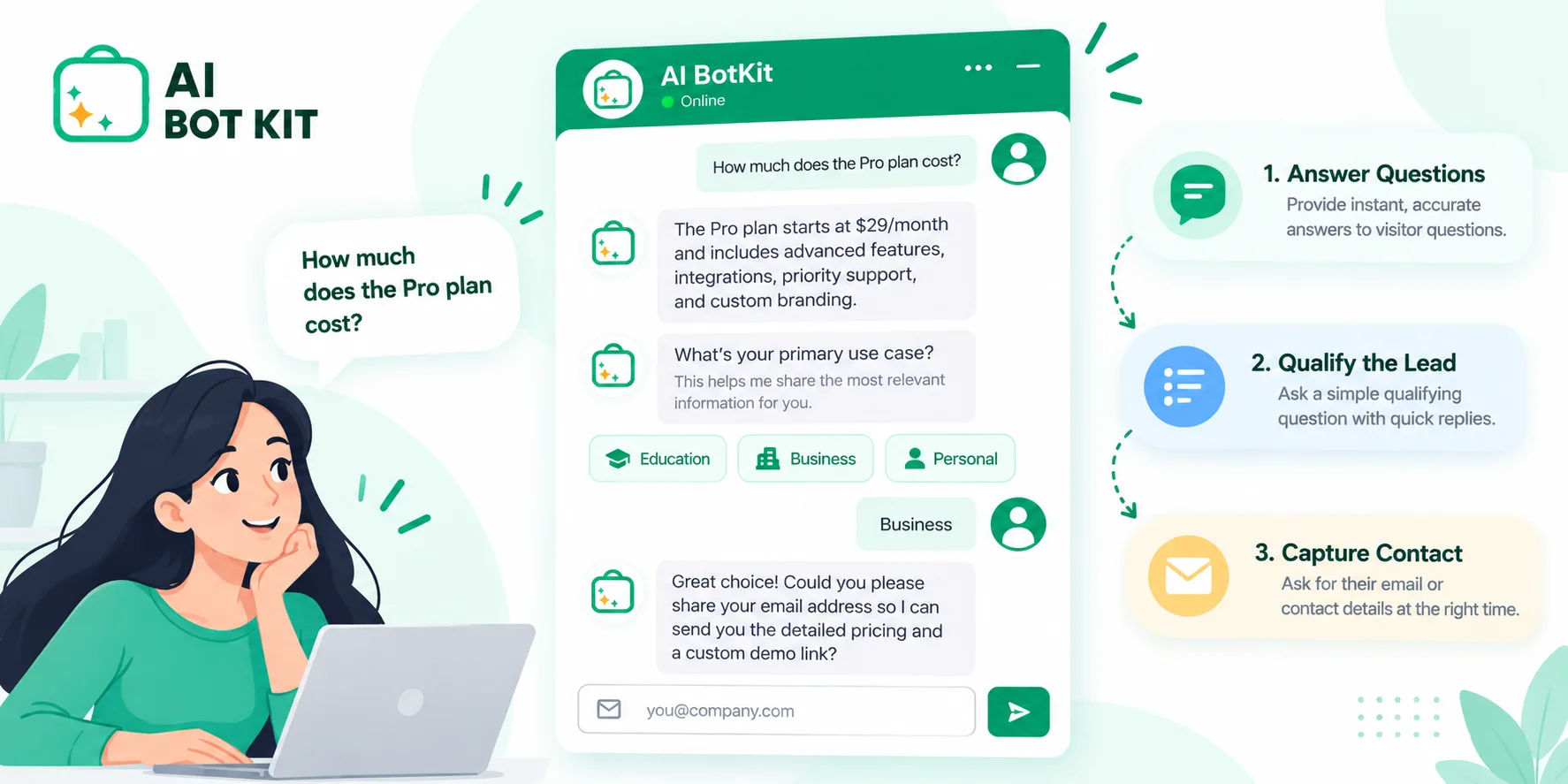
Chatbot qualifying questions are the few questions a website chatbot asks to work out what a visitor wants, whether you can help them, and how soon to follow up. Most small businesses need only three to five per conversation, picked from a bigger bank to suit the page. Below are 15, grouped by what each tells you, with ready-made sets so your lead qualification chatbot asks the right ones.
Someone lands on your pricing page at 9 p.m. and asks your chatbot whether you work with businesses their size. The bot replies with a form asking for their name, email, phone number and budget. They close the tab, and you never learn they were a good fit.
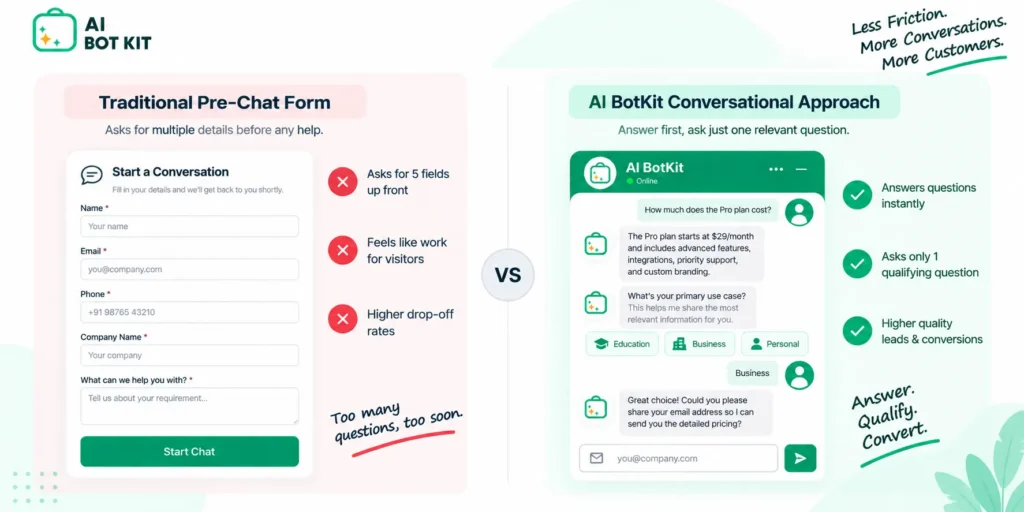
We built AI BotKit around the opposite order: answer first, then ask the one question that tells you who you’re talking to. This guide gives you the full bank of questions, then shows you how to choose the handful that fit your pages.
Why does a lead qualification chatbot need fewer questions than you’d think?
Qualifying questions exist to decide what happens next: who follows up, how quickly, and with what. A question that doesn’t change any of those is just friction, and every extra step gives a visitor another moment to leave.
Speed is the other reason to keep flows short. In their Harvard Business Review study, The Short Life of Online Sales Leads, Oldroyd, McElheran and Elkington found that firms that tried to reach a lead within an hour of the enquiry were nearly seven times as likely to qualify it as firms that waited even one hour longer, and more than 60 times as likely as firms that waited a day or more.
The same research found most businesses are slow. In an audit of 2,241 US companies, 23% never replied to a web enquiry at all, and those that did took 42 hours on average. A chatbot fixes the first reply. A short flow makes sure more visitors finish that conversation, so their details reach you while they’re still interested.
Ask the fewest questions that change what you do next, and let the bot answer everything else.
Every question should change what happens next
Before adding a question, ask yourself one thing: if the visitor answered it differently, would you do anything differently? If not, cut it.
A salon doesn’t need team size. A web design studio probably doesn’t need the visitor’s postcode. A plumber almost certainly does, because it decides whether the job is even possible.
An AI chatbot can pick up answers you didn’t ask for
An AI chatbot reads what visitors type, so it doesn’t need a separate question for every detail. Someone who writes “I run a small physio clinic in Pune and want online booking” has already told you their business type, location and need.
A good bot responds to that and moves on to what’s still missing. That’s the practical case for a chatbot that captures and qualifies leads instead of a fixed questionnaire.
There’s a real dependency here, though. We train AI BotKit on your own pages, posts, PDFs and external URLs, and those are the sources it answers from. If your service pages are thin or out of date, its answers will be too. The better your content, the more useful the “answer first” half of the conversation becomes.
The 15 chatbot qualifying questions, grouped by what they tell you
Treat this list as a bank, not a script. Each question sits in one of six groups, and each comes with a note on when to skip it. Most sites will use three to five in total.
Pick from each group only when the answer changes your follow-up.
Intent: what did they come here to do?
Intent questions come first because they sort sales conversations from support and research. A useful starting point is the five-question sequence Digital Marketer co-founder Ryan Deiss tested for chatbots, covered in Nutshell’s guide to qualifying leads with chatbots. The three below build on the same idea.
1. “What brought you here today?”
What it tells you: whether this is a buying, support or research visit, in the visitor’s own words.
Skip it if: the page already tells you. Someone on your “book a repair” page has answered this by being there.
2. “Are you comparing options, or ready to pick one?”
What it tells you: how far along they are. People comparing options want to know what makes you different. People who are ready want the next step.
Skip it if: you sell low-cost items where nearly everyone is ready to buy.
3. “What would be most useful right now: a quote, a quick call, or just answers?”
What it tells you: which next step they’ll actually accept. It also respects the people who only want answers, and they often come back later.
Skip it if: you offer only one next step.
Need: what problem are they trying to solve?
4. “What’s the main thing you’re trying to fix?”
What it tells you: the problem behind the visit. This is the one question that belongs in almost every set.
Skip it if: the visitor has already described their problem in their first message.
5. “What have you tried so far?”
What it tells you: whether they’re switching from something else and what disappointed them. That’s valuable for whoever follows up.
Skip it if: this is usually a first-time purchase in your category.
6. “What would make this worth it for you?”
What it tells you: how they’ll judge success, which helps you pitch the follow-up.
Skip it if: the purchase is simple. It feels heavy before a small order.
Fit: can you actually help them?
7. “What kind of business or project is this for?”
What it tells you: whether they match the customers you serve well.
Skip it if: you genuinely serve everyone the same way.
8. “Where are you based?”
What it tells you: for local and service businesses, whether you cover their area. Say why you’re asking (“so I can check we cover your area”) and people answer more readily.
Skip it if: you work entirely online.
9. “Roughly how big is this: how many people, products or pages?”
What it tells you: the scale of the job, which usually points to a package or plan. Offer ranges as buttons rather than asking for a number.
Skip it if: scale doesn’t affect what you’d offer them.
Timing: how soon should you follow up?
10. “When are you hoping to have this sorted?”
What it tells you: urgency, so you know whose reply goes first. Ask it plainly and don’t manufacture pressure.
Skip it if: every enquiry gets the same response time anyway.
11. “Is there a date or event driving this?”
What it tells you: a hard deadline, such as a launch, a wedding or a busy season. This is often more useful than a vague timeframe.
Skip it if: your category rarely has deadlines.
Budget and decision: is this realistic?
12. “Which of these ranges is closest to what you had in mind?”
What it tells you: whether the enquiry is realistic for you. Show three or four ranges as buttons and always include “Not sure yet.”
Skip it if: your prices are public. Your pricing page already does this filtering.
13. “Is anyone else involved in making the call?”
What it tells you: whether the follow-up should include something they can share with a partner, co-founder or client. It’s gentler than asking “Are you the decision-maker?”
Skip it if: you sell to individuals making their own purchases.
Next step: where does this conversation go?
14. “Want me to pass this to [name] so they can come back with specifics?”
What it tells you: clear intent, plus the visitor’s agreement to be contacted. If you’re a one-person business, use your own name. It feels more personal than “our team”.
Skip it if: you have no one available to follow up within a reasonable time.
15. “What’s the best way to reach you: email or WhatsApp?”
What it tells you: how to follow up. Ask for one channel, not three, and ask it last, after the bot has been useful.
Skip it if: you already have their details, for example because they’re logged in.
| # | Question | What it tells you |
|---|---|---|
| 1 | What brought you here today? | Visit type |
| 2 | Comparing options, or ready to pick? | Buying stage |
| 3 | A quote, a call, or just answers? | Preferred next step |
| 4 | Main thing you’re trying to fix? | Core need |
| 5 | What have you tried so far? | Switching intent |
| 6 | What would make this worth it? | Success measure |
| 7 | What kind of business or project? | Fit |
| 8 | Where are you based? | Service area |
| 9 | Roughly how big is this? | Scale |
| 10 | When do you want this sorted? | Urgency |
| 11 | Is a date driving this? | Deadline |
| 12 | Which budget range is closest? | Realistic spend |
| 13 | Is anyone else involved? | Decision path |
| 14 | Pass this to [name]? | Consent to follow up |
| 15 | Email or WhatsApp? | Contact channel |
Which 5 should your bot ask? Sets by business type
The right five depend on what you sell and how you follow up. These sets are starting points. Swap a question out as soon as your chat transcripts show it isn’t pulling its weight.
Start with the set closest to your business, run it for two weeks, then cut whatever never changes your reply.
| Business type | Questions | Why this set |
|---|---|---|
| Service business | 1, 4, 8, 10, 15 | Area and urgency decide whether you can take the job |
| Online store (bulk, custom or high-value orders) | 2, 4, 9, 12, 15 | Scale and budget separate trade enquiries from casual shoppers |
| SaaS or digital product | 2, 4, 7, 9, 14 | Fit and scale point to the right plan |
| Agency building for a client | Chosen with the client | The client’s follow-up process decides the set |
Service business
For a clinic, salon, repair business or consultant, the first job is confirming you can help at all. Location and timing matter more than budget, because you’ll usually quote after you understand the job.
Online store
For most small stores, the chatbot’s main job is answering product questions, not qualifying anyone. Qualify only when an enquiry is for a bulk, custom or high-value order, because that’s when a personal follow-up is worth your time.
SaaS or digital product
Visitors here are often comparing you with other tools. Question 2 tells you where they are in that process, and questions 7 and 9 point you to the right plan to talk about.
Agency building a bot for a client
If you’re building a chatbot for a client, choose the set with them, not for them. Start from the end: who reads the lead, on which device, and how fast can they reply? That decides question 14 or 15. If some of your clients are on Squarespace rather than WordPress, our guide to Squarespace AI chatbots covers setup there.
What order should the questions come in?
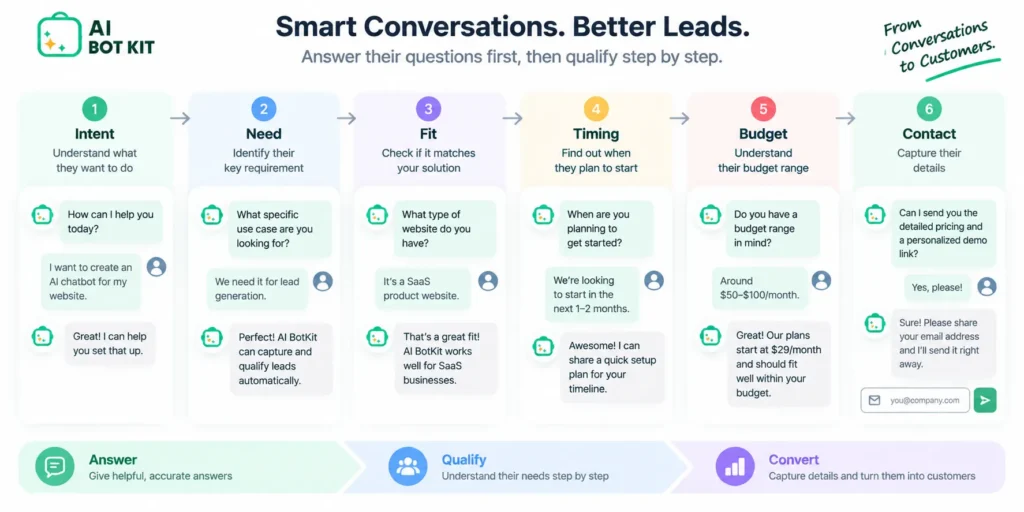
The order that works best follows how people naturally explain themselves: intent, then need, fit, timing, budget, and finally contact details. Wherever you can, have the bot answer something useful between questions so the chat never feels like a form.
Ask for contact details last, once the bot has earned them.
The “form before chat” trap
Many owners want to collect details before the chat even starts. One site owner asked in the WordPress.org support forum for AI Engine whether they could put a form in front of the chatbot to gather user information before the conversation began.
The instinct is understandable, but it works against you. Bluehost’s guide to chatbot lead generation warns that requesting a name and email in the first or second message causes most visitors to abandon the chat. A visitor who hasn’t been helped yet has no reason to hand over their email.
How to turn someone down kindly
Some visitors won’t be a fit, and your bot should say so politely rather than collecting their details for nothing. A line like “That’s outside what we cover, but here’s where people usually go for it” keeps goodwill intact.
If you can point them to a genuinely useful page or resource, do. Visitors remember a business that helped them even when it couldn’t sell to them.
Where do the answers go when there’s no sales team?
For many small businesses, the person reading the lead is the owner, on their phone, between jobs. So the answers need to arrive somewhere you already look, and in a form you can act on in seconds.
The problem isn’t only a small-business one. One user on G2’s discussion of AI chatbots for lead qualification said their aim was to cut the manual work of sorting through inbound leads so time goes only to the best prospects.
The best qualifying flow is wasted if the answers land somewhere you don’t check.
Getting leads to your inbox or phone
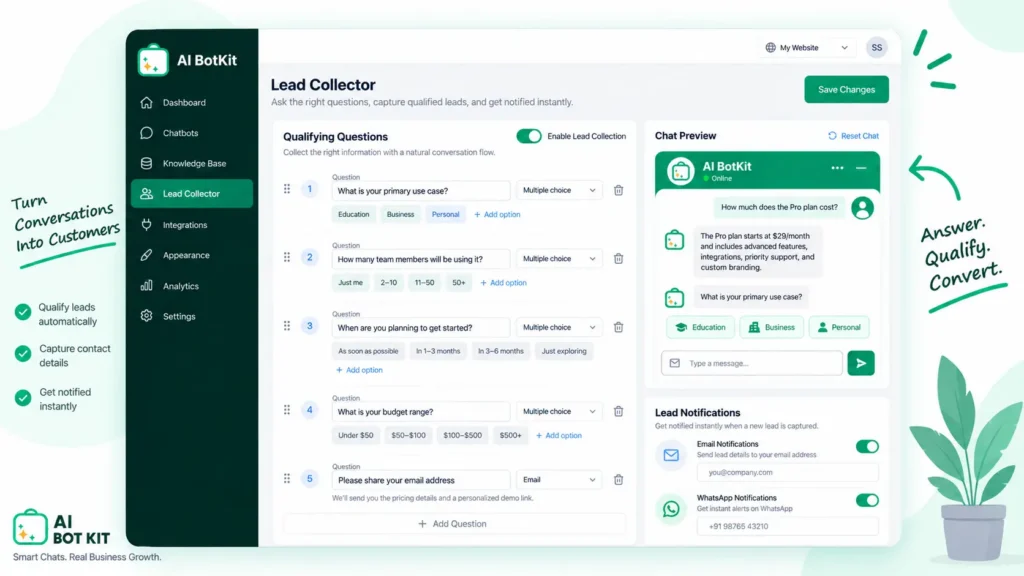
In AI BotKit, we send the leads your bot qualifies straight to you by email or WhatsApp, along with the answers the visitor gave. You can see the flow on our demo page before setting anything up. If you’re on WordPress, our guide to the best chatbot for WordPress walks through installation.
Handing off to a person without making the visitor repeat themselves
Some conversations should go to a human: a pricing exception, a complaint, or a question your content doesn’t cover. Our bots pass those conversations to your team with the full context, so the visitor doesn’t have to explain themselves twice.
What to check about data handling
Qualifying questions mean collecting personal details, so check where chat transcripts and lead details are stored, and for how long. Make sure your privacy policy mentions the chat, and only ask for what you’ll actually use.
If you work in a regulated field or sell into the EU, confirm your obligations with someone qualified. Don’t assume any tool, including ours, covers them for you.
Checklist: is your chatbot qualifying leads or just interrogating visitors?
If you’re already running a chatbot and the leads feel thin, run through these six checks. If you’re setting up your first one, use them as your launch list.
☑ It answers the visitor’s question before it asks one of its own.
☑ It asks no more than five qualifying questions in one conversation.
☑ Every question changes who follows up, how fast, or with what.
☑ Budget is offered as ranges, including “Not sure yet”.
☑ There’s a clear way to reach a person at any point.
☑ You’ve read last week’s transcripts and cut the question people drop off at.
If you tick fewer than four, fix the order before you change the questions.
FAQ
How many qualifying questions should a chatbot ask?
Three to five is enough for most small businesses. Pick the questions whose answers change your follow-up, and let an AI chatbot pick up anything the visitor mentions on their own. Past five, the chat starts to feel like a form and completion drops.
Should a chatbot ask about budget?
Only if budget decides whether you can help, and only as a set of ranges with a “Not sure yet” option. If your prices are public, skip it, because your pricing page already does that filtering.
Should a chatbot ask for an email address right away?
No. Asking for contact details before the bot has helped is one of the most common reasons visitors abandon a chat. Ask last, and ask for one channel only.
Can an AI chatbot qualify leads without a fixed script?
Partly. An AI chatbot can note details a visitor offers unprompted, such as their business type or location, and skip questions that are already answered. You still need to decide which details matter, because the bot can only work toward the criteria you give it.
What is BANT, and does a small business need it?
BANT stands for budget, authority, need and timeline, a sales framework for judging whether a lead is worth pursuing. Small businesses rarely need all four. Need and timing usually matter most, and authority only matters when someone else signs off on the purchase.
Pick the five questions that match your business, put them on the page where visitors ask the most, and read the first week of transcripts before changing anything. If you’d like a chatbot that answers from your own content and sends qualified leads to your inbox or WhatsApp, you can start on our free plan and have it live today with AI BotKit.