
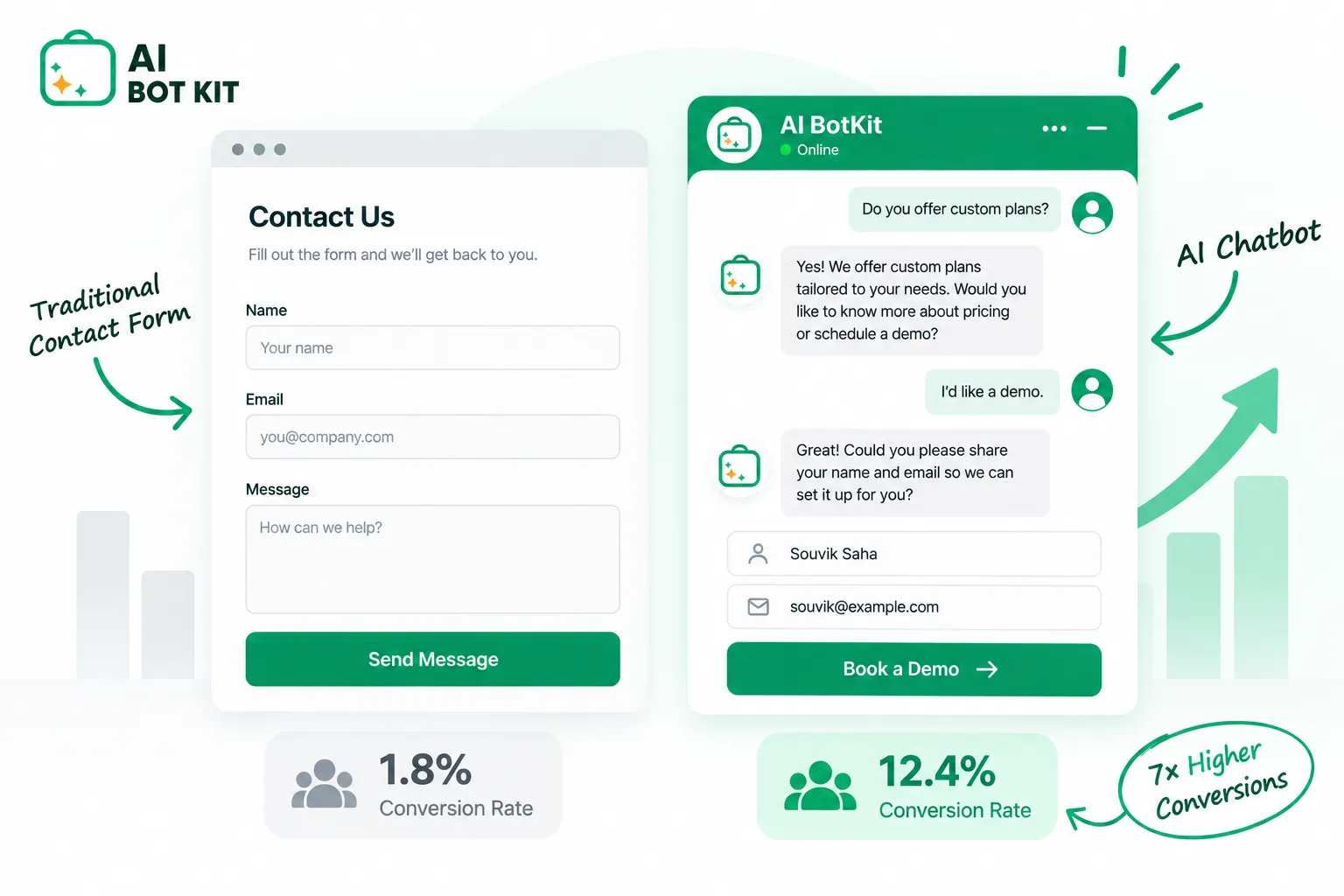
A chatbot usually captures more leads than a contact form when two conditions hold: it answers the visitor’s question before asking for their details, and it’s trained on accurate content. The common “1–3% vs 10–15%” comparison measures different groups of visitors, so the only chatbot conversion rate you can trust is the one you measure on your own site. Keep the form for detailed requests and for visitors who prefer it.
Search “chatbot vs contact form” and nearly every result repeats the same numbers: contact forms convert 1–3% of visitors, chatbots convert 10–15%. We went looking for the study behind those figures and couldn’t find one.
What we did find is more useful. The two figures count different visitors, so part of the gap they show comes from how they’re measured. The number that matters is your own chatbot conversion rate compared with your own form, measured the same way.
At AI BotKit, we build a chatbot, so you’d expect us to pick a side. Instead, every number below links to its source, and one section covers when your form should stay exactly as it is.
Where do the “1–3% vs 10–15%” numbers come from?
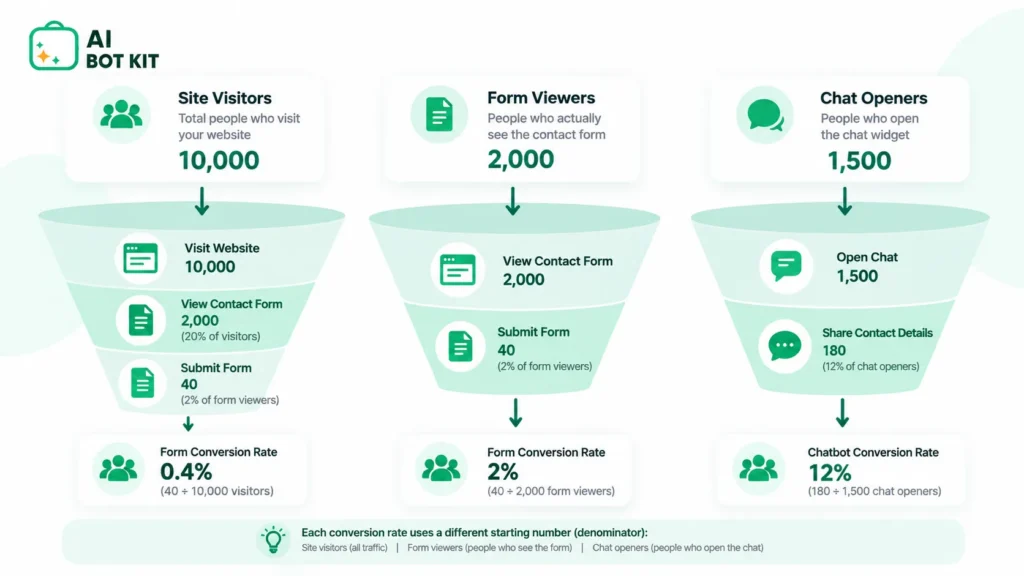
A conversion rate is leads divided by a starting count. If you change the starting count, the rate changes, even when nothing about the form or the chatbot has changed. That is the core problem with the headline comparison.
The form number counts every visitor to the page
The 1–3% figure is usually presented as the share of all page visitors who end up submitting the form. One vendor comparison, for example, puts forms at 1–3% against 10–15% for chatbots on the same pages. None of the pages we reviewed links that figure to a published study.
That doesn’t make it wrong. It’s a plausible range for a contact form on a services page. It just isn’t sourced, and it counts everyone who loaded the page, including people who never scrolled down to the form.
The chatbot number often counts only people who opened the chat
Chatbot figures often start from a smaller, warmer group. Conferbot’s FAQ, for instance, says most businesses see 8–15% of chatbot-engaged visitors become leads, against 2–5% for contact forms.
Someone who opens a chat has already shown interest. Measuring leads against that group, then comparing the result with a form measured against every page visitor, tilts the outcome before the test even starts.
Comparing an engaged-visitor rate with an every-visitor rate will always make the chatbot look better.
What independent form data says
The most useful neutral data on forms comes from Zuko, a form analytics company. Its benchmark finds that only 45% of people who reach a form go on to complete it. That is a third starting count: people who reached the form itself.
Zuko’s breakdown by form purpose also shows that contact and enquiry forms have the lowest completion of any form type. That’s a real, sourced reason contact forms underperform, and it doesn’t rely on anything chatbot vendors say.
| What’s being counted | Figure often quoted | Where it comes from |
|---|---|---|
| Page visitors who submit a contact form | 1–3% | Vendor comparison pages, no primary study linked |
| Chat-engaged visitors who share contact details | 8–15% | Conferbot FAQ |
| Form viewers who complete the form | 45% | Zuko benchmark, all form types |
Why do chatbots often capture more leads when they’re set up well?
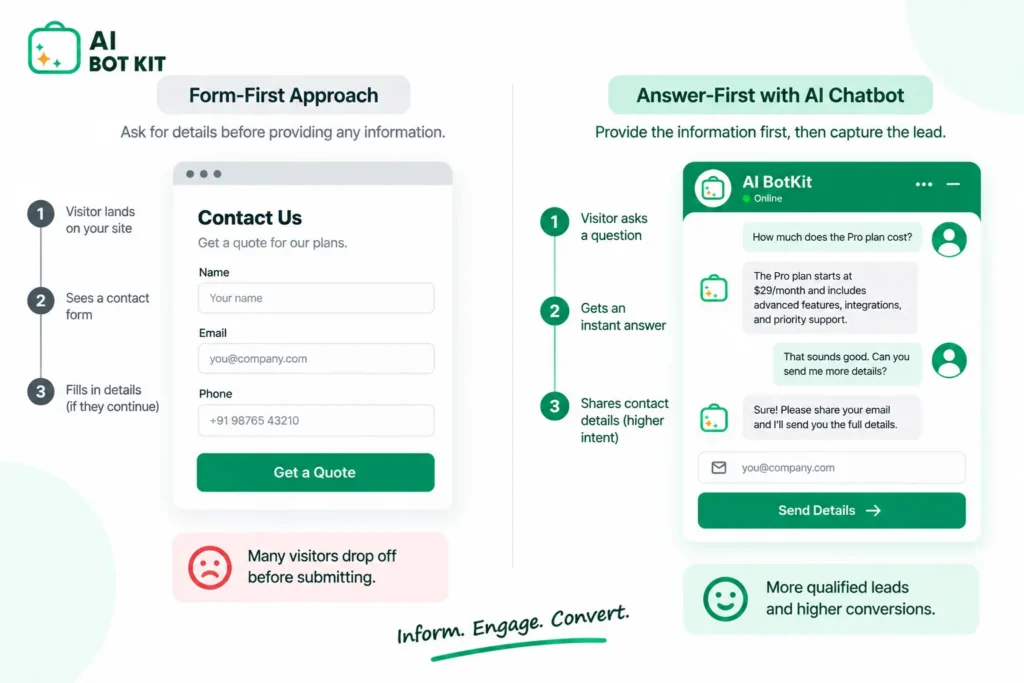
The honest case for a chatbot rests on two things a form can’t do: answering before it asks, and replying in seconds. Neither depends on the AI being clever. Both depend on how you set it up.
Answers come before the ask
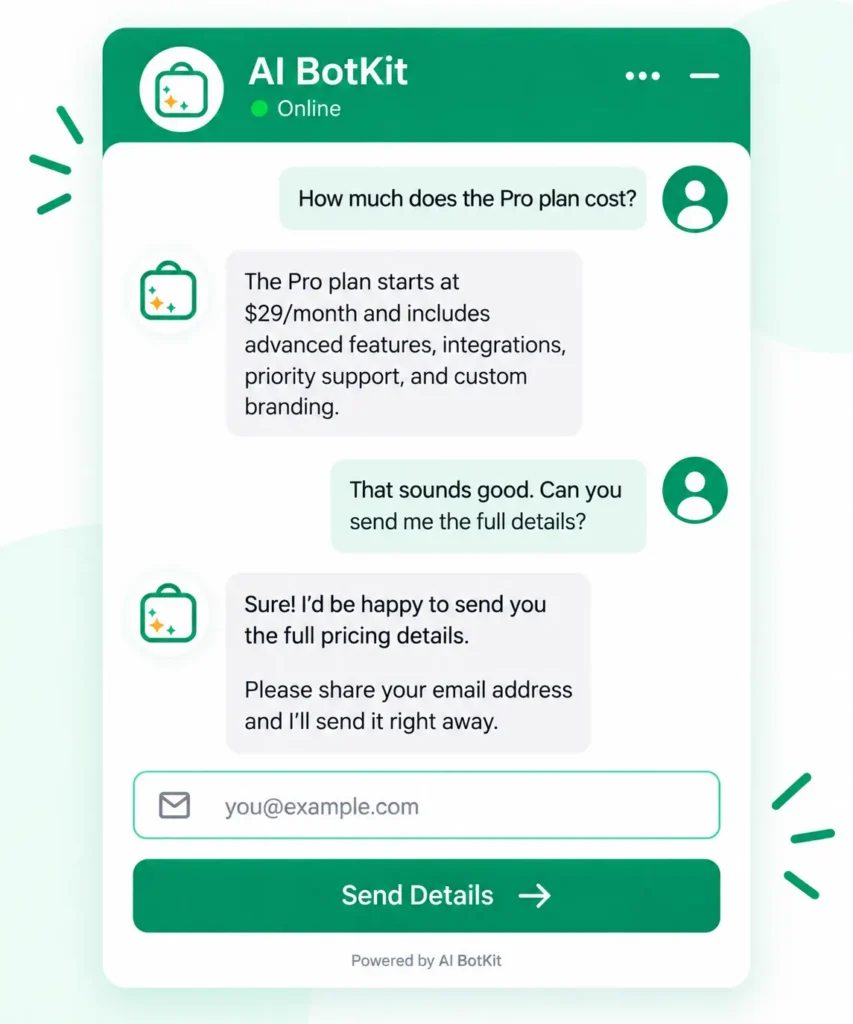
A form asks for your name and email before you get anything back. A chat can answer the pricing or availability question first, then ask for an email address to send a quote. The visitor gets something useful before they give anything.
That order matters most for early-stage visitors who aren’t ready to talk to anyone yet. Our lead generation chatbot guide covers which qualifying questions to ask once the visitor has their answer.
Response time is where most forms lose
Forms rarely lose leads at the moment someone submits them. They lose them in the hours afterwards. When Harvard Business Review audited 2,241 US companies in 2011, the average response to a web lead took 42 hours, and 23% of companies never replied at all.
The same research found that firms that followed up within an hour were nearly seven times as likely to qualify the lead as firms that waited even one hour longer. The study is 15 years old, but the pattern still holds for small teams who answer forms in between other work.
A chatbot doesn’t fix your follow-up. What it does is give the visitor an answer straight away and hand you a lead with context, so your reply the next morning starts further along.
The fields people drop out on can come later
Zuko’s field-level data shows email and phone fields have abandonment rates of around 6.4% and 6.3%, among the highest of any common field. On a form, those fields sit at the start. In a chat, you can ask for them once the visitor has a reason to share them.
Most of a chatbot’s advantage comes from speed and sequence, not from the AI itself.
When is a contact form the better choice?
A chatbot isn’t the right answer for every site or every enquiry. In three situations your form is probably doing its job, and replacing it would cost you leads.
Detailed or structured requests
If your enquiries need many specific details, such as project scope, dates, file uploads or a quote specification, a form collects them in one pass. A chat that asks for eight details one at a time is just a slower form.
Developers make the same point. In a Hacker News discussion about contact forms, one commenter said they prefer listing an email address, but still reach for forms when a client needs specific information collected.
When friction is doing a useful job
Some friction is deliberate. A solo developer on Hacker News wrote that “a significant number of users think of the contact form as a chatbot,” sending lazy one-line questions. Their response was to hide the form more and add extra fields to create friction.
More submissions aren’t automatically better. If your inbox fills with low-effort messages, a chatbot that removes all friction might raise your lead volume while lowering its quality. Track both.
When the bot has little good content to answer from
A chatbot answers from whatever content you give it. Thin, outdated or contradictory pages produce thin, outdated or contradictory answers, and visitors notice quickly.
That mistake is expensive. A Gartner survey published in September 2026 found that only 27% of customers would be willing to try a chatbot again after a negative experience. A form that goes unanswered loses one lead. A bot that answers badly can put the visitor off using your chat at all.
A badly set up chatbot costs more than a form, because it loses the lead and puts people off trying your chat again.
What the independent research adds
The academic evidence is mixed, and it’s about surveys rather than sales enquiries. A 2019 CHI paper comparing chatbot and web surveys concluded that the chatbot version produced higher-quality data. A 2026 experiment, however, found participants rated the chatbot-style design harder to navigate, with no significant difference in response time or answer length.
Chatbot vs contact form: a side-by-side comparison you can trust
Most comparison tables on this topic have two columns and one winner. This one adds a third column, because almost every row depends on how you set things up.
| Contact form | Chatbot | It depends on | |
|---|---|---|---|
| Time to first response | Whenever you reply | Seconds | Whether the bot’s answer is correct |
| Availability | Takes messages 24/7, replies in your hours | Answers 24/7 | Content quality for out-of-hours questions |
| What the visitor does first | Fills in fields | Asks a question | How soon the bot asks for details |
| Detail you receive | Exactly the fields you set | Contact details plus the conversation | Whether you read the transcript |
| Structured requests (quotes, applications) | Strong | Weak when many fields are required | Number of required fields |
| Lead qualification | None until you reply | Can ask two or three questions | Whether you set those questions up |
| Spam exposure | Basic forms are easy targets | Less studied, still worth filtering | Filtering on both |
| Setup effort | Minutes | Minutes to install, longer to train and test | Size and state of your content |
| Cost of getting it wrong | A slow reply | A wrong answer the visitor remembers | Training, plus a path to a person |
The chatbot wins most rows only if the “It depends on” column goes your way.
How do you test a chatbot against your contact form on your own site?
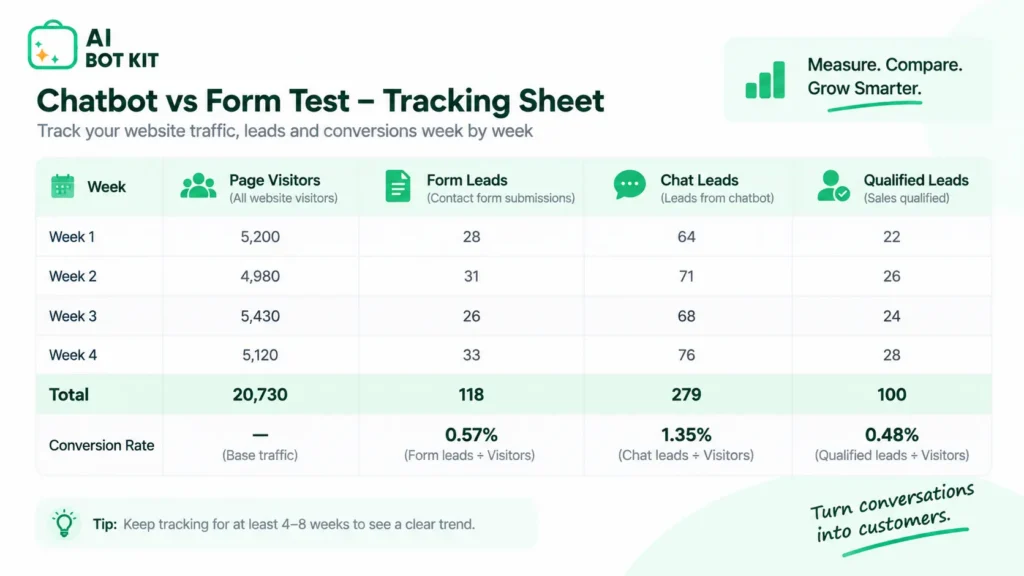
The only chatbot conversion rate worth trusting is one you measured yourself. This test takes about two months and needs nothing more than your analytics and a spreadsheet.
Step 1: Pick one page with steady traffic
Choose a pricing, services or contact page that gets consistent visits. Low-traffic pages take too long to show a difference, and testing across the whole site makes it hard to see what changed.
Step 2: Record a baseline for your form
For about four weeks, record page visitors and form submissions each week. Divide submissions by visitors and multiply by 100. That’s your form’s leads per 100 visitors.
Step 3: Add the chatbot and keep the form
Install the chatbot on the same page and leave the form where it is. Removing the form at the same time mixes two changes together, and some visitors will always prefer a form.
Step 4: Measure both against page visitors
Run the test for another four weeks, avoiding any big seasonal shift between the two periods. Count form leads and chat leads separately, and divide each by total page visitors, not by chats opened. Now both numbers share the same starting count.
Step 5: Count qualified leads, not submissions
Mark a lead as qualified if it led to a real conversation, quote or booking. Form totals are easy to inflate. A recurring complaint in the WordPress.org support forums is spam getting through, with one reply noting that simple forms are “easy for bots to target.”
Step 6: Decide page by page
If chat plus form beats form alone on qualified leads, keep both on that page and repeat the test on the next one. If it doesn’t, check the bot’s answers before giving up on it.
If you can’t measure both against the same number of visitors, you’re not comparing them.
Is a chatbot likely to beat your contact form? A 6-question self-check
Answer these honestly. They won’t give you a conversion rate, but they’ll tell you whether a test is worth your time.
- Does this page bring in at least a handful of enquiries a month?
- Do visitors ask the same few questions before they contact you?
- Do your pages answer those questions clearly and accurately today?
- Do form messages sometimes wait more than a few hours for a reply?
- Can most enquiries start without a lot of structured detail?
- Do visitors arrive outside the hours when you can reply?
Mostly yes: a chatbot is worth testing. Start with a free chatbot plan on one page and run the test above.
Yes to most, but no to question 3: fix your content first. A bot trained on weak pages will give weak answers.
Mostly no: your form is probably fine. Cut unnecessary fields and speed up your replies before adding anything. At AI BotKit, we’d rather you skip a chatbot than install one your content can’t support.
How do you set up a chatbot so it doesn’t hurt your conversions?
Train it on your real pages first
Point the bot at the pages visitors already read: services, pricing, FAQs and policies. If those pages are thin, fix them first, because the bot can only be as accurate as they are. Our guide to training a chatbot on your website content covers which sources to include.
Ask for details after the answer, and only what you need
Let the bot answer at least one question before it asks for anything. Then ask for one contact detail, usually email, plus one or two qualifying questions. Asking for everything up front just recreates the form.
Give visitors a clear path to a person
Some questions should go to you, not the bot. In the same Gartner release, 87% of customers said access to a human agent is essential when companies use generative AI in customer service.
People notice when that path is hidden. In a Hacker News thread about contact pages that push people away, one commenter described an app whose chatbot could only occasionally be coaxed into switching to a human. Keep the handoff obvious and keep the form.
Check how conversation and lead data is handled
Chat transcripts and lead details are personal data, just like form submissions. Before you go live, check where they’re stored, who can see them, how long they’re kept, and whether your privacy policy mentions the chat. Get advice if you’re unsure what rules apply to you.
How we approach this
We built AI BotKit so you can train a bot on your own pages, posts, PDFs and external URLs, capture leads inside the conversation, and hand off to a person when a question needs one. It runs as a WordPress plugin or as an embed snippet on Shopify, Wix, Squarespace or custom HTML.
To see what a chatbot that answers first and asks second looks like, try the live demo. If you’re on WordPress, our guide to capturing leads inside the chat walks through the setup.
Setup decides the result: the same chatbot can beat your form or lose to it, depending on your content and the order of its questions.
FAQ
What is a good chatbot conversion rate?
There isn’t a reliable universal benchmark, because published figures use different starting counts. The useful measure is leads per 100 page visitors, calculated the same way for your form and your chatbot on the same page. If chat plus form beats your form-only baseline on qualified leads, that’s a good rate for you.
Should I remove my contact form if I add a chatbot?
No, at least not until you’ve tested. Some visitors prefer forms, and detailed requests often fit a form better. Most sites do best by keeping the form and adding the chatbot alongside it.
Are chatbot leads lower quality than form leads?
It depends on the setup. A chat that asks one or two qualifying questions can give you more context than a one-line form message, but a chat with no friction can also attract more casual enquiries. Track qualified leads, not just totals, to find out which applies to you.
Can I use a chatbot and a contact form on the same page?
Yes, and it’s usually the safest way to start. Running both lets visitors choose how to reach you, and it gives you a clean comparison when you measure each one against the same page visitors.
If your form brings in a trickle of messages, your replies sometimes wait until the next day, and your pages already answer the questions visitors keep asking, a chatbot is most likely to help you. The low-risk way to find out is to add one to a single page, leave the form in place, and compare qualified leads for a month. That’s how we’d suggest trying AI BotKit: start free on one page, and let your own numbers decide.