
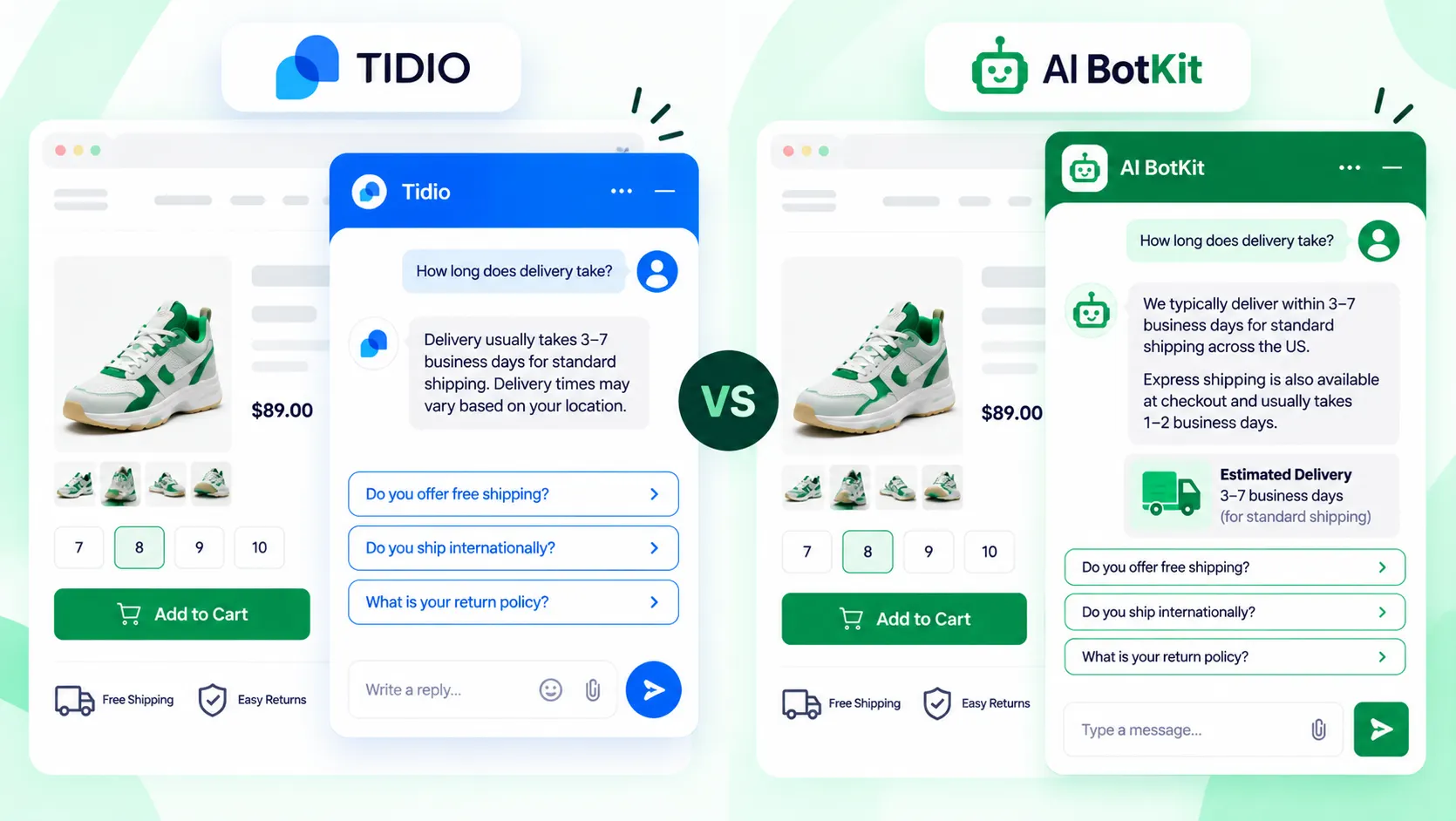
Quick answer: If you want a tidio alternative for ecommerce that answers only from your own pages, we built AI BotKit for that job. Stay on Tidio if your team needs a shared live chat inbox or Shopify order actions inside the chat. Both tools cap usage, so check how each one counts conversations before you switch.
Tidio’s free plan gives you 50 Lyro AI conversations once, not every month. When they run out, the AI agent stops until you buy the Lyro add-on, which is billed apart from your chat plan. That is usually the moment a store owner starts searching for a tidio alternative.
A tidio alternative, for a small store, is any chat tool that covers the same jobs, answering shoppers and handing off to you, with billing and features that fit your volume better. Below is a plain comparison of Tidio vs AI BotKit. At AI BotKit, we will say where we fit and where Tidio is the better call.
Why do store owners start looking for a tidio alternative?
Three things come up again and again, and the first two are about billing, not features.
The Lyro allowance runs out
Tidio’s pricing page lists 50 Lyro conversations as a one-off on the free plan. A Lyro conversation is any chat where the AI agent sends at least one reply, so one shopper asking three questions still uses one.
Once the 50 are gone, Lyro needs the paid add-on, from $32.50 a month billed annually.
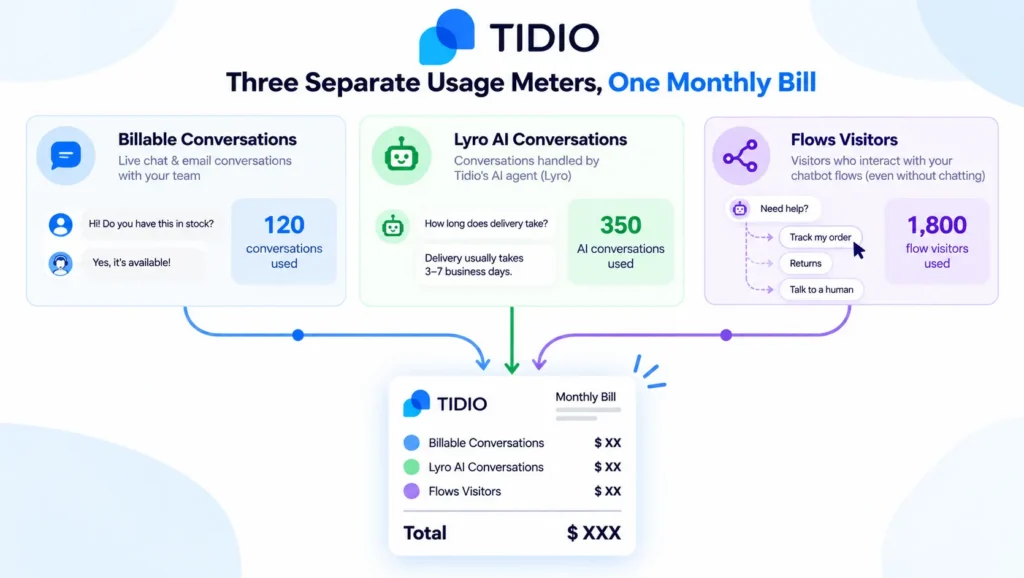
Three meters, one bill
Tidio meters three things separately: billable conversations that a human replies to, Lyro AI conversations, and visitors reached by Flows. Each has its own limit, so the price on the plan card is rarely the price on your invoice.
On G2, “expensive” is tagged in 73 Tidio reviews, ahead of missing features at 55. G2 also rates Tidio 4.6 out of 5 across more than 1,900 reviews, so the same people who like it still flag the bill.
What owners report
A Trustpilot reviewer wrote that Tidio will “upgrade your plan, without permission” after conversation limits were introduced. That is one person’s account, and Tidio replies to negative reviews there, so treat it as a reason to check your billing settings, not a verdict.
What does Tidio do well that you should not give up lightly?
Tidio is a full customer service suite, and that is its real strength. Its pricing page lists live chat, ticketing and an email system on every plan, with WhatsApp, Instagram and Messenger integrations alongside.
If you sell on Shopify, Tidio lists native Shopify actions on Growth and above. That is the feature to weigh if you want the chat to handle order questions. You can install Tidio from its Shopify listing or as a WordPress plugin.
Two more points in its favour. Its Premium plan carries a written 50% Lyro resolution guarantee, which is rare. And its Shopify listing says Lyro pauses at your limit instead of billing overage, according to this independent review.
If your store needs a team inbox with live chat and order actions in one place, Tidio is built for it.
How is AI BotKit different from Tidio in practice?
Tidio is a support suite with an AI agent inside. We built AI BotKit as a chatbot that answers from your content and passes the rest to you.
Where the answers come from
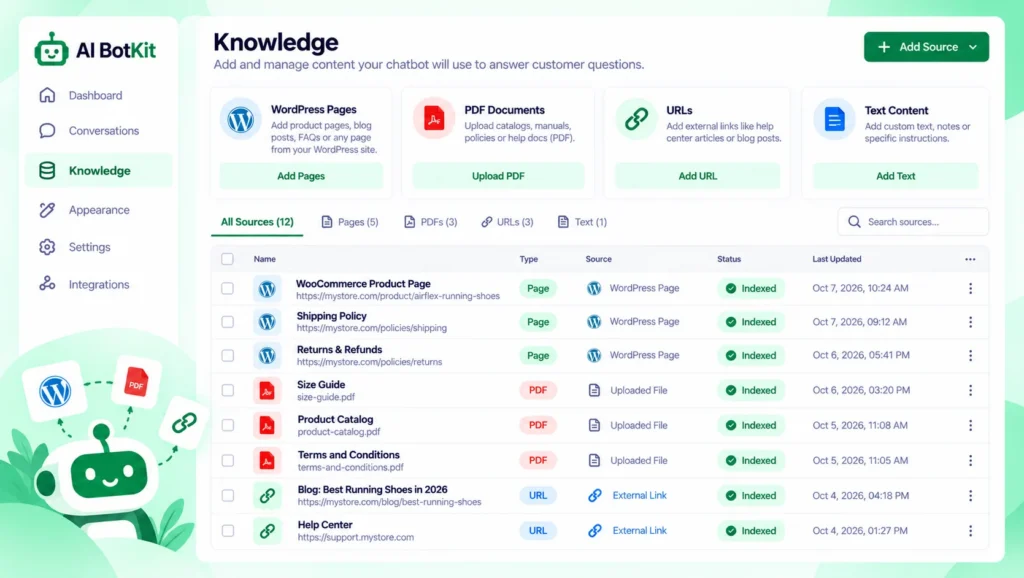
In AI BotKit, we let you train on WordPress pages and posts, uploaded PDFs and external URLs, through our WordPress chatbot plugin or an embed snippet. The bot answers from those sources, so it only knows what your pages say.
If your shipping page is out of date, the bot’s answer will be too.
Lyro also answers from your support content, and Tidio’s pricing page lists FAQ upload and a website scraper on every plan. The difference is less the source and more what surrounds it: inbox, billing and actions. Our guide to how WordPress chatbot plugins work covers what to feed a bot.
Who answers when the bot can’t
Our bot can offer to hand a chat to you by Email, WhatsApp, Telegram, Instagram or Messenger. You can also set handover to trigger after consecutive unanswered questions. We built it as a chatbot, not a helpdesk.
Live chat, where a person takes over inside the widget, is on our Business plan. Handover options on lower plans vary, so check the pricing page for current plan contents.
Order lookups and cart actions
This is the clearest gap. We built AI BotKit to answer policy and product questions from your pages. We are not claiming live order lookup or cart building, because those need a live connection to your store data.
Our WooCommerce chatbot guide explains that split in detail. Tidio lists native Shopify actions on Growth and above. If “where is my order” is your top question, that favours Tidio.
| Tidio | AI BotKit | |
|---|---|---|
| Core job | Live chat, helpdesk and AI agent (Lyro) in one suite | Chatbot trained on your own content |
| Trains on | FAQs, website scraper, support content | WordPress pages and posts, PDFs, external URLs |
| Human handover | Live chat inbox and tickets | Handover to Email, WhatsApp, Telegram, Instagram, Messenger |
| Live chat | Included in all plans | Business plan |
| Order lookup and cart actions | Native Shopify actions on Growth and above | Not claimed |
| Where it installs | WordPress plugin, Shopify app | WordPress plugin, or embed snippet for other platforms including Shopify |
| Free plan | 50 billable conversations a month, 50 Lyro conversations once | Yes, with a message limit |
| Billing model | Three meters: billable conversations, Lyro conversations, Flows visitors | Monthly plan with a monthly AI message limit |
What will each one cost a store with 40 questions a week?
Forty questions a week is about 170 a month. That is a normal load for a small store, and a useful size for testing how each plan counts.
The Tidio math
On annual billing, Tidio’s Starter plan is $24.17 a month for 100 billable conversations. Add the Lyro add-on at $32.50 a month for 50 conversations and you are at $56.67 a month. Those 50 AI conversations cover under a third of 170.
Growth starts at $49.17 for 250 billable conversations, with Lyro still extra. Plus starts at $300 a month plus usage, so there is a steep step if you outgrow the lower tiers.
A Capterra reviewer said Tidio changed its pricing and ended up “limiting the free plan quite a bit”. Plans change, so price from the live page on the day you decide.
The AI BotKit math
We have a free plan and paid tiers, and every tier has a monthly AI message limit. Current prices are on our pricing page.
Compare the message limit with your 170 monthly chats, because that number decides what you pay more than the sticker price does. A message and a conversation are counted differently, so read how each tool defines them.
Where each tool’s cap bites
Tidio’s Lyro pauses at its limit, per its Shopify listing. Our pricing FAQ says a chatbot over its limit may be restricted until the next billing cycle.
A cap is a cap, so decide in advance what shoppers see when the AI stops.
Will the bot answer correctly, or confidently wrong?
Both tools are only as good as the content behind them. Thin or outdated pages produce thin or outdated answers, whichever bot reads them.
An independent test of Tidio on a Shopify store caught Lyro giving a confidently wrong price until the shopper pushed back, as Blinto’s review describes. One test is not a rate, and our bot can be wrong in the same way.
Tidio’s own pricing page says Lyro resolves 75% of conversations on average for its customers. Your result depends on your pages, so test before you trust any figure.
Test with your own questions
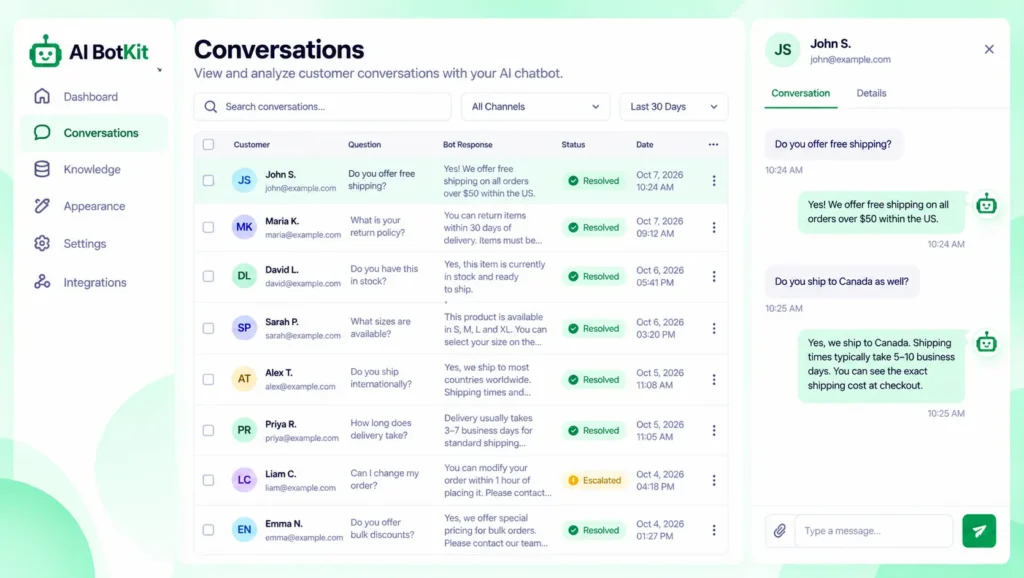
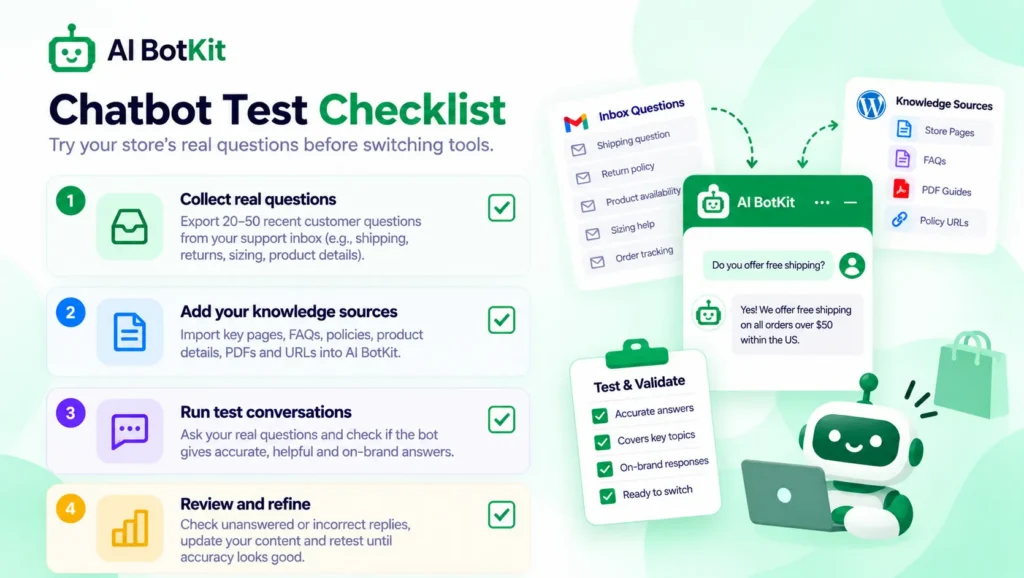
Take 10 to 15 real questions from your inbox. Ask each one and mark the answer right, wrong, or “not on any page”. Fix wrong answers by editing the page behind them, not by arguing with the bot.
When a person should step in
Refunds, damaged items and payment problems belong to a person in either tool. Set handover for those, and write a fallback message that points shoppers to you.
On data, read each provider’s privacy policy for where conversations are stored. Tell shoppers they are talking to a bot, and keep customer details out of training documents. This is not legal advice.
On WordPress.org, one reviewer said our team helped train the bot on their materials and handled initial setup. That is a single review of a small listing, so treat it as one data point.
Which tool fits which store?
Your answer depends on what your shoppers ask most, so here are three situations.
Stay on Tidio if
- Your team needs a shared inbox with live chat and tickets
- You want native Shopify actions for order questions
- You need WhatsApp, Instagram and Messenger in one place
- You want a written resolution guarantee and have the volume for Premium
Pick AI BotKit if
- Most questions are shipping, returns or sizing, and your pages already answer them
- You want to start from WordPress or paste an embed snippet, and test on a free plan
- Handover to channels you already use is enough
- You would rather price on a monthly message limit
Our guide to pre-sales questions ecommerce stores leave unanswered shows which questions a page can answer.
Still deciding, or very low volume
If you get a handful of questions a month, a clear FAQ page and a visible returns policy may be enough. Baymard Institute puts average cart abandonment near 70%, and an unanswered shipping question is one you can still reach before the shopper leaves.
Our guide to reducing cart abandonment with AI chat shows what chat can and cannot fix.
Which tool fits your store? A 6-question check
Answer yes or no to each question.
- Does a person need to take over chats inside a shared inbox?
- Is “where is my order” your most common question?
- Are most of your questions already answered on your shipping, returns or product pages?
- Do you run on WordPress, or can you paste an embed snippet on your platform?
- Do you want to test on a free plan before paying?
- Is a predictable monthly bill more important to you than extra channels?
If you said yes to 1 and 2, Tidio is the safer fit. If you said yes to 3, 4 and 5, try AI BotKit on a free plan first. If your answers are mixed, run both free plans against the same 10 to 15 questions for a week.
How do you test a tidio alternative before you switch?
Keep your current chat live the whole time, so no shopper is left without an answer.
- Collect 10 to 15 real questions from your inbox or current chat history.
- Create a free account and train the bot on your shipping, returns and top product pages.
- Ask each question in preview and mark it right, wrong, or “not on any page”.
- Read the usage count after a week and see how many chats the bot answered or passed on.
You can also try our demo first to see how a trained bot answers.
FAQ
Is Tidio’s Lyro AI free?
Only as a trial. Tidio’s pricing page gives every account 50 Lyro conversations as a one-off. After that, the AI agent needs a paid Lyro plan, which starts at $32.50 a month billed annually for 50 conversations.
Is there a free tidio alternative for online stores?
Several tools have free plans with limits, so check each limit before you rely on one. We have a free plan with a message limit. Our guide to free chatbots for WordPress compares what each free plan gives you.
Can I use AI BotKit on Shopify?
Our embed snippet works on other platforms, including Shopify. We do not claim live order lookup or cart actions there. Tidio lists native Shopify actions for that job.
Does AI BotKit have live chat?
Yes, on our Business plan, where a person can take over a chat. Handover options on lower plans vary, so check the pricing page for what each plan includes.
What happens when I hit the usage limit?
Tidio’s Lyro pauses at its limit, per its Shopify listing. Our pricing FAQ says a chatbot over its limit may be restricted until the next billing cycle. In either tool, decide what shoppers see when the AI stops, and set a useful fallback message.
If you answer the same shipping and returns questions by hand every week, start on the free plan and see whether a bot trained on your pages can take them. After a decade of building WordPress products at WisdmLabs, we built AI BotKit for that situation. Start free on the AI BotKit plugin page and test it today.