
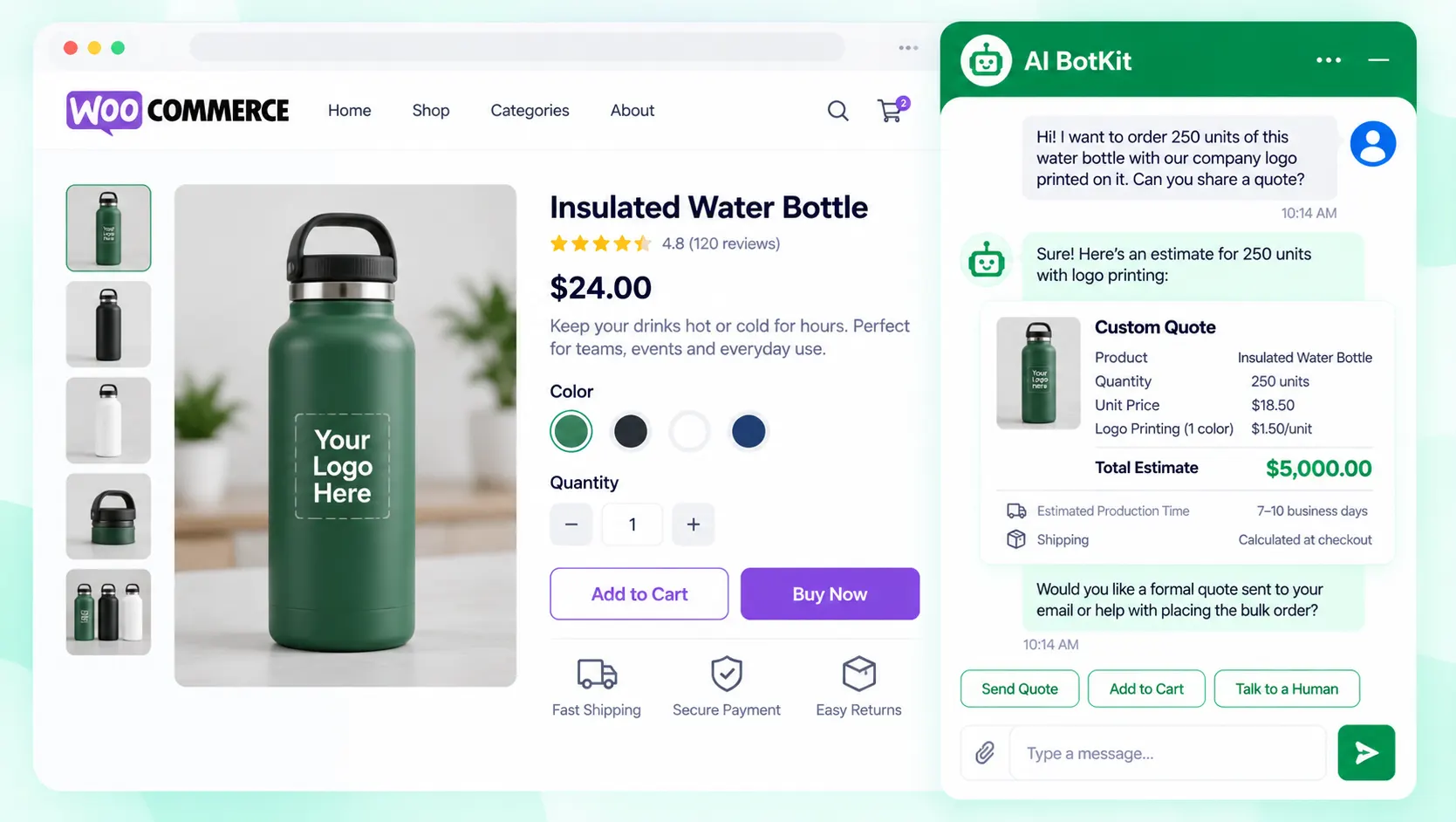
An ai quotation generator, for a store, is a chat on your product page that asks buyers for quantity, customisation and timeline, then gives an instant estimate from the pricing you’ve trained it on. It won’t replace your judgement on custom jobs, but it answers at 2 a.m. and hands you a complete lead.
Picture a buyer on a bulk product page at 9 p.m. who wants 250 units with a logo. They meet a long enquiry form and close the tab. You never learn they were there. At AI BotKit, we built our AI quote assistant for that moment, and this guide covers how it works and where you still step in.
What does an AI quotation generator actually do?
A quotation generator turns a buyer’s requirements into a price offer. That is the useful meaning for a business. Search the phrase and you will also find tools that make inspirational quotes for posters, which have nothing to do with pricing. This guide is about the first kind.
Quote vs estimate: why the difference matters
A quote is a price you commit to. An estimate is a price you expect, based on what you know so far. The instant figure a chat gives a buyer is an estimate unless you decide otherwise.
That matters for custom work. If the logo needs a setup fee, or the order is double your usual size, someone should check the number before it becomes a promise. Say “estimate” on screen, and say what happens next.
Two kinds of tools: document generators and a chat on your own site
Document generators such as Manus take your description of a job and produce a formatted quotation with payment terms and validity periods. Chat-based builders such as Voiceflow’s quote template put a bot in front of buyers, with Make.com and a Google Sheets price list doing the maths in the background.
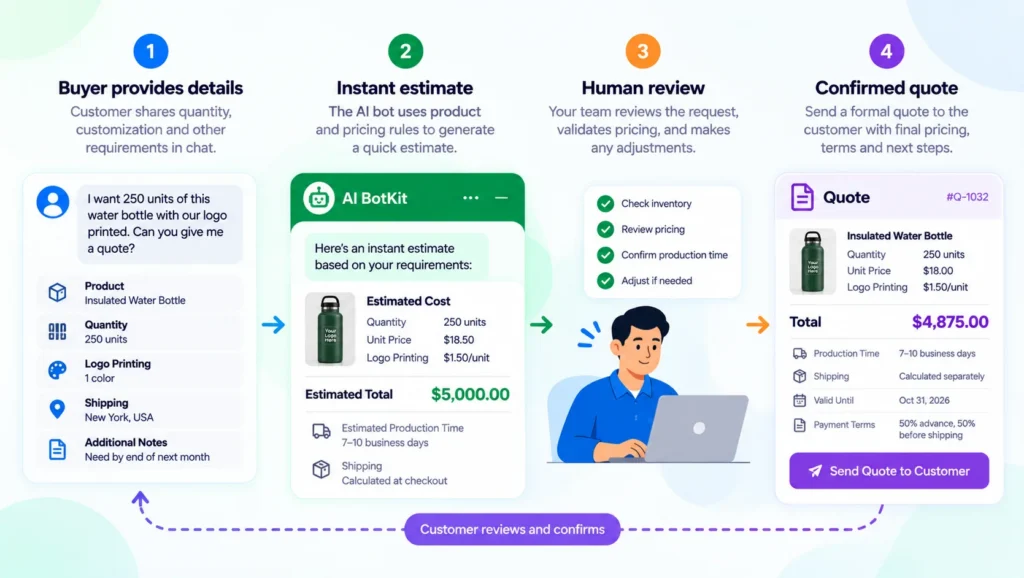
At AI BotKit, we took the second route. Our AI quote assistant for WooCommerce sits on your product page, works with Product Inquiry Pro, and ends in an estimate for the buyer and a lead summary for you.
What one conversation looks like
In the demo on our product page, a buyer asks for a quote on 250 units. The assistant asks whether they need customisation or branding. The buyer says logo printing, and the assistant replies with an estimate based on quantity and branding.
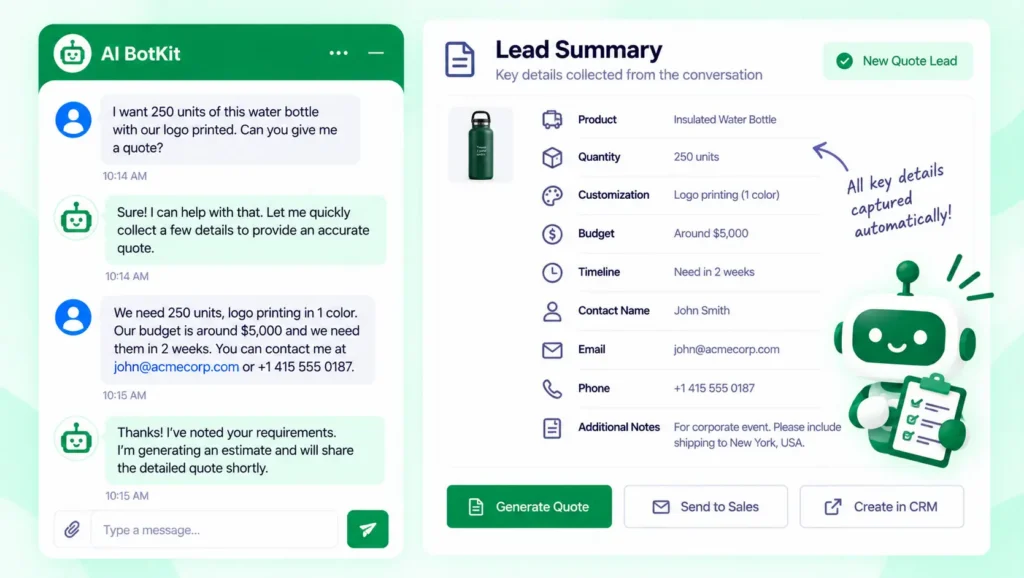
Behind that exchange, you receive the buyer’s contact details and a summary of what they asked for. The buyer gets a first answer in the same visit, and you get a lead that is ready to quote from.
Why do enquiry forms lose buyers before you ever see them?
A long form asks for effort before the buyer has seen a single number. Quantity, specs, budget, timeline and contact details feel like homework, so some buyers leave without telling you. You cannot count the ones who never submit.
Incomplete submissions cost you a second round
Buyers who do submit often skip the detail you need, such as quantity or customisation. You write back to ask, they reply a day later, and the lead has cooled.
A chat can ask each missing question in turn, in the order a person would. Our guide to chatbot qualifying questions covers which few are worth asking, and our comparison of a chatbot vs a contact form looks at where each one wins.
What a slow reply costs
The 2011 Harvard Business Review study, The Short Life of Online Sales Leads, audited 2,241 US firms. Among companies that replied within 30 days, the average first response took 42 hours. Firms that contacted a lead within an hour were nearly seven times more likely to qualify it than those that waited an hour longer.
An instant estimate closes the gap between interest and a first answer. The study is from 2011 and covered web leads in general, so read it as direction, not a forecast for your store.
How do you set up a quote bot on your store, step by step?
Your pricing needs to exist in writing before the bot can use it. Our product page says setup takes under 15 minutes, so allow longer if your price list is still in someone’s head. Our documentation has the setup screens, and if you would rather not build it yourself, we offer a free 20-minute setup call.
Step 1: Install the plugin and connect your account
Install our free WordPress plugin and connect your account with us. If you already use Product Inquiry Pro on your product pages, you link the two so the chat appears where your enquiry button is today.
Product Inquiry Pro comes from the same team, and we have spent over a decade building WordPress products at WisdmLabs. Our WooCommerce chatbot setup guide covers the store side in more detail.
Step 2: Train it on your catalog and pricing sheet
In AI BotKit, we let you sync your website and WooCommerce product pages, and upload catalogs, pricing sheets or product URLs. Our guide to training a chatbot on your website content walks through pages, posts and PDFs.
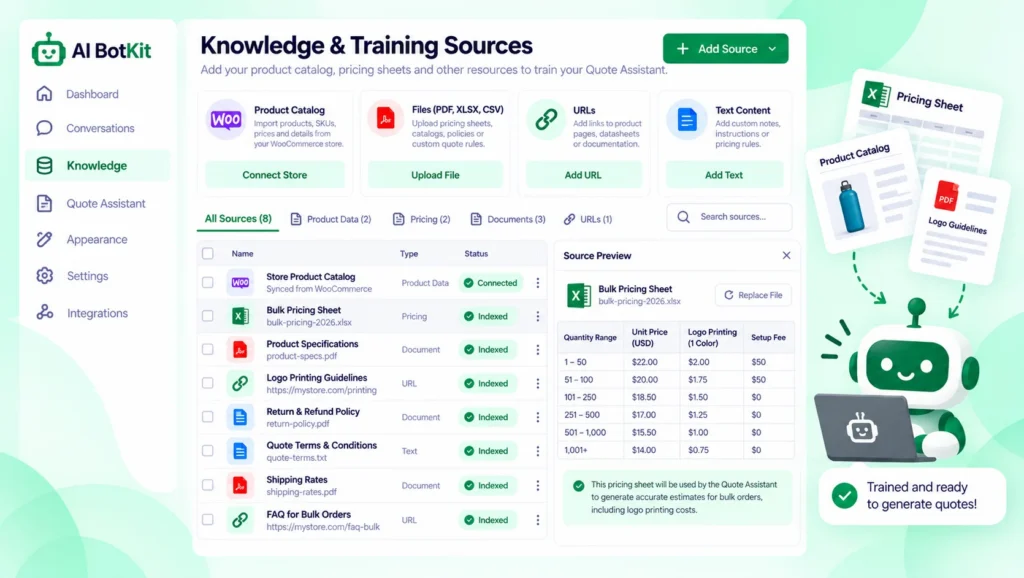
Everything the bot says about price comes from this material, so a stale sheet gives stale estimates. Update the sheet whenever your prices change.
Step 3: Choose the questions it asks
Start with the four details your team asks for anyway: quantity, customisation, budget and timeline. Our product page lists these as what the assistant captures, alongside contact details and a summary of the conversation.
Add a question only if the answer changes the price. Every extra question is another reason for a buyer to stop.
Step 4: Decide what it says when it cannot price something
Per our product FAQ, when a buyer asks something the bot has not been trained on, it shows a fallback message you write, and can ask for contact details. Write that message for quote requests: say a person will confirm the price, and by when.
This is a common setup question. A site owner in the plugin’s support forum asked how to show a support email when the bot cannot answer. The answer was to put the contact details in the bot instructions and set a fallback message. That is how we handle it in AI BotKit.
Step 5: Route the lead summary and set up handoff
Each conversation ends with a lead summary that holds the buyer’s requirements and contact details. Human Handover, which notifies you by email when a buyer needs a person, is available on our higher-tier plans. Check your plan before you promise it to buyers.
Then name one person who reviews new leads every morning. A fast estimate only helps if someone follows up on it.
Which quotes can run on autopilot, and which need you?
Autopilot works for the questions your pricing data fully covers. For everything else, the bot’s job is to collect the details and pass them on. This table shows how that splits by pricing type.
| Your pricing situation | What the bot can do | What you check |
|---|---|---|
| Fixed price list | Give an estimate from your sheet | That the sheet is current |
| Tiered bulk pricing | Estimate by quantity, if the tiers are in your material | Orders near the tier limits |
| Custom specs such as logo, size or materials | Gather every detail | The estimate, before the buyer treats it as a quote |
| Unclear scope | Collect what it can and flag the rest | A person scopes and prices the job |
Test each row with five real past enquiries before you go live. The gaps show up quickly.
Plan for volume as well as accuracy
In a forum thread about a different chatbot plugin, AI Engine, a tester found that after the usage limit was reached, the chat box stayed open and kept returning the same limit notice. The plugin’s author fixed it in a later release.
Ours is a different product, so test what your own visitors see when your message cap is reached. Per our FAQ, if you hit your monthly limit you can upgrade from the dashboard, and you can see how many messages and storage characters you have left.
Quote bot go-live checklist
Run this list before the bot talks to a real buyer. Each item takes a few minutes.
- Your pricing sheet and product pages are current
- The on-screen wording says “estimate” and says who confirms the final price
- The fallback message is written for quote requests
- You have tested what visitors see at your message limit
- Human Handover is on your plan, or you have chosen another way to reach buyers
- You know what the chat stores, and you have checked it against your privacy policy
- One named person reviews new leads each morning
Conversations and lead details are personal data, so check what your chatbot stores and when. In a WordPress.org thread about AI Engine, a site owner asked for its session cookie to wait until the visitor gave consent. The author pointed to a consent setting that does this.
Look for the equivalent in whatever you install, including ours, and check it against your privacy policy. We cannot make that call for you, so ask a professional if you are unsure.
What if your store is not on WooCommerce?
The quote assistant described here is built for WooCommerce with Product Inquiry Pro. If you run a service business or another platform, it is not the right page for you, and we would rather say so.
Our general chatbot captures leads and can be embedded on other platforms, including Shopify, Squarespace and Wix. Our lead generation chatbot guide shows how it works.
If you build stores for clients, decide up front who owns the pricing sheet. The bot’s estimates are only as current as that file.
FAQ
What happens when the bot cannot answer a quote question?
It shows a fallback message you write, and can ask the buyer for contact details so you can follow up. Write that message for quote requests and say who will confirm the price. The bot answers only from what you have trained it on, so gaps in your pricing sheet show up here first.
Is an instant estimate the same as a binding quotation?
No, unless you decide it is. The estimate comes from the pricing you have trained the bot on and what the buyer says, so treat it as a starting figure. For custom work, have a person confirm it before the buyer relies on it.
What happens when I reach my monthly message limit?
Per our FAQ, you can upgrade your plan from the dashboard, and you can see how many messages and storage characters you have left. Check your plan’s limit before a busy season, and test what visitors see when it is reached.
Does a quote bot change my GDPR obligations?
It can, because chats and lead details are personal data. Check what your chatbot stores, whether it needs consent before chats start, and what your privacy policy says. This is not legal advice, so ask a professional if you are unsure.
If buyers are leaving your enquiry form half-finished, start with one product page. At AI BotKit, we would rather you test the assistant on a single bulk product and compare the leads you get against your form. Try the quote assistant on one product page and see how it handles your own pricing.